
前言#
我们之前分析完了编译阶段
现在该到浏览器上跑一跑了
入口#
那么问题来了,runtime的入口在哪?
自然就是我们main.ts中调用的vue包里的createApp方法。
不过在看这个方法之前,我们先来看下vue/src/index.ts中的代码。
// This entry is the "full-build" that includes both the runtime
// and the compiler, and supports on-the-fly compilation of the template option.
import { initDev } from './dev'
import { compile, CompilerOptions, CompilerError } from '@vue/compiler-dom'
import { registerRuntimeCompiler, RenderFunction, warn } from '@vue/runtime-dom'
import * as runtimeDom from '@vue/runtime-dom'
import { isString, NOOP, generateCodeFrame, extend } from '@vue/shared'
import { InternalRenderFunction } from 'packages/runtime-core/src/component'

if (__DEV__) {
  initDev()
}

const compileCache: Record<string, RenderFunction> = Object.create(null)

// ...省略compilerToFunction

registerRuntimeCompiler(compileToFunction)

export { compileToFunction as compile }
export * from '@vue/runtime-dom' 这段代码在main中导入vue包的时候就会被执行。
我们先来看下registerRuntimeCompiler
registerRuntimeCompiler#
let compile: CompileFunction | undefined
let installWithProxy: (i: ComponentInternalInstance) => void

/**
 * For runtime-dom to register the compiler.
 * Note the exported method uses any to avoid d.ts relying on the compiler types.
 */
export function registerRuntimeCompiler(_compile: any) {
  compile = _compile
  installWithProxy = i => {
    if (i.render!._rc) {
      i.withProxy = new Proxy(i.ctx, RuntimeCompiledPublicInstanceProxyHandlers)
    }
  }
}
这个方法是在缓存编译方法。
不过这里还有一个installWithProxy的函数,它返回一个proxy实例对象, 这个方法我放到下面【其它】中,这里不多说。
另外,注意这里_compile的类型是any,这样做避免把编译器包里的类型文件也引过来。
compilerToFunction#
然后我们再来看下compilerToFunction这个方法
 function compileToFunction(
  template: string | HTMLElement,
  options?: CompilerOptions
): RenderFunction {
  if (!isString(template)) {
    if (template.nodeType) {
      template = template.innerHTML
    } else {
      __DEV__ && warn(`invalid template option: `, template)
      return NOOP
    }
  }

  const key = template
  const cached = compileCache[key]
  if (cached) {
    return cached
  }

  if (template[0] === '#') {
    const el = document.querySelector(template)
    if (__DEV__ && !el) {
      warn(`Template element not found or is empty: ${template}`)
    }
    // __UNSAFE__
    // Reason: potential execution of JS expressions in in-DOM template.
    // The user must make sure the in-DOM template is trusted. If it's rendered
    // by the server, the template should not contain any user data.
    template = el ? el.innerHTML : ``
  }

  const opts = extend(
    {
      hoistStatic: true,
      onError: __DEV__ ? onError : undefined,
      onWarn: __DEV__ ? e => onError(e, true) : NOOP
    } as CompilerOptions,
    options
  )

  if (!opts.isCustomElement && typeof customElements !== 'undefined') {
    opts.isCustomElement = tag => !!customElements.get(tag)
  }

  const { code } = compile(template, opts)

  function onError(err: CompilerError, asWarning = false) {
    const message = asWarning
      ? err.message
      : `Template compilation error: ${err.message}`
    const codeFrame =
      err.loc &&
      generateCodeFrame(
        template as string,
        err.loc.start.offset,
        err.loc.end.offset
      )
    warn(codeFrame ? `${message}\n${codeFrame}` : message)
  }

  // The wildcard import results in a huge object with every export
  // with keys that cannot be mangled, and can be quite heavy size-wise.
  // In the global build we know `Vue` is available globally so we can avoid
  // the wildcard object.
  const render = (
    __GLOBAL__ ? new Function(code)() : new Function('Vue', code)(runtimeDom)
  ) as RenderFunction

  // mark the function as runtime compiled
  ;(render as InternalRenderFunction)._rc = true

  return (compileCache[key] = render)
}这一段代码简单地说就是获取dom的innerHTML,也就是真实dom的模板,然后再compile编译一次,再生成render function。
总结下#
把这段代码贴出来主要有以下几点:
- 入口不只是
createApp,包括了这个createApp在import进入当前文件中触发的各种行为。 - 这里使用了
@vue/compiler-dom这一个编译包,而这里是runtime环境,导致这种情况的原因有几种:
- 使用了
inline template,比如new Vue({ template: 'xxx' }),这种是得留到runtime阶段才能处理的,这个时候自然就得用到编译的包 template是真实的html,在html文件中。而vue组件则是在js中通过new Vue({ el: 'xxx' })的方式来绑定模板。也就是无法预处理(pre-build)的,这个时候也只能去runtime捕获真实dom再编译。
那么这种情况有什么问题呢?
-
- 包体积变大,这是毋庸置疑的(而且是变大的很多,多于
runtime-only40%,这比例道听途说的,可能不对,也可能过期了) - 自然就是损耗,如果
pre-build了,那就不需要进行runtime compile处理了。反之,runtime还多了一步compile处理成render function。
- 包体积变大,这是毋庸置疑的(而且是变大的很多,多于
在webpack等工具的加持下,通过vue-sfc的方式开发是可以直接用runtime包的,对应打包后的dist/vue.runtime.js。
而runtime compile的则是对应vue.js。
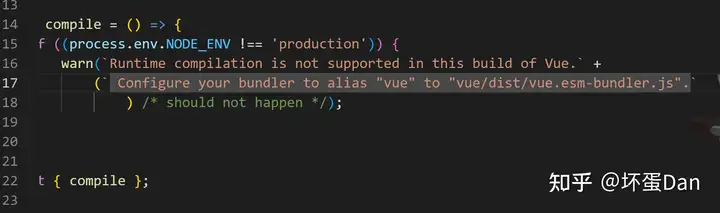
具体的版本介绍我放到下一篇里说
其它#
installWithProxy#
在分析这个方法之前,我们需要了解Proxy[1]。
大家也应该清楚vue3底层采用Proxy替代Object.defineProperty[2]来实现数据代理。
  installWithProxy = i => {
    if (i.render!._rc) {
      i.withProxy = new Proxy(i.ctx, RuntimeCompiledPublicInstanceProxyHandlers)
    }
}target:是传入的实例的ctx也就是实例的上下文,这里的实例实际上就是component组件RuntimeCompiledPublicInstaqnceProxyHandlers:这个就是handler。
来看下RuntimeCompiledPublicInstanceProxyHandlers
export const RuntimeCompiledPublicInstanceProxyHandlers = /*#__PURE__*/ extend(
  {},
  PublicInstanceProxyHandlers,
  {
    get(target: ComponentRenderContext, key: string) {
      // fast path for unscopables when using `with` block
      if ((key as any) === Symbol.unscopables) {
        return
      }
      return PublicInstanceProxyHandlers.get!(target, key, target)
    },
    has(_: ComponentRenderContext, key: string) {
      const has = key[0] !== '_' && !isGloballyWhitelisted(key)
      if (__DEV__ && !has && PublicInstanceProxyHandlers.has!(_, key)) {
        warn(
          `Property ${JSON.stringify(
            key
          )} should not start with _ which is a reserved prefix for Vue internals.`
        )
      }
      return has
    }
  }
)extend:代码不看了,就是Object.assign。
很明显这里就是在覆盖PublicIntanceProxyHandlers里的method。
但是又没完全覆盖,get方法还是调用的PublicInstanceProxyHandlers里的get,同理has。
isGloballyWhitelisted:就是白名单,之前有发过,这里还是再发一次。
import { makeMap } from './makeMap'

const GLOBALS_WHITE_LISTED =
  'Infinity,undefined,NaN,isFinite,isNaN,parseFloat,parseInt,decodeURI,' +
  'decodeURIComponent,encodeURI,encodeURIComponent,Math,Number,Date,Array,' +
  'Object,Boolean,String,RegExp,Map,Set,JSON,Intl,BigInt'

export const isGloballyWhitelisted = /*#__PURE__*/ makeMap(GLOBALS_WHITE_LISTED)
然后我们来看下PublicInstanceProxyHandlers这个handlers对象
export const PublicInstanceProxyHandlers: ProxyHandler<any> = {
  get({ _: instance }: ComponentRenderContext, key: string) {
    const { ctx, setupState, data, props, accessCache, type, appContext } =
      instance

    // for internal formatters to know that this is a Vue instance
    if (__DEV__ && key === '__isVue') {
      return true
    }

    // prioritize <script setup> bindings during dev.
    // this allows even properties that start with _ or $ to be used - so that
    // it aligns with the production behavior where the render fn is inlined and
    // indeed has access to all declared variables.
    if (
      __DEV__ &&
      setupState !== EMPTY_OBJ &&
      setupState.__isScriptSetup &&
      hasOwn(setupState, key)
    ) {
      return setupState[key]
    }

    // data / props / ctx
    // This getter gets called for every property access on the render context
    // during render and is a major hotspot. The most expensive part of this
    // is the multiple hasOwn() calls. It's much faster to do a simple property
    // access on a plain object, so we use an accessCache object (with null
    // prototype) to memoize what access type a key corresponds to.
    let normalizedProps
    if (key[0] !== '$') {
      const n = accessCache![key]
      if (n !== undefined) {
        switch (n) {
          case AccessTypes.SETUP:
            return setupState[key]
          case AccessTypes.DATA:
            return data[key]
          case AccessTypes.CONTEXT:
            return ctx[key]
          case AccessTypes.PROPS:
            return props![key]
          // default: just fallthrough
        }
      } else if (setupState !== EMPTY_OBJ && hasOwn(setupState, key)) {
        accessCache![key] = AccessTypes.SETUP
        return setupState[key]
      } else if (data !== EMPTY_OBJ && hasOwn(data, key)) {
        accessCache![key] = AccessTypes.DATA
        return data[key]
      } else if (
        // only cache other properties when instance has declared (thus stable)
        // props
        (normalizedProps = instance.propsOptions[0]) &&
        hasOwn(normalizedProps, key)
      ) {
        accessCache![key] = AccessTypes.PROPS
        return props![key]
      } else if (ctx !== EMPTY_OBJ && hasOwn(ctx, key)) {
        accessCache![key] = AccessTypes.CONTEXT
        return ctx[key]
      } else if (!__FEATURE_OPTIONS_API__ || shouldCacheAccess) {
        accessCache![key] = AccessTypes.OTHER
      }
    }

    const publicGetter = publicPropertiesMap[key]
    let cssModule, globalProperties
    // public $xxx properties
    if (publicGetter) {
      if (key === '$attrs') {
        track(instance, TrackOpTypes.GET, key)
        __DEV__ && markAttrsAccessed()
      }
      return publicGetter(instance)
    } else if (
      // css module (injected by vue-loader)
      (cssModule = type.__cssModules) &&
      (cssModule = cssModule[key])
    ) {
      return cssModule
    } else if (ctx !== EMPTY_OBJ && hasOwn(ctx, key)) {
      // user may set custom properties to `this` that start with `$`
      accessCache![key] = AccessTypes.CONTEXT
      return ctx[key]
    } else if (
      // global properties
      ((globalProperties = appContext.config.globalProperties),
      hasOwn(globalProperties, key))
    ) {
      if (__COMPAT__) {
        const desc = Object.getOwnPropertyDescriptor(globalProperties, key)!
        if (desc.get) {
          return desc.get.call(instance.proxy)
        } else {
          const val = globalProperties[key]
          return isFunction(val)
            ? Object.assign(val.bind(instance.proxy), val)
            : val
        }
      } else {
        return globalProperties[key]
      }
    } else if (
      __DEV__ &&
      currentRenderingInstance &&
      (!isString(key) ||
        // #1091 avoid internal isRef/isVNode checks on component instance leading
        // to infinite warning loop
        key.indexOf('__v') !== 0)
    ) {
      if (data !== EMPTY_OBJ && isReservedPrefix(key[0]) && hasOwn(data, key)) {
        warn(
          `Property ${JSON.stringify(
            key
          )} must be accessed via $data because it starts with a reserved ` +
            `character ("$" or "_") and is not proxied on the render context.`
        )
      } else if (instance === currentRenderingInstance) {
        warn(
          `Property ${JSON.stringify(key)} was accessed during render ` +
            `but is not defined on instance.`
        )
      }
    }
  },

  set(
    { _: instance }: ComponentRenderContext,
    key: string,
    value: any
  ): boolean {
    const { data, setupState, ctx } = instance
    if (setupState !== EMPTY_OBJ && hasOwn(setupState, key)) {
      setupState[key] = value
      return true
    } else if (data !== EMPTY_OBJ && hasOwn(data, key)) {
      data[key] = value
      return true
    } else if (hasOwn(instance.props, key)) {
      __DEV__ &&
        warn(
          `Attempting to mutate prop "${key}". Props are readonly.`,
          instance
        )
      return false
    }
    if (key[0] === '$' && key.slice(1) in instance) {
      __DEV__ &&
        warn(
          `Attempting to mutate public property "${key}". ` +
            `Properties starting with $ are reserved and readonly.`,
          instance
        )
      return false
    } else {
      if (__DEV__ && key in instance.appContext.config.globalProperties) {
        Object.defineProperty(ctx, key, {
          enumerable: true,
          configurable: true,
          value
        })
      } else {
        ctx[key] = value
      }
    }
    return true
  },

  has(
    {
      _: { data, setupState, accessCache, ctx, appContext, propsOptions }
    }: ComponentRenderContext,
    key: string
  ) {
    let normalizedProps
    return (
      !!accessCache![key] ||
      (data !== EMPTY_OBJ && hasOwn(data, key)) ||
      (setupState !== EMPTY_OBJ && hasOwn(setupState, key)) ||
      ((normalizedProps = propsOptions[0]) && hasOwn(normalizedProps, key)) ||
      hasOwn(ctx, key) ||
      hasOwn(publicPropertiesMap, key) ||
      hasOwn(appContext.config.globalProperties, key)
    )
  },

  defineProperty(
    target: ComponentRenderContext,
    key: string,
    descriptor: PropertyDescriptor
  ) {
    if (descriptor.get != null) {
      // invalidate key cache of a getter based property #5417
      target._.accessCache![key] = 0
    } else if (hasOwn(descriptor, 'value')) {
      this.set!(target, key, descriptor.value, null)
    }
    return Reflect.defineProperty(target, key, descriptor)
  }
}四个默认方法,这个handlers就是用来处理组件实例对象数据访问的。
get:访问这个对象的属性,这里的场景有些多,简单地说就是判断这个值在哪块数据里,比如在data里,然后返回对应的值。后面有遇到我们再详细分析,下面几个方法同上。set:给这个对象的属性赋值,在这里是改写组件的数据,这个数据不只有$data,还有$props等。不过$开头以及prop数据是readonly的,不允许改动。has:查找这个对象中是否存在这个属性,比如在这里对于component实例对象来说,$data是它的一个属性。defineProperty:给这个对象的某个字段自定义属性,比如重写get/set,如果已经存在了就直接改原来的值即可。
后面如果有问题会回来补充
参考#
- ^Proxy https://developer.mozilla.org/en-US/docs/Web/JavaScript/Reference/Global_Objects/Proxy
- ^Object.defineProperty https://developer.mozilla.org/en-US/docs/Web/JavaScript/Reference/Global_Objects/Object/defineProperty
编辑于 2023-01-24 22:24・IP 属地广东