
前言#
经过入口、如何创建vnode以及patch阶段
坏蛋Dan:vue runtime源码分析学习——patch汇总
我觉得差不多了可以开始分析热更新这一块了,主要就是经过了patch阶段,我们了解到了很多组件创建过程中的原理。
建议先看下这篇文章,里面大量涉及到等会会说到的点
坏蛋Dan:vue runtime源码分析学习——day8:patch打补丁part4:processComponent处理组件
提前了解#
webpack热更新原理:#
桥梁:#
补充:#
编译阶段#
我把vue-loader分析里面的那张图copy过来
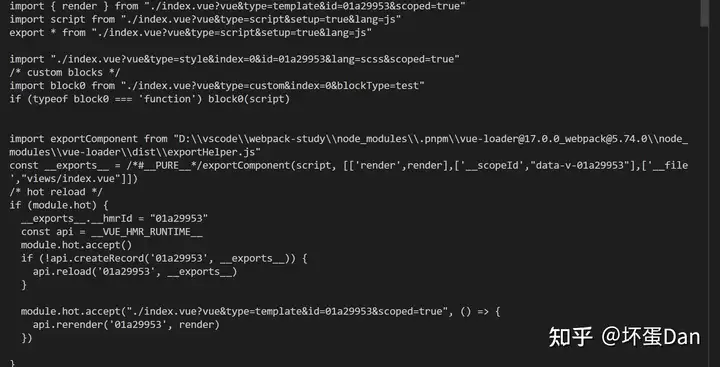
这里面有几个关键点:
module.hot[1]:这个就不多说了,用来控制是否可以HMR热更新__exports__:这货就是就是我们的vue文件编译后跑到runtime中变成instance.type的家伙。里面有我们的setup函数、render function等__hmrId:这货相当重要,开发阶段独有,它会被插入到__exports__里面一起被贡献给组件instance。也是这个组件热更新时的防伪标记。__VUE_HMR_RUNTIME__:这个全局变量来自vue runtime,这里先不说是干嘛的,等会会说到。module.hot.accept[2]:用来捕获自己更新api.createRecord:等会会分析到api.reload:同上api.rerender:同上
然后我们去到runtime看下做了什么
现在当文件发生了变化之后会重新编译当前文件,然后触发reload/rerender这俩api。
注意,这里仅有type=template的import会被rerender,为什么呢?
因为script/style会被编译成普通的js和css文件,这俩文件webpack自身就可以让它更新。
但是template不行,为什么呢?虽然template也是变成js,但是它是用来渲染的,文件变化并不会引起DOM的重新渲染,所以这个时候就需要有特殊的api:rerender来让这个DOM更新自己。
有一点需要注意,这里的reload并不是window.location.reload[3] 。而是组件的重新patch。
runtime阶段#
VUE_HMR_RUNTIME#
我们直接去到对应的文件中:packages\runtime-core\src\hmr.ts
if (__DEV__) {
  getGlobalThis().__VUE_HMR_RUNTIME__ = {
    createRecord: tryWrap(createRecord),
    rerender: tryWrap(rerender),
    reload: tryWrap(reload)
  } as HMRRuntime
}

function tryWrap(fn: (id: string, arg: any) => any): Function {
  return (id: string, arg: any) => {
    try {
      return fn(id, arg)
    } catch (e: any) {
      console.error(e)
      console.warn(
        `[HMR] Something went wrong during Vue component hot-reload. ` +
          `Full reload required.`
      )
    }
  }
}其实它就是整个HMR的api集合,我们前面说的三个api都在它身上。
但是组件存储的地方不在他身上,只是注册/更新需要先经过它。
注册HMR#
要想热更新,首先就需要注册
那么注册的地方在哪里呢?
组件注册的地方自然就在组件创建的地方,我们前面分析组件在patch过程中做了什么的文章里面就有分析到
坏蛋Dan:vue runtime源码分析学习——day8:patch打补丁part4:processComponent处理组件
位置是在packages\runtime-core\src\renderer.ts的mountComponent方法里
  const mountComponent: MountComponentFn = (
    // ...
  ) => {
    // ...

    if (__DEV__ && instance.type.__hmrId) {
      registerHMR(instance)
    }

    // ...
} 这个type是我们之前的编译阶段的产物,也就是上面说的__exports__,这个__hmrId自然就是热更新防伪标志。
而instance则是组件的实例,注意产物和实例不是同一个东西,硬要说谁比较更接近于组件这个概念,那应该是这个instance。但是这个不影响。
我们来分析下这个registerHMR
registerHMR
const map: Map<
  string,
  {
    // the initial component definition is recorded on import - this allows us
    // to apply hot updates to the component even when there are no actively
    // rendered instance.
    initialDef: ComponentOptions
    instances: Set<ComponentInternalInstance>
  }
> = new Map()

export function registerHMR(instance: ComponentInternalInstance) {
  const id = instance.type.__hmrId!
  let record = map.get(id)
  if (!record) {
    createRecord(id, instance.type as HMRComponent)
    record = map.get(id)!
  }
  record.instances.add(instance)
}这个map就是用来存储所有热更新组件的,key是前面提到的防伪标志__hmrId。
这块代码很简单,就是注册的时候从map里面找下是否已经存在了,如果不存在,给这个组件实例创建一个record,然后将这个组件存储到这个record里面。
再来看下createRecord方法做了什么
function createRecord(id: string, initialDef: HMRComponent): boolean {
  if (map.has(id)) {
    return false
  }
  map.set(id, {
    initialDef: normalizeClassComponent(initialDef),
    instances: new Set()
  })
  return true
}

function normalizeClassComponent(component: HMRComponent): ComponentOptions {
  return isClassComponent(component) ? component.__vccOpts : component
}

export function isClassComponent(value: unknown): value is ClassComponent {
  return isFunction(value) && '__vccOpts' in value
}
class component[4]:这个是啥我这里就不说了,之前的文章里有分析过。
这个方法做的事情也很简单,就是在创建一个record,然后把这个record放入map里面。
这里有一个疑惑点,为什么要用Set[5] 来存储组件呢?前面不是已经有防伪标记__hmrId了吗?
实际上这个instances里存放的是整个项目所有这个__hmrId的组件实例。
比如A和B两个组件都引用了C组件作为子组件,那么这个时候C就有两个instance了。
它根据initialDef模板分别在A和B里面创建了C组件节点,所以自然就有两个C实例。
扯远了,回到我们的代码里。
现在我们的组件已经注册完毕了,由于这个map并没有暴露到全局,所以我们无法直接在浏览器中看到这个map。
但是我们可以改下源码,让它也暴露出来。
随便起一个项目,现在默认是使用的esm-bundler.js,找到以下文件
\node_modules\@vue\runtime-core\dist\runtime-core.esm-bundler.js 然后加入以下代码
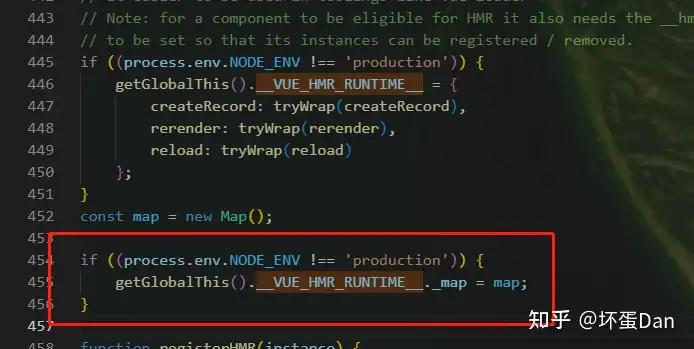
然后重新跑下项目,接着浏览器中log下__VUE_HMR_RUNTIME__。
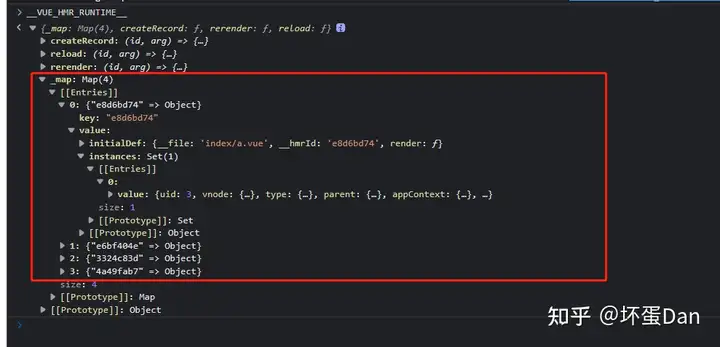
现在我们就能看到注册了的组件了。
那么注册完了,之后呢?
之后自然就是reload和rerender了。
我们前面看到vue-loader中调用的两个api,它们就是用来衔接runtime和webpack热更新的。
准确的说是重新触发页面渲染。
reload#
在分析代码之前,我们先回到vue-loader中看下对应的代码
function genHotReloadCode(id, templateRequest) {
    return `
/* hot reload */
if (module.hot) {
  __exports__.__hmrId = "${id}"
  const api = __VUE_HMR_RUNTIME__
  module.hot.accept()
  if (!api.createRecord('${id}', __exports__)) {
    api.reload('${id}', __exports__)
  }
  ${templateRequest ? genTemplateHotReloadCode(id, templateRequest) : ''}
}
`;
}
exports.genHotReloadCode = genHotReloadCode;
function genTemplateHotReloadCode(id, request) {
    return `
  module.hot.accept(${request}, () => {
    api.rerender('${id}', render)
  })
`;
}这里reload是必定触发的,只要有任何的(script)改动都会触发reload
改动css不会触发,因为没必要,不会改动到任何的逻辑,它只需要重新被引入就会是最新的效果了,而这块webpack就能做到了(当然,还得搭配vue-post-loader等loader给文件里的class规则加上scopeId)。
而template有自己的rerender。
但是script的改动得重新reload,因为有逻辑改动。
不信的话我们来测试下,
回到我们前面创建的项目中,我们修改下这块的代码,
找到\node_modules\vue-loader\dist\hotReload.js文件,然后加入以下代码
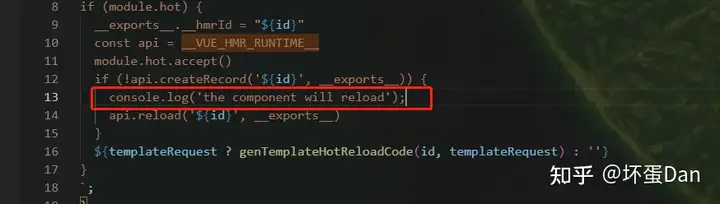
这是一段runtime,会被注入到我们的代码中,然后跟着上浏览器。
注意开发阶段你是无法在dist文件夹里找到对应文件的,因为走了webpack热更新逻辑,本机编译的文件会被放到内存里而不是硬盘,所以这个时候本机是不会有对应编译文件存在的。当然,这么做的好处自然就是快,比文件读写快很多。
扯远了,回到我们这里,我们重启下项目后打开浏览器
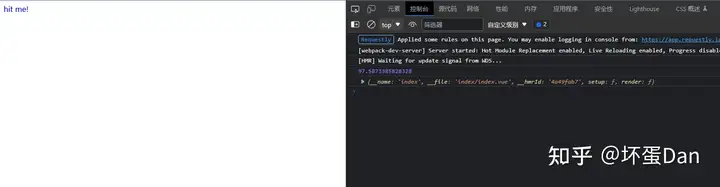
现在我们是看不到的,因为我们还没改动文件。
我来给文件加个console.log
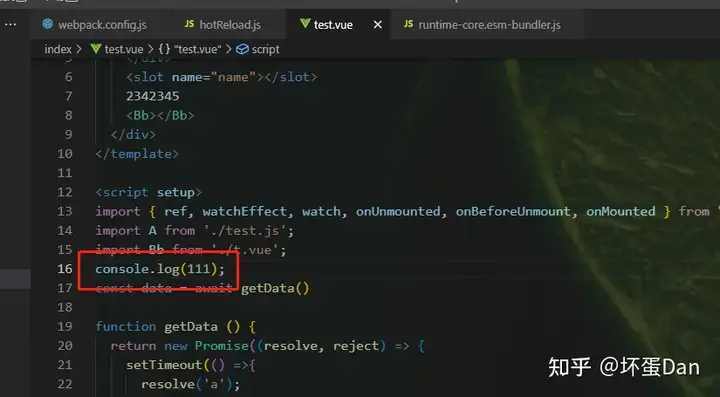
当我们改动文件并保存后,等编译完成之后再次看下浏览器(注意切勿F5刷新浏览器)
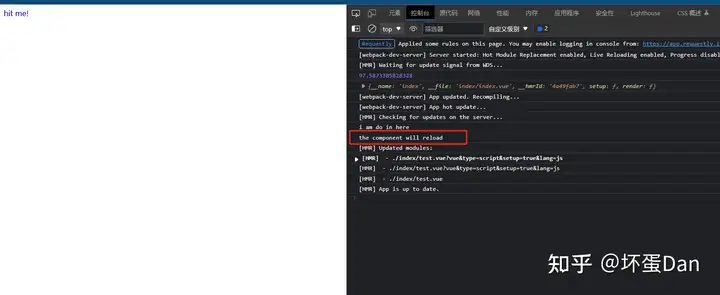
然后我们来改动下样式,比如加个css样式
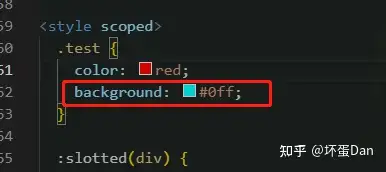
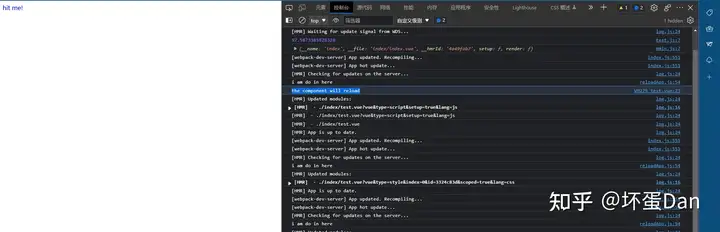
可以看到并没有触发我们的代码。
至于template的我们等下分析rerender的时候试下即可。
那么我们来到回到reload代码里
function reload(id: string, newComp: HMRComponent) {
  const record = map.get(id)
  if (!record) return

  newComp = normalizeClassComponent(newComp)
  // update initial def (for not-yet-rendered components)
  updateComponentDef(record.initialDef, newComp)

  // create a snapshot which avoids the set being mutated during updates
  const instances = [...record.instances]

  for (const instance of instances) {
    const oldComp = normalizeClassComponent(instance.type as HMRComponent)

    if (!hmrDirtyComponents.has(oldComp)) {
      // 1. Update existing comp definition to match new one
      if (oldComp !== record.initialDef) {
        updateComponentDef(oldComp, newComp)
      }
      // 2. mark definition dirty. This forces the renderer to replace the
      // component on patch.
      hmrDirtyComponents.add(oldComp)
    }

    // 3. invalidate options resolution cache
    instance.appContext.optionsCache.delete(instance.type as any)

    // 4. actually update
    if (instance.ceReload) {
      // custom element
      hmrDirtyComponents.add(oldComp)
      instance.ceReload((newComp as any).styles)
      hmrDirtyComponents.delete(oldComp)
    } else if (instance.parent) {
      // 4. Force the parent instance to re-render. This will cause all updated
      // components to be unmounted and re-mounted. Queue the update so that we
      // don't end up forcing the same parent to re-render multiple times.
      queueJob(instance.parent.update)
      // instance is the inner component of an async custom element
      // invoke to reset styles
      if (
        (instance.parent.type as ComponentOptions).__asyncLoader &&
        instance.parent.ceReload
      ) {
        instance.parent.ceReload((newComp as any).styles)
      }
    } else if (instance.appContext.reload) {
      // root instance mounted via createApp() has a reload method
      instance.appContext.reload()
    } else if (typeof window !== 'undefined') {
      // root instance inside tree created via raw render(). Force reload.
      window.location.reload()
    } else {
      console.warn(
        '[HMR] Root or manually mounted instance modified. Full reload required.'
      )
    }
  }

  // 5. make sure to cleanup dirty hmr components after update
  queuePostFlushCb(() => {
    for (const instance of instances) {
      hmrDirtyComponents.delete(
        normalizeClassComponent(instance.type as HMRComponent)
      )
    }
  })
}
代码稍微有那么一点长,但是挺好理解的。
前面触发这个方法的时候传入的数据是__exports__,也就是我们编译的最终产物。
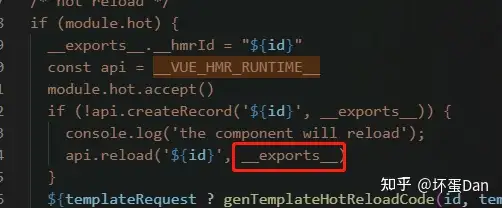
而它就是instance.type,我们前面组件初始化的时候把它注册到record.initialDef里了。
那么这里的newComp就是我们的最新的instance.type。
我们来看下updateComponentDef做了什么
function updateComponentDef(
  oldComp: ComponentOptions,
  newComp: ComponentOptions
) {
  extend(oldComp, newComp)
  for (const key in oldComp) {
    if (key !== '__file' && !(key in newComp)) {
      delete (oldComp as any)[key]
    }
  }
}
export const extend = Object.assign很好理解,就是diff两个编译产物,有则增,无则删。
hmrDirtyComponents:这个变量是一个Set,它用来存储旧的组件实例,表示它是需要被更新的组件。这个变量我们在patch阶段也遇到过。代码在packages\runtime-core\src\vnode.ts里面。
export function isSameVNodeType(n1: VNode, n2: VNode): boolean {
  if (
    __DEV__ &&
    n2.shapeFlag & ShapeFlags.COMPONENT &&
    hmrDirtyComponents.has(n2.type as ConcreteComponent)
  ) {
    // HMR only: if the component has been hot-updated, force a reload.
    return false
  }
  return n1.type === n2.type && n1.key === n2.key
}组件需要被reload处理,所以一定得是false也就是not same。
注意这个时候n1和n2指向的都是同一个组件实例。
扯远了,回到我们的代码中
ceReload:这个是自定义元素的热更新方法,这里我们就不分析了。自定义元素的具体定义可以看:Vue and Web Components | Vue.js (vuejs.org)。是基于Web Components实现的,浏览器原生支持,我之前也写了篇入门文章,感兴趣的可以去看下:https://zhuanlan.zhihu.com/p/611306395。queueJob:这个方法我们前面的文章里有仔细的分析了,后面会单独抽一个篇文章,是vue的任务调度,比如watch触发的任务会被放到全局共用的调度队列里,然后按顺序执行。instance.parent.update:这个update方法我们在patch组件那篇文章里有详细解释做了什么,感兴趣的可以看下:https://zhuanlan.zhihu.com/p/612336916。这里简单地说,这个方法会触发组件自身的`mount`或者`update`。__asyncLoader:这个是异步组件(Async Components[6])的,一般用来搭配Suspense[7] 。这里就不解释了,之前的文章中有反复的说明过。appContext.reload:appContext是全局唯一的,来自我们createApp之后的mount,我们之前有分析过,它的reload不需要__hmrId,因为它会将整个app reload。代码在packages\runtime-core\src\apiCreateApp.ts里面
      mount(
        rootContainer: HostElement,
        isHydrate?: boolean,
        isSVG?: boolean
      ): any {
        if (!isMounted) {
          // #5571
          if (__DEV__ && (rootContainer as any).__vue_app__) {
            warn(
              `There is already an app instance mounted on the host container.\n` +
                ` If you want to mount another app on the same host container,` +
                ` you need to unmount the previous app by calling \`app.unmount()\` first.`
            )
          }
          const vnode = createVNode(
            rootComponent as ConcreteComponent,
            rootProps
          )
          // store app context on the root VNode.
          // this will be set on the root instance on initial mount
          vnode.appContext = context

          // HMR root reload
          if (__DEV__) {
            context.reload = () => {
              render(cloneVNode(vnode), rootContainer, isSVG)
            }
          }
// ...
}queuePostFlushCb:这个在前面的文章中也有分析了:vue runtime源码分析学习——day6:patch打补丁part1:注销旧节点 - 知乎 (zhihu.com),简单地说就是queueJob里的任务队列执行完之后才会执行的任务队列,这里面一般是一些生命周期回调,比如onUpdated里注册的回调等。
那么总结下reload这个方法做了什么。
拿到__exports__也就是最新的编译产物之后通过__hmrId找到对应的record,然后更新它的initialDef。
-
快照(
snapshot)一波这个records里的instance,避免在更新阶段改动了instances这个集合。 -
遍历这些
instance -
- 拿到旧的编译产物
- 判断它是否在
hmrDirtyComponents里面,如果没有,把它加入到里面,然后判断这个旧的产物和最新的产物是否一样,不一样直接更新它为最新的产物,注意,这里引用还是同一个对象,只是参照了最新的产物增删了它的属性字段。当它被标记为hmrDirtyComponents之后,patch就一定会去走unmount逻辑。 - 移除之前存储在
appContext里面对应的cache。 - 判断是什么组件:
- 自定义元素:先加入到
hmrDirtyComponents里,然后调用它自身有的ceReload方法进行reload。完事后再将它从hmrDirtyComponents里移除。 - 子组件:调用父组件实例的
update方法强制父组件更新自己,这样就会更新子组件了,这也就是前面为什么要把它加入到hmrDirtyComponents里面的原因。在父组件触发子组件节点的更新的时候,由于被交际为dirty,所以在调用isSameVNodeType判断是否可以绕过unmount的时候被判定为false,必须被unmount,这样就完成了父组件更新它里面的这个子组件为最新的组件。这里使用queueJob的原因其中之一是为了避免多个子组件触发同一个父组件update。 app:如果找不到parent,那就通知根组件直接使用它自己的reload更新整个app。- 如果上面的都不适用,只能通过
window.location.reload让整个页面reload了。 - 还不行只能给提示了,爱莫能助。。。
\3. 等待queueJob注册的任务队列清洗完毕后将之前注册到hmrDirtyComponents里面的组件实例移除,放到queuePostFlushCb是因为这个方法存放的队列是在queueJob存放的队列执行完毕后(try { ... } finally {do})才会执行。
rerender#
我们前面并没有测试rerender的效果,现在我们来试下。
回到我们之前创建的项目,我们回到node_modules\vue-loader\dist\hotReload.js中,加入以下代码
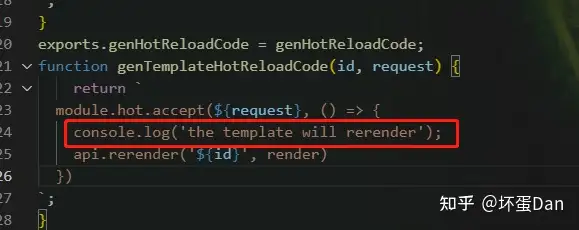
重启服务后去到浏览器刷新,刷新之后回来修改文件的template部分。
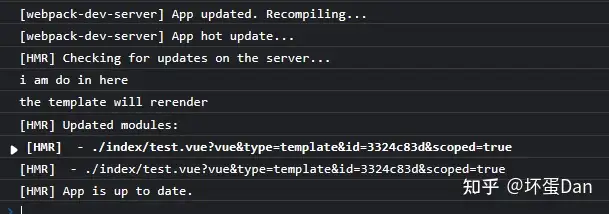
可以看到触发了,而并没有触发我们之前写在另一块hmr runtime里的。
所以只有type=template的时候这个api才会被触发。
话不多说,我们直接来看下代码
function rerender(id: string, newRender?: Function) {
  const record = map.get(id)
  if (!record) {
    return
  }

  // update initial record (for not-yet-rendered component)
  record.initialDef.render = newRender

  // Create a snapshot which avoids the set being mutated during updates
  ;[...record.instances].forEach(instance => {
    if (newRender) {
      instance.render = newRender as InternalRenderFunction
      normalizeClassComponent(instance.type as HMRComponent).render = newRender
    }
    instance.renderCache = []
    // this flag forces child components with slot content to update
    isHmrUpdating = true
    instance.update()
    isHmrUpdating = false
  })
}这块就简单很多。只需要更新render function即可。
render function就是template在编译阶段的最终产物,注意这个render function仅在开发模式下存在,因为prod阶段只需要编译一次,不需要热更新,它编译会走inline mode的逻辑,简单地说就是render function被整合进setup function里面了,而开发阶段是分开的,为的就是这热更新。
没啥好分析的,就是替换instance的render function,因为等会触发它们的update之后会触发它们自己的updateComponentFn,然后更新组件,由于只是render function发生了改变,其它都没变,所以diff过程省去很多事情。
注意这里是触发组件自己的update。
reload和rerender的区别#
最主要的区别在于reload作用于script而rerender作用于template。
这里为什么要做区分呢?
一方面只是模板发生改变,如果full diff会损耗较多资源。
另一方面是为了安全,比如props,我们新在script里定义了一个props,这个时候如果不reload,此时的逻辑就错了。
render function是一个函数,它接收的ctx就是来自script。而它自身里面的东西是不会跑出作用域的即render function里面的变量都叫做local variable也就是局部变量,影响不到除它以外的东西。所以模板发生改变只是替换render function即可。
prod和dev编译的产物差别为什么大#
我在这篇文章后面展示出了development和production两种mode下的编译产物。
开发环境的render function会被单独拿出来,而生产环境的render function会被整合到setup function里面,这里面的原因是production走inline mode。
但是并不清楚为什么开发模式下要单独拿出来。
今天我们分析完了热更新这块功能之后其实已经可以解答这个问题了,就是为了这个rerender,如果不能rerender,那么只能都是reload了,那么patch时间就会变得较长,因为是full diff的。
总结#
没啥好说的,还是比较简单的,就是逻辑较散,经过前面几篇文章的分析之后也就水到渠成了。
写这篇文章的时候很顺,基本没有逻辑卡顿。
当然,可能还是有些问题,如果觉得有问题麻烦评论区里说下,不胜感激!
另外,如果这篇文章对你有帮助的话,请不要吝啬你的点赞!
参考#
- ^module.hot https://webpack.js.org/api/module-variables/#modulehot-webpack-specific
- ^module.hot.accept https://webpack.js.org/api/hot-module-replacement/#accept
- ^window.location.reload https://developer.mozilla.org/en-US/docs/Web/API/Location/reload
- ^class component https://vuejs.org/api/options-composition.html#extends
- ^Set https://developer.mozilla.org/en-US/docs/Web/JavaScript/Reference/Global_Objects/Set
- ^async components https://vuejs.org/guide/components/async.html#async-components
- ^Suspense https://vuejs.org/guide/built-ins/suspense.html#suspense
发布于 2023-03-16 13:04・IP 属地广东