
前言#
上篇文章中我们分析了如何处理非setup语法糖script block,知道了是如何处理分析import、export以及各种变量的。如果没看过可以去看下。
坏蛋Dan:vue/compiler-sfc源码分析学习--part2:如何处理script--day2
点个赞也是可以滴~doge
正文#
老规矩会省略error场景以及一些无关代码,另外setup script block或者setup block指的是<script setup>...</script>,同样non setup block指的是<script>...</script> 。
话不多说,我们接着往下分析。
测试单元#
还是沿用上期的那个~
将setup block处理成ast#
  // 2. parse <script setup> and  walk over top level statements
  const scriptSetupAst = parse(
    scriptSetup.content,
    {
      plugins: [
        ...plugins,
        // allow top level await but only inside <script setup>
        'topLevelAwait'
      ],
      sourceType: 'module'
    },
    startOffset
  )

  function parse(
    input: string,
    options: ParserOptions,
    offset: number
  ): Program {
    try {
      return _parse(input, options).program
    } catch (e: any) {
      e.message = `[@vue/compiler-sfc] ${e.message}\n\n${
        sfc.filename
      }\n${generateCodeFrame(source, e.pos + offset, e.pos + offset + 1)}`
      throw e
    }
}plugins: 之前说过了,typescript、jsx、tsx或者babel自己的plugin等。sourceType:Indicate the mode the code should be parsed in. Files with ES6 imports and exports are considered "module"[1],之前学babel[2]的文章里应该有提到过,简单的说就是通知parser如何去处理源码,module自然是模块,将源码当作模块去处理。_parse:@babel/parser[3]的parse,不多说。
这段代码很简单,就是处理setup script block,转换为ast。
遍历分析setupscript的ast#
前面处理成ast了,这里自然就是分析。
代码有些长,300来行,这回我们就不直接贴出来了,换下展示效果,先展示整体,再一小块一小块分析。
  for (const node of scriptSetupAst.body) {
    const start = node.start! + startOffset
    let end = node.end! + startOffset
    // ...具体逻辑下面分析
} 整体是for循环遍历scriptSetupAst
startOffset:setupscript``block代码的起始位置。
校正代码起始结束位置
    // locate comment
    if (node.trailingComments && node.trailingComments.length > 0) {
      const lastCommentNode =
        node.trailingComments[node.trailingComments.length - 1]
      end = lastCommentNode.end + startOffset
}trailingComments: 注释一类中的末尾注释,类似的还有头部注释(leadingComments),babel不会忽略他们。
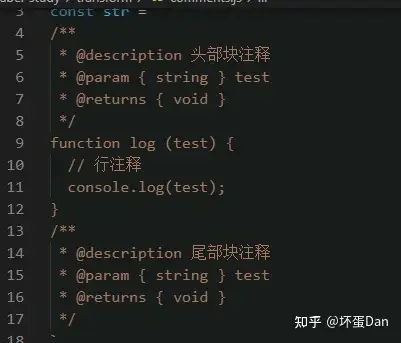
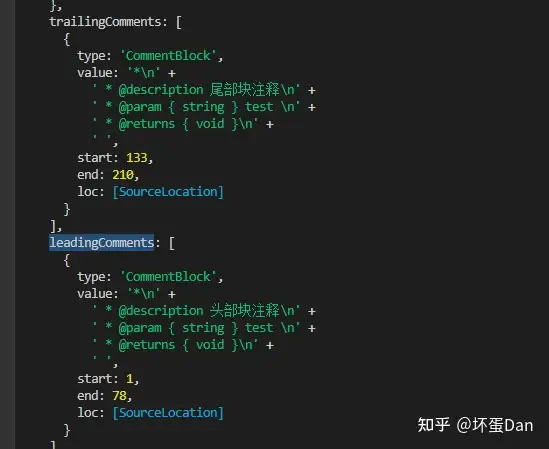
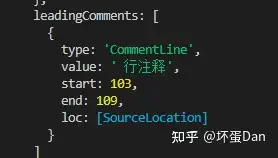
这块代码很简单,就是在校正代码的起始结束位置,将位于代码下面的comments也就是注释行数列数也算进去。我们接着往下看。
清理代码间空白区域
    // locate the end of whitespace between this statement and the next
    while (end <= source.length) {
      if (!/\s/.test(source.charAt(end))) {
        break
      }
      end++
}这个很简单,就是end位置继续往下,知道没有空的space结束,在我们parse之前会对源码做trim()处理,但是这仅能去除前后空白,并且不能做全局匹配去除,因为会误伤,所以这里又做了去除空白的处理。
接着往下看。
处理和收集import#
这块代码有些小长
if (node.type === "ImportDeclaration") {
  // import declarations are moved to top
  s.move(start, end, 0);

  // dedupe imports
  let removed = 0;
  const removeSpecifier = (i: number) => {
    const removeLeft = i > removed;
    removed++;
    const current = node.specifiers[i];
    const next = node.specifiers[i + 1];
    s.remove(
      removeLeft
        ? node.specifiers[i - 1].end! + startOffset
        : current.start! + startOffset,
      next && !removeLeft
        ? next.start! + startOffset
        : current.end! + startOffset
    );
  };

  for (let i = 0; i < node.specifiers.length; i++) {
    const specifier = node.specifiers[i];
    const local = specifier.local.name;
    let imported =
      specifier.type === "ImportSpecifier" &&
      specifier.imported.type === "Identifier" &&
      specifier.imported.name;
    if (specifier.type === "ImportNamespaceSpecifier") {
      imported = "*";
    }
    const source = node.source.value;
    const existing = userImports[local];
    if (
      source === "vue" &&
      (imported === DEFINE_PROPS ||
        imported === DEFINE_EMITS ||
        imported === DEFINE_EXPOSE)
    ) {
      warnOnce(
        `\`${imported}\` is a compiler macro and no longer needs to be imported.`
      );
      removeSpecifier(i);
    } else if (existing) {
      if (existing.source === source && existing.imported === imported) {
        // already imported in <script setup>, dedupe
        removeSpecifier(i);
      } else {
        error(`different imports aliased to same local name.`, specifier);
      }
    } else {
      registerUserImport(
        source,
        local,
        imported,
        node.importKind === "type" ||
          (specifier.type === "ImportSpecifier" &&
            specifier.importKind === "type"),
        true,
        !options.inlineTemplate
      );
    }
  }
  if (node.specifiers.length && removed === node.specifiers.length) {
    s.remove(node.start! + startOffset, node.end! + startOffset);
  }
}imported: 这个就不多说了,上篇文章说过了,这个imported指的是import的对象,比如import { a } from 'b'中的aremoveSpecifier: 代码就在上面,看名字就知道是用来移除这个字段的,需要注意,操作的对象是s,也就是通过magic-string[4]处理过后的。registerUserImport: 也是熟人了,上篇文章也说过了,这里就不多说了,简单的说就是将import目标注册到userImport这个集合中。
这段代码有点小长,但是很简单。如果你看过上篇文章,应该就没有阅读难点了。简单的说就是和non script block一样的操作,都是将import的对象存放到userImport这个集合中。不过setup script block有额外的操作。
- 移除
defineProps、defineEmits、defineExpose三个api的导入代码,为什么要这么做呢?因为在setup block中不需要手动导入了,可以直接用。 - 判断
import的家伙之前是否已经import过了,有了直接移除。是的,你的non setup script block的import其实是共用的,这也就是为什么non setup block要被移到setup block之前。 当然这里还有一个问题就是别名(alias)问题。这里注册到userImport的key就是这个alias,而多个import可能出现别名一样但是导入的东西和路径不一样的情况。比如以下场景
import { a as _a } from 'b.js';
import { c as _a } from 'd.js';
这就存在问题了,所以这里还多了一层对路径以及导入对象的判断,如果确定没问题则移除重复的,如果相同别名而又不同内容则直接叉出去报错。
来看下数据
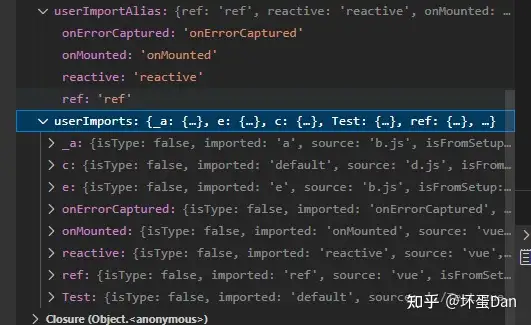
userImportAlias:这个是专门用来收集vue自己的api的,因为允许别名(alias),所以还得收集下才行,不然到时候自己都不认识了。userImportAlias[imported] = local,其中imported是api原名,而local是别名,没有别名用原名。
可以很清楚的看到里面不仅有当前script block的import,还有之前的non setup block的import。
我们接着往下看
处理defineProps、defineEmits、withDefaults、defineExpose表达式调用#
    if (node.type === 'ExpressionStatement') {
      // process `defineProps` and `defineEmit(s)` calls
      if (
        processDefineProps(node.expression) ||
        processDefineEmits(node.expression) ||
        processWithDefaults(node.expression)
      ) {
        s.remove(node.start! + startOffset, node.end! + startOffset)
      } else if (processDefineExpose(node.expression)) {
        // defineExpose({}) -> expose({})
        const callee = (node.expression as CallExpression).callee
        s.overwrite(
          callee.start! + startOffset,
          callee.end! + startOffset,
          'expose'
        )
      }
}processDefineProps: 这里不贴代码,下面开个小标题来分析下,简单的说就是在处理props,收集变量啊啥的,具体看下面**processDefineProps做了什么**这一个小section。processDefineEmits: 同上,收集emits赋值的变量名。processWithDefaults: 同上,收集赋值给props的数据。processDefineExpose: 不做收集,仅是判断。calle: 调用表达式中被调用的对象,比如defineProps({}),defineProps就是被调用的对象。
这段代码很简单,这个小标题中的代码都是处理普通表达式的,比如defineProps({xxx})这样,并没有声明变量等,所以其实这里并没有做收集处理(WithDefaults除外,这货收集了)。 只是在做判断,是否正常调用api。
processDefineProps做了什么#
来看下代码,有点小长
  function processDefineProps(node: Node, declId?: LVal): boolean {
    if (!isCallOf(node, DEFINE_PROPS)) {
      return false
    }

    if (hasDefinePropsCall) {
      error(`duplicate ${DEFINE_PROPS}() call`, node)
    }
    hasDefinePropsCall = true

    propsRuntimeDecl = node.arguments[0]

    // call has type parameters - infer runtime types from it
    if (node.typeParameters) {
      if (propsRuntimeDecl) {
        error(
          `${DEFINE_PROPS}() cannot accept both type and non-type arguments ` +
            `at the same time. Use one or the other.`,
          node
        )
      }

      propsTypeDeclRaw = node.typeParameters.params[0]
      propsTypeDecl = resolveQualifiedType(
        propsTypeDeclRaw,
        node => node.type === 'TSTypeLiteral'
      ) as TSTypeLiteral | TSInterfaceBody | undefined

      if (!propsTypeDecl) {
        error(
          `type argument passed to ${DEFINE_PROPS}() must be a literal type, ` +
            `or a reference to an interface or literal type.`,
          propsTypeDeclRaw
        )
      }
    }

    if (declId) {
      if (enablePropsTransform && declId.type === 'ObjectPattern') {
        propsDestructureDecl = declId
        // props destructure - handle compilation sugar
        for (const prop of declId.properties) {
          if (prop.type === 'ObjectProperty') {
            if (prop.computed) {
              error(
                `${DEFINE_PROPS}() destructure cannot use computed key.`,
                prop.key
              )
            }

            const propKey =
              prop.key.type === 'StringLiteral'
                ? prop.key.value
                : (prop.key as Identifier).name

            if (prop.value.type === 'AssignmentPattern') {
              // default value { foo = 123 }
              const { left, right } = prop.value
              if (left.type !== 'Identifier') {
                error(
                  `${DEFINE_PROPS}() destructure does not support nested patterns.`,
                  left
                )
              }
              // store default value
              propsDestructuredBindings[propKey] = {
                local: left.name,
                default: right
              }
            } else if (prop.value.type === 'Identifier') {
              // simple destructure
              propsDestructuredBindings[propKey] = {
                local: prop.value.name
              }
            } else {
              error(
                `${DEFINE_PROPS}() destructure does not support nested patterns.`,
                prop.value
              )
            }
          } else {
            // rest spread
            propsDestructureRestId = (prop.argument as Identifier).name
          }
        }
      } else {
        propsIdentifier = scriptSetup!.content.slice(declId.start!, declId.end!)
      }
    }

    return true
}isCallOf: 这个上篇文章也说过了,这里就不多说了。hasDefinePropsCall: 不多说,一个script block中只能有一个defineProps。propsRuntimeDecl:node.arguments[0]就是你传给defineProps的params。node.typeParameters: 这个是typescript代码解析后特有的类型定义,为什么这里会有呢?因为vue3.x支持defineProps的时候通过type-only的方式定义props类型[5],这样就不需要runtime代码定义,比如:
const props = defineProps<{
  foo: string
  bar?: number
}>() 当然这得是在typescript下才能使用,另外如果用了type-only就不能再使用runtime define了,也就是常规的props定义。两个之间只能有一个。
propsTypeDeclRaw:type-only定义的具体。propsTypeDecl:propsTypeDeclaration,type为TSTypeLiteral[6]的那个节点。resolveQualifiedType: 代码就不看了,简单的说就是找到你这个type,由于你这个type可能有好几种方式,比如import进来的又或者是通过interface传给的,所以得找到这个type。declId: 这个是声明目标的对象,比如const a = defineProps({}),这个a就是这个对象,也是这个表达式的id节点。enablePropsTransform: 其实就是reactivityTransform[7],前面也说过很多次了,这里就不多说了。ObjectPattern[8]: 这个之前也说过了,是解构赋值,比如const { a, b, c } = {xxx};,这个a,b,c就是解构赋值的对象变量。ObjectProperty[9]: 对象属性,这个就不多说了,大家应该都清楚,不过需要注意的一点是,并非所有的放到对象上的东西都是objectProperty,比如这个{ log () {} },这个log就不是objectProperty,而是objectMethod[10] 。这些也是前面文章中就说到过的,大家可以去看下。StringLiteral[11]: 字符串节点AssignmentPattern[12]: 解构的默认赋值 ,比如const { a = 123 } = xxx,这个123就是默认赋值。left,right: 解构赋值的左右边
当把所有不明白的点都罗列出来时这一大段代码就变得非常简单了~
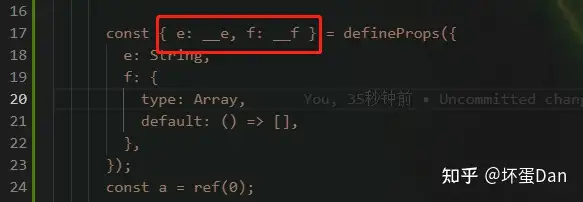
总结一下processDefineProps做了什么
- 先判断你是否是
defineProps,不是直接叉出去 ; - 判断之前是否已经有调用过
defineProps了,是的话直接叉出去并且报错; - 判断是否是
type-only定义,如果是的话接着判断是否又传入了runtime定义,是的话直接叉出去,一处定义只允许有一种。找到type-only的目标类型定义,如果没找到直接报错。 - 判断是否传入了
declId也就是变量声明左边的家伙,是的话进入以下场景: 是否开启了reactivityTransform并且是解构赋值 。
- 不是:直接截取这个变量名存入
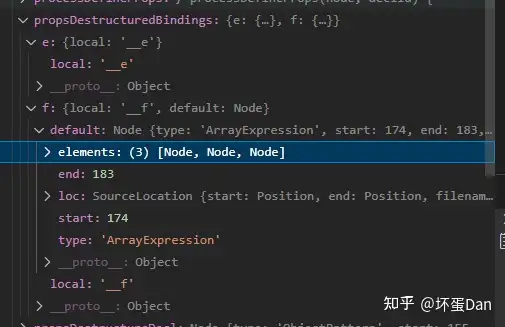
propsIdentifier字段中。 - 是:遍历这个解构赋值中每一个变量,存入
propsDestructuredBindings集合中,变量名字包括默认值。
稍微调整下我们的测试单元,看下数据是怎么样的。
processDefineEmits做了什么#
在分析看代码之前,我们先稍微修改下我们的测试单元,毕竟之前并没有加上defineEmits

  function processDefineEmits(node: Node, declId?: LVal): boolean {
    if (!isCallOf(node, DEFINE_EMITS)) {
      return false
    }
    if (hasDefineEmitCall) {
      error(`duplicate ${DEFINE_EMITS}() call`, node)
    }
    hasDefineEmitCall = true
    emitsRuntimeDecl = node.arguments[0]
    if (node.typeParameters) {
      if (emitsRuntimeDecl) {
        error(
          `${DEFINE_EMITS}() cannot accept both type and non-type arguments ` +
            `at the same time. Use one or the other.`,
          node
        )
      }

      emitsTypeDeclRaw = node.typeParameters.params[0]
      emitsTypeDecl = resolveQualifiedType(
        emitsTypeDeclRaw,
        node => node.type === 'TSFunctionType' || node.type === 'TSTypeLiteral'
      ) as TSFunctionType | TSTypeLiteral | TSInterfaceBody | undefined

      if (!emitsTypeDecl) {
        error(
          `type argument passed to ${DEFINE_EMITS}() must be a function type, ` +
            `a literal type with call signatures, or a reference to the above types.`,
          emitsTypeDeclRaw
        )
      }
    }

    if (declId) {
      emitIdentifier = scriptSetup!.content.slice(declId.start!, declId.end!)
    }

    return true
}这个没啥好说的。。。该分析的东西processDefineProps中都分析完了。
简单的说和processDefineProps做的事情一样,defineEmits也是支持only-type[13]的,当然,也是在typescript的情况下,也只能二选一。
另外defineEmits不支持解构,所以直接就一个字段emitIdentifier存储了。
processWithDefaults做了什么#
withDefaults方法是用来处理defineProps使用only-type时无法设置默认值的问题的。
但其实,还有另一种方式——解构赋值,通过给解构的变量设置默认值的方式来实现给props赋值默认值,没想到吧。
  function processWithDefaults(node: Node, declId?: LVal): boolean {
    if (!isCallOf(node, WITH_DEFAULTS)) {
      return false
    }
    if (processDefineProps(node.arguments[0], declId)) {
      if (propsRuntimeDecl) {
        error(
          `${WITH_DEFAULTS} can only be used with type-based ` +
            `${DEFINE_PROPS} declaration.`,
          node
        )
      }
      if (propsDestructureDecl) {
        error(
          `${WITH_DEFAULTS}() is unnecessary when using destructure with ${DEFINE_PROPS}().\n` +
            `Prefer using destructure default values, e.g. const { foo = 1 } = defineProps(...).`,
          node.callee
        )
      }
      propsRuntimeDefaults = node.arguments[1] as ObjectExpression
      if (
        !propsRuntimeDefaults ||
        propsRuntimeDefaults.type !== 'ObjectExpression'
      ) {
        error(
          `The 2nd argument of ${WITH_DEFAULTS} must be an object literal.`,
          propsRuntimeDefaults || node
        )
      }
    } else {
      error(
        `${WITH_DEFAULTS}' first argument must be a ${DEFINE_PROPS} call.`,
        node.arguments[0] || node
      )
    }
    return true
} 这块代码很简单,判断是否符合执行withDefaults的条件,如果确实是用了only-type但是使用了解构赋值,这时就没必要执行这个方法,直接叉出去。如果符合条件则放到propsRuntimeDefaults变量中。
processDefineExpose做了什么#
defineExpose[14] ,这个api有些陌生,因为是vue3特有的,vue2.x中通过$refs或者$parents等获取组件的数据或者方法时是可以直接获取的。但是这在3.x中就不适用,默认是没有东西暴露的。所以这里就需要这个defineExpose抛出你想暴露的数据方法,这样就非常安全。话不多说,来看下代码。
  function processDefineExpose(node: Node): boolean {
    if (isCallOf(node, DEFINE_EXPOSE)) {
      if (hasDefineExposeCall) {
        error(`duplicate ${DEFINE_EXPOSE}() call`, node)
      }
      hasDefineExposeCall = true
      return true
    }
    return false
  }
没了。。
这里没做收集,只是判断是否是这个api并且是否重复使用而已。
收集props、emits、withDefaults数据#
    if (node.type === 'VariableDeclaration' && !node.declare) {
      const total = node.declarations.length
      let left = total
      for (let i = 0; i < total; i++) {
        const decl = node.declarations[i]
        if (decl.init) {
          // defineProps / defineEmits
          const isDefineProps =
            processDefineProps(decl.init, decl.id) ||
            processWithDefaults(decl.init, decl.id)
          const isDefineEmits = processDefineEmits(decl.init, decl.id)
          if (isDefineProps || isDefineEmits) {
            if (left === 1) {
              s.remove(node.start! + startOffset, node.end! + startOffset)
            } else {
              let start = decl.start! + startOffset
              let end = decl.end! + startOffset
              if (i < total - 1) {
                // not the last one, locate the start of the next
                end = node.declarations[i + 1].start! + startOffset
              } else {
                // last one, locate the end of the prev
                start = node.declarations[i - 1].end! + startOffset
              }
              s.remove(start, end)
              left--
            }
          }
        }
      }
    }
小标题5中我们提到了收集,但实际上收集执行的代码是在这里。比如以下情况会执行这段代码:
const { a = 123, b = "test" } = defineProps({ a:Number, b: String }); 变量赋值表达式(变量声明,VariableDeclaration)的情况下会执行这段代码。
这段代码也没什么好说的,收集变量名和数据,然后移除这段代码,毕竟不是runtime的代码。
另外还有一点需要注意,那就是这里仅收集props、emit的数据。
收集变量、函数、类#
    // walk declarations to record declared bindings
    if (
      (node.type === 'VariableDeclaration' ||
        node.type === 'FunctionDeclaration' ||
        node.type === 'ClassDeclaration') &&
      !node.declare
    ) {
      walkDeclaration(node, setupBindings, userImportAlias)
}这个不多说,上篇文章说过walkDeclaration这个方法了,可以去看下。这里简单的说就是收集变量等并分门别类标记,最后存放到bindings中。不过需要注意这个bindings并不是共用的,也就是说non setup block和setup block各自有各自的bindings集合。
这里需要注意,收集的是除props、emits以外的,毕竟上面已经处理过了。
至于为什么要收集呢?因为语法糖中的东西默认最终都会setup()出去。
迁移代码以及处理await#
 // walk statements & named exports / variable declarations for top level
// await
if (
  (node.type === "VariableDeclaration" && !node.declare) ||
  node.type.endsWith("Statement")
) {
  const scope: Statement[][] = [scriptSetupAst.body];
  (walk as any)(node, {
    enter(child: Node, parent: Node) {
      if (isFunctionType(child)) {
        this.skip();
      }
      if (child.type === "BlockStatement") {
        scope.push(child.body);
      }
      if (child.type === "AwaitExpression") {
        hasAwait = true;
        // if the await expression is an expression statement and
        // - is in the root scope
        // - or is not the first statement in a nested block scope
        // then it needs a semicolon before the generated code.
        const currentScope = scope[scope.length - 1];
        const needsSemi = currentScope.some((n, i) => {
          return (
            (scope.length === 1 || i > 0) &&
            n.type === "ExpressionStatement" &&
            n.start === child.start
          );
        });
        processAwait(child, needsSemi, parent.type === "ExpressionStatement");
      }
    },
    exit(node: Node) {
      if (node.type === "BlockStatement") scope.pop();
    },
  });
}walk: 这个方法来自estree-walker[15],这个包简单的说就是可以帮你移动/删除/替换ast里的节点。不过ast的方案存在多种,这里支持ESTree-compliant AST。它的使用方式如下
walk(ast, {
  enter(node, parent, prop, index) {
    // some code happens
  },
  leave(node, parent, prop, index) {
    // some code happens
  }
});参数第一个传入需要处理的ast,第二个则是回调。其中enter表示进入某个节点,leave自然就是离开。
而如果不想处理某个节点可以执行this.skip()跳过。需要替换则执行this.replace(newNode)。移除则是this.remove()。
扯远了,我们继续看代码。
scope: 这是一个栈空间,这种嵌套的用栈来处理挺不错的。BlockStatement[16]: 块语句,也就是一个块作用域。比如{ function a () {} },这个就是一个块语句节点。AwaitExpression[17]: 这个不用多说,await表达式。由于我们的代码中并没有await,所以我们加点料。

需要注意的一点是setup block中实际上是允许你直接使用await的,不需要用async包裹,为什么可以呢,我们等会会分析到。
processAwait: 我们来看下代码
  /**
   * await foo()
   * -->
   * ;(
   *   ([__temp,__restore] = withAsyncContext(() => foo())),
   *   await __temp,
   *   __restore()
   * )
   *
   * const a = await foo()
   * -->
   * const a = (
   *   ([__temp, __restore] = withAsyncContext(() => foo())),
   *   __temp = await __temp,
   *   __restore(),
   *   __temp
   * )
   */
  function processAwait(
    node: AwaitExpression,
    needSemi: boolean,
    isStatement: boolean
  ) {
    const argumentStart =
      node.argument.extra && node.argument.extra.parenthesized
        ? (node.argument.extra.parenStart as number)
        : node.argument.start!

    const argumentStr = source.slice(
      argumentStart + startOffset,
      node.argument.end! + startOffset
    )

    const containsNestedAwait = /\bawait\b/.test(argumentStr)

    s.overwrite(
      node.start! + startOffset,
      argumentStart + startOffset,
      `${needSemi ? `;` : ``}(\n  ([__temp,__restore] = ${helper(
        `withAsyncContext`
      )}(${containsNestedAwait ? `async ` : ``}() => `
    )
    s.appendLeft(
      node.end! + startOffset,
      `)),\n  ${isStatement ? `` : `__temp = `}await __temp,\n  __restore()${
        isStatement ? `` : `,\n  __temp`
      }\n)`
    )
  }
我把注释带上之后应该就已经一目了然了~
withAsyncContext: 存放在另一个包中,毕竟是runtime来的,具体@vue/runtime-core/src/apiSetupHelpers.ts[18]中,具体分析请看其它-withAsyncContext这一小标题。
简单的说就是帮你重写这段代码,用立即执行函数包裹,这也就是为什么你写await不需要async包裹的原因,编译时自动帮你处理了。这里有个点需要注意,立即执行函数前最好带一个;,不带的话可能会出现解析出错。
总结一下迁移代码以及处理await这段代码
这段代码做的事情很简单,就是在把变量声明等迁移到文件头,而如果是await的话顺便将await用立即执行函数包裹 。
处理TS代码#
    if (isTS) {
      // runtime enum
      if (node.type === 'TSEnumDeclaration') {
        registerBinding(setupBindings, node.id, BindingTypes.SETUP_CONST)
      }

      // move all Type declarations to outer scope
      if (
        node.type.startsWith('TS') ||
        (node.type === 'ExportNamedDeclaration' &&
          node.exportKind === 'type') ||
        (node.type === 'VariableDeclaration' && node.declare)
      ) {
        recordType(node, declaredTypes)
        s.move(start, end, 0)
      }
}如果你用了typescript,这里会收集ts的类型,然后移除。毕竟类型定义不是我们runtime需要的(enum除外,用得上)。
总结#
ok,今天就分析到这里。别忘了我们分析的范围,在一个for循环中,遍历的setupscript的节点。
主要做了俩事:
- 将
setup block处理成ast - 遍历
ast
其中遍历节点过程中又做了几件事
- 处理以及收集
import变量。 - 处理
defineProps、defineEmits、withDefaults、defineExpose这几个api相关的代码,如果是变量声明,那就收集变量以及数据(withDefaults仅收集数据,defineExpose改写为expose,是个runtime方法)。 - 收集变量声明、函数声明以及类声明。
- 迁移变量声明等至代码头,并且处理
await表达式场景。 - 如果是
typescript,收集类型定义等并迁移至代码外部。
具体请往回看。
其他#
withAsyncContext#
上面分析如何处理await时并没有分析这个方法,仅说了整体是怎么样的,并没有说到这里面具体做了什么,立即执行函数包裹我们就不多说了,我们来看下这个runtime方法是干啥用的。
/**
 * `<script setup>` helper for persisting the current instance context over
 * async/await flows.
 *
 * `@vue/compiler-sfc` converts the following:
 *
 * ```ts
 * const x = await foo()
 * ```
 *
 * into:
 *
 * ```ts
 * let __temp, __restore
 * const x = (([__temp, __restore] = withAsyncContext(() => foo())),__temp=await __temp,__restore(),__temp)
 * ```
 * @internal
 */
export function withAsyncContext(getAwaitable: () => any) {
  const ctx = getCurrentInstance()!
  if (__DEV__ && !ctx) {
    warn(
      `withAsyncContext called without active current instance. ` +
        `This is likely a bug.`
    )
  }
  let awaitable = getAwaitable()
  unsetCurrentInstance()
  if (isPromise(awaitable)) {
    awaitable = awaitable.catch(e => {
      setCurrentInstance(ctx)
      throw e
    })
  }
  return [awaitable, () => setCurrentInstance(ctx)]
}getCurrentInstance: 代码就不看了,获取当前上下文环境,一般都是组件自身getAwaitable: 你的await目标,不过被包裹了一层,变成了回调。unsetCurrentInstance: 当前作用域中移除了这货并且注销了他。isPromise: 代码挺有意思的
export const isPromise = <T = any>(val: unknown): val is Promise<T> => {
  return isObject(val) && isFunction(val.then) && isFunction(val.catch)
} setCurrentInstance: 注册回来。
结合demo分析
const x = (([__temp, __restore] = withAsyncContext(() => foo())),__temp=await __temp,__restore(),__temp) withAsyncContext这个方法中返回了一个数组,第一个数是加了个catch的promise,也即是你的await目标,但是多了层catch监听。而第二个数__restore则是一个回调,将当前上下文环境重新注册回来。
这样也保证了组件的顺序是正确的。
如果觉得这篇文章对你有帮助,麻烦点个赞,谢谢!
参考#
- ^@babel/parser-options https://babeljs.io/docs/en/babel-parser#options
- ^babel入门学习 https://zhuanlan.zhihu.com/p/576231528
- ^@babel/parser https://babeljs.io/docs/en/babel-parser
- ^magic-string https://www.npmjs.com/package/magic-string
- ^vue3-type-only-defineProps https://vuejs.org/api/sfc-script-setup.html#typescript-only-features
- ^babel-tsTypeLiteral https://babeljs.io/docs/en/babel-types#tstypeliteral
- ^vue3-reactivityTransform https://vuejs.org/guide/extras/reactivity-transform.html#reactivity-transform
- ^babel-objectPattern https://babeljs.io/docs/en/babel-types#objectpattern
- ^babel-objectProperty https://babeljs.io/docs/en/babel-types#objectproperty
- ^babel-objectMethod https://babeljs.io/docs/en/babel-types#objectmethod
- ^babel-stringLiteral https://babeljs.io/docs/en/babel-types#stringliteral
- ^babel-assignmentPattern https://babeljs.io/docs/en/babel-types#assignmentpattern
- ^vue3-defineEmits-only-type https://vuejs.org/api/sfc-script-setup.html#typescript-only-features
- ^defineExpose https://vuejs.org/api/sfc-script-setup.html#defineexpose
- ^estree-walker https://www.npmjs.com/package/estree-walker
- ^babel-BlockStatement https://babeljs.io/docs/en/babel-types#blockstatement
- ^babel-awaitExpression https://babeljs.io/docs/en/babel-types#awaitexpression
- ^@vue/runtime-core https://github.com/vuejs/core/tree/main/packages/runtime-core
发布于 2022-11-25 12:54・IP 属地广东