
前言#
上篇文章我们找到了调用入口,找了测试单元,也分析了非setup的script block做了什么。如果没看过上篇文章的可以去看下。
[坏蛋Dan:vue/compiler-sfc源码分析学习--part2:如何处理script--day1
今天我们就接着往下分析。
正文#
老规矩,同样是省略一些error判断和无关场景,一下non setup script block指的是不带有任何属性的script block,比如。同理`setup script block`指的是。
切换测试单元#
由于day1分析时分析到了non setup script block,切换了测试单元,所以在分析代码之前我们需要切换回来。
  test('test compileScript', () => {
    const data = compile(`
    <template>
      <div @click="handleChangeColor" class="test">
        <Test :a="a" :b="b" />
        <input type="text" ref="input">
      </div>
    </template>
    <script setup>
      import Test from "./Test.vue";
      import { ref, reactive, defineProps, onMounted, onErrorCaptured  } from "vue";
      const props = defineProps({
        e: String,
        f: {
          type: Array,
          default: () => [],
        },
      });
      const a = ref(0);
      const colorList = reactive(['#000', '#f00', '#0f0', '#00f', '#fff'])
      const color = colorList[0]
      const b = reactive({
        c: 1,
        d: 2,
      });
      const input = ref(null);
      function handleChangeColor () {
        const { random } = Math
        color.value = colorList(random() * 5)
      }
      onMounted(() => {
        a.value = 1;
        b.c = 2;
        b.d = 3;
        input.value.focus();
      });
      onErrorCaptured((err) => {
        console.log(err);
      });
    </script>

    <script>
      console.log(6666)
      function iAmInNonSetupScriptBlcok () { console.log(666) };
    </script>

    <style lang="scss" scoped>
      .test {
        color: v-bind(color)
      }
    </style>
    `)
    expect(data).toBe(data)
})这个测试元带有一个setup script block以及一个non setup block并且这个单纯的script不带有lang。
然后直接左上角debug
处理单纯script block#
啥叫单纯script block?指的就是这种,当然,也可以带上`lang`,比如 。
注意你的script block的lang都需要保持一致。
// magic-string state
const s = new MagicString(source)
const startOffset = scriptSetup.loc.start.offset
const endOffset = scriptSetup.loc.end.offset
const scriptStartOffset = script && script.loc.start.offset
const scriptEndOffset = script && script.loc.end.offset

// 1. process normal <script> first if it exists
let scriptAst: Program | undefined
if (script) {
  scriptAst = parse(
    script.content,
    {
      plugins,
      sourceType: 'module'
    },
    scriptStartOffset!
  )

  for (const node of scriptAst.body) {
    if (node.type === 'ImportDeclaration') {
      // record imports for dedupe
      for (const specifier of node.specifiers) {
        const imported =
          specifier.type === 'ImportSpecifier' &&
          specifier.imported.type === 'Identifier' &&
          specifier.imported.name
        registerUserImport(
          node.source.value,
          specifier.local.name,
          imported,
          node.importKind === 'type' ||
            (specifier.type === 'ImportSpecifier' &&
              specifier.importKind === 'type'),
          false,
          !options.inlineTemplate
        )
      }
    } else if (node.type === 'ExportDefaultDeclaration') {
      // export default
      defaultExport = node

      // check if user has manually specified `name` or 'render` option in
      // export default
      // if has name, skip name inference
      // if has render and no template, generate return object instead of
      // empty render function (#4980)
      let optionProperties
      if (defaultExport.declaration.type === 'ObjectExpression') {
        optionProperties = defaultExport.declaration.properties
      } else if (
        defaultExport.declaration.type === 'CallExpression' &&
        defaultExport.declaration.arguments[0].type === 'ObjectExpression'
      ) {
        optionProperties = defaultExport.declaration.arguments[0].properties
      }
      if (optionProperties) {
        for (const s of optionProperties) {
          if (
            s.type === 'ObjectProperty' &&
            s.key.type === 'Identifier' &&
            s.key.name === 'name'
          ) {
            hasDefaultExportName = true
          }
          if (
            (s.type === 'ObjectMethod' || s.type === 'ObjectProperty') &&
            s.key.type === 'Identifier' &&
            s.key.name === 'render'
          ) {
            // TODO warn when we provide a better way to do it?
            hasDefaultExportRender = true
          }
        }
      }

      // export default { ... } --> const __default__ = { ... }
      const start = node.start! + scriptStartOffset!
      const end = node.declaration.start! + scriptStartOffset!
      s.overwrite(start, end, `const ${DEFAULT_VAR} = `)
    } else if (node.type === 'ExportNamedDeclaration') {
      const defaultSpecifier = node.specifiers.find(
        s => s.exported.type === 'Identifier' && s.exported.name === 'default'
      ) as ExportSpecifier
      if (defaultSpecifier) {
        defaultExport = node
        // 1. remove specifier
        if (node.specifiers.length > 1) {
          s.remove(
            defaultSpecifier.start! + scriptStartOffset!,
            defaultSpecifier.end! + scriptStartOffset!
          )
        } else {
          s.remove(
            node.start! + scriptStartOffset!,
            node.end! + scriptStartOffset!
          )
        }
        if (node.source) {
          // export { x as default } from './x'
          // rewrite to `import { x as __default__ } from './x'` and
          // add to top
          s.prepend(
            `import { ${defaultSpecifier.local.name} as ${DEFAULT_VAR} } from '${node.source.value}'\n`
          )
        } else {
          // export { x as default }
          // rewrite to `const __default__ = x` and move to end
          s.appendLeft(
            scriptEndOffset!,
            `\nconst ${DEFAULT_VAR} = ${defaultSpecifier.local.name}\n`
          )
        }
      }
      if (node.declaration) {
        walkDeclaration(node.declaration, scriptBindings, userImportAlias)
      }
    } else if (
      (node.type === 'VariableDeclaration' ||
        node.type === 'FunctionDeclaration' ||
        node.type === 'ClassDeclaration' ||
        node.type === 'TSEnumDeclaration') &&
      !node.declare
    ) {
      walkDeclaration(node, scriptBindings, userImportAlias)
    }
  }

  // apply reactivity transform
  if (enableReactivityTransform && shouldTransform(script.content)) {
    const { rootRefs, importedHelpers } = transformAST(
      scriptAst,
      s,
      scriptStartOffset!
    )
    refBindings = rootRefs
    for (const h of importedHelpers) {
      helperImports.add(h)
    }
  }

  // <script> after <script setup>
  // we need to move the block up so that `const __default__` is
  // declared before being used in the actual component definition
  if (scriptStartOffset! > startOffset) {
    // if content doesn't end with newline, add one
    if (!/\n$/.test(script.content.trim())) {
      s.appendLeft(scriptEndOffset!, `\n`)
    }
    s.move(scriptStartOffset!, scriptEndOffset!, 0)
  }
}
代码有些长并且也不太好再切块来分析,所以我们只能是慢慢来了。
magic-string[1]: 转换为可修改的source源码,上篇文章中提到过了,这里就不多说了。startOffset:setup block代码起始位置。endOffset:setup block代码的结束位置。scriptStartOffset:non setup block代码的起始位置。scriptEndOffset:non setup block代码的结束位置。parse: 来看下parse方法的代码。
  function parse(
    input: string,
    options: ParserOptions,
    offset: number
  ): Program {
    try {
      return _parse(input, options).program
    } catch (e: any) {
      e.message = `[@vue/compiler-sfc] ${e.message}\n\n${
        sfc.filename
      }\n${generateCodeFrame(source, e.pos + offset, e.pos + offset + 1)}`
      throw e
    }
} 其实还是调用babel[2]的parse方法。接下来是和babel的ast有关的代码。
由于我们的non script block并不带有import,所以我们先暂停调试,切回去加上import
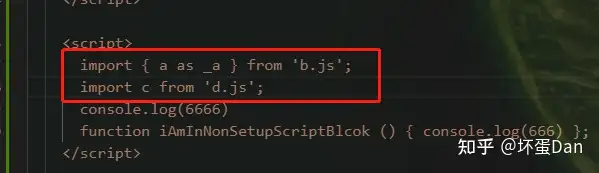
然后重新debug
ImportDeclaration[3]:import声明ImportSpecifier[4]: 非default,即是通过解构的方式导入的,而default则是:ImportDefaultSpecifier[5]node.importKind === 'type': 这里提一下这个,这个是专门import类型的,用法如下。
import type { Ref } from 'vue'; registerUserImport: 看名字就知道是用来注册你代码里的import的,来看下代码。
注册import
function registerUserImport(
  source: string,
  local: string,
  imported: string | false,
  isType: boolean,
  isFromSetup: boolean,
  needTemplateUsageCheck: boolean
) {
  if (source === 'vue' && imported) {
    userImportAlias[imported] = local
  }

  // template usage check is only needed in non-inline mode, so we can skip
  // the work if inlineTemplate is true.
  let isUsedInTemplate = needTemplateUsageCheck
  if (
    needTemplateUsageCheck &&
    isTS &&
    sfc.template &&
    !sfc.template.src &&
    !sfc.template.lang
  ) {
    isUsedInTemplate = isImportUsed(local, sfc)
  }

  userImports[local] = {
    isType,
    imported: imported || 'default',
    source,
    isFromSetup,
    isUsedInTemplate
  }
}source: 对应node.source.value, 导入对象所在的模块local: 对应specifier.local.name: 在当前文件中的namespace,比如{ a as _a },这个_a就是一个local name。imported: 如果import的是default,比如import a from 'b.js',则不会有imported这个字段isType: 这指的是导入是否仅限于type,比如import type { a } from 'b.d.ts'这样。isFromSetup:false,毕竟我们在分析一个单纯的script block。needTemplateUsageCheck: 这个是针对是否是inlineTemplate的,是的话不需要check。isImportUsed: 这个看名字就知道是干啥的,确认你的import的local name是否被template使用了。代码就不看了,里面是通过ast去处理排查的。
这段代码也挺简单,主要做了仨事
- 搜集从
vue中import的api,格式为[original name]:namespace。 - 判断是否需要检查
template以及这个import的对象是否被template使用了 。 - 注册到
userImports中。
让我们回到之前的代码,回到遍历ast节点那里。
elseif(node.type ==='ExportDefaultDeclaration')场景
ExportDefaultDeclaration[6]: 这个看名字就知道是export default声明。hasDefaultExportName: 有name字段hasDefaultExportRender: 有render字段
这块代码也很简单,就是判断这个non setup block是否有export default,如果有,判断是否有name和render字段,为啥要判断这俩呢?我们后面会说到。然后将字符串export default为const __default__ = 。
这里你是否有疑惑?前面不是也处理过了吗?为什么这里又有一个这样的,其实前面处理的是没有setup语法糖script block的场景。而这里是存在setup语法糖block的情况下又存在单个script block。
我们接着往下看
else if (node.type === 'ExportNamedDeclaration')场景
由于我们的测试单元没有这块逻辑,所以我们加点料
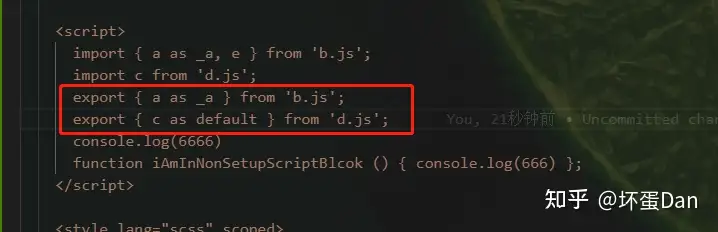
ExportNamedDeclaration[7]: 导出声明。
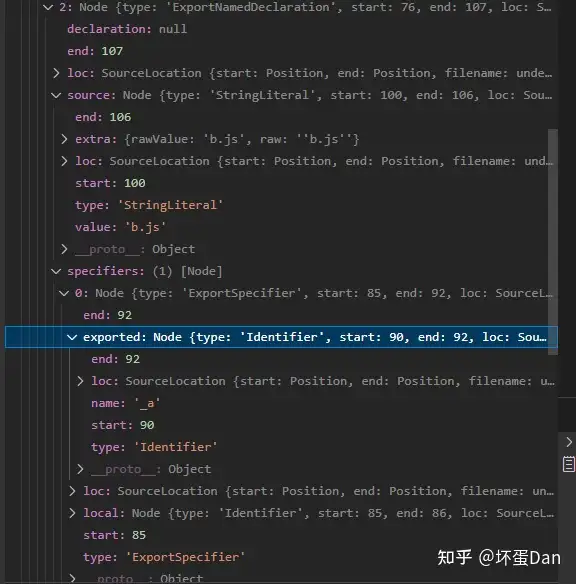
defaultSpecifier: 这个指的是导出默认,比如export { c as default } from 'd.js'但是这个需要babel的相关插件处理,不然会报错。walkDeclaration: 这里就不分析了,看下一个小标题即可。简单的说就是在给将被setup暴露出去的数据分门别类。
这段代码也不难理解,主要做了俩事
- 判断是否是
export了default,如果是,先移除这行代码,然后改为import { x as __default__ } from './x'这样,为什么要这么做呢?因为后面会统一export __default__,所以这里自然得改为import。 - 如果节点有声明(
declaration),调用walkDeclaration。
我们接着往下分析
其它场景
 else if (
        (node.type === 'VariableDeclaration' ||
          node.type === 'FunctionDeclaration' ||
          node.type === 'ClassDeclaration' ||
          node.type === 'TSEnumDeclaration') &&
        !node.declare
      ) {
        walkDeclaration(node, scriptBindings, userImportAlias)
}VariableDeclaration[8]: 变量声明。FunctionDeclaration[9]: 函数声明,而且是function xx () {}这种,箭头函数声明则是另一个。ClassDeclaration[10]: 类声明。TSEnumDeclaration:typescript的枚举类型声明,比如:
enum Direction {
  Up = 1,
  Down = 2,
  Left = 3,
  Right = 4,
} walkDeclaration: 这里也不分析,看下一个小标题即可。简单的说就是在给将被setup暴露出去的数据分门别类。
来总结下这段对ast节点遍历处理。
简单的说就是在从上到下整理代码,具体逻辑请往回看。
- 处理
import, 将他们注册到userImport这个集合中。 - 处理
export default,将export default改写为const __default__ =,等着后面统一export。 - 处理非
default的export,都被收集到bingdings这个集合中等着后面统一setup暴露出去。当然如果是export { x as default }这种就会被移除,取而代之的是import { x as __default__ } from,毕竟导出得统一导出,你这里直接导出default就乱套了。 - 非以上场景中遇到变量声明,函数声明,类声明,
TS枚举声明则调用walkDeclaration将变量分门别类收集到bindings这个集合中。
然后让我们回到处理这个non setup script block的代码中,由于里的太远,所以这里就再贴一次代码 。
    // apply reactivity transform
    if (enableReactivityTransform && shouldTransform(script.content)) {
      const { rootRefs, importedHelpers } = transformAST(
        scriptAst,
        s,
        scriptStartOffset!
      )
      refBindings = rootRefs
      for (const h of importedHelpers) {
        helperImports.add(h)
      }
    }

    // <script> after <script setup>
    // we need to move the block up so that `const __default__` is
    // declared before being used in the actual component definition
    if (scriptStartOffset! > startOffset) {
      // if content doesn't end with newline, add one
      if (!/\n$/.test(script.content.trim())) {
        s.appendLeft(scriptEndOffset!, `\n`)
      }
      s.move(scriptStartOffset!, scriptEndOffset!, 0)
}enableReactivityTransform: 这个day1中解释过了,简单的说就是一个目前还在实验中的语法糖,会在编译过程中替换为原来的用法。需要在options中配置reactivityTransform: true。shouldTransform:day1中也说过了,判断你这里面有没有语法糖用法,比如$ref。transformAST: 同上,这个方法来自@vue/reactivity-transform[11]这个包,另外这个方法里面是会改动源码的,比如$ref语法糖不需要xxx.value = xxx来实现响应式,直接xxx = xxx就行了,而这里面就是帮你把xxx = xxx转换成xxx.value = xxx。importedHelpers: 辅助函数,一般runtime才会需要辅助函数。 上篇文章里也说过了,实际上就是帮你导入对应的vue的api。比如你用了$ref,然后这里会帮你import { ref as _ref } from 'vue';。rootRefs: 语法糖赋值的对象数组,比如const a = $ref(0),这里的a就会被放到rootRefs中。
这两块代码很简单,就是处理reactivityTransform语法糖还有将non setup script block迁移至setup script block之前,这样non setup script中的__default__才能正常被setup script block调用。
总结一下这一个标题内容
简单的说就是在处理带有setup的script block之前,先处理掉没有setup属性的script block。
- 先是调用
babel将代码转换为ast,通过调用magic-string将代码转换成可操作的source方便后面移除或者替换代码。 - 遍历
ast
- 收集
import; - 处理
export,具体看上面分析; - 收集声明,包括上面的
export、变量、函数、类以及typescript的枚举(enum)声明;
-
判断是否使用
activityTransform语法糖,用了转换成原来的。 -
将
non setup script block迁移至setup script block之前,确保__default__能被setup的调用到。
walkDeclaration做了什么。#
单独拿出来说,因为里面的逻辑还是比较绕的,涉及到很多babel的东西。
function walkDeclaration(
  node: Declaration,
  bindings: Record<string, BindingTypes>,
  userImportAlias: Record<string, string>
) {
  if (node.type === 'VariableDeclaration') {
    const isConst = node.kind === 'const'
    // export const foo = ...
    for (const { id, init } of node.declarations) {
      const isDefineCall = !!(
        isConst &&
        isCallOf(
          init,
          c => c === DEFINE_PROPS || c === DEFINE_EMITS || c === WITH_DEFAULTS
        )
      )
      if (id.type === 'Identifier') {
        let bindingType
        const userReactiveBinding = userImportAlias['reactive'] || 'reactive'
        if (isCallOf(init, userReactiveBinding)) {
          // treat reactive() calls as let since it's meant to be mutable
          bindingType = isConst
            ? BindingTypes.SETUP_REACTIVE_CONST
            : BindingTypes.SETUP_LET
        } else if (
          // if a declaration is a const literal, we can mark it so that
          // the generated render fn code doesn't need to unref() it
          isDefineCall ||
          (isConst && canNeverBeRef(init!, userReactiveBinding))
        ) {
          bindingType = isCallOf(init, DEFINE_PROPS)
            ? BindingTypes.SETUP_REACTIVE_CONST
            : BindingTypes.SETUP_CONST
        } else if (isConst) {
          if (isCallOf(init, userImportAlias['ref'] || 'ref')) {
            bindingType = BindingTypes.SETUP_REF
          } else {
            bindingType = BindingTypes.SETUP_MAYBE_REF
          }
        } else {
          bindingType = BindingTypes.SETUP_LET
        }
        registerBinding(bindings, id, bindingType)
      } else {
        if (isCallOf(init, DEFINE_PROPS)) {
          // skip walking props destructure
          return
        }
        if (id.type === 'ObjectPattern') {
          walkObjectPattern(id, bindings, isConst, isDefineCall)
        } else if (id.type === 'ArrayPattern') {
          walkArrayPattern(id, bindings, isConst, isDefineCall)
        }
      }
    }
  } else if (
    node.type === 'TSEnumDeclaration' ||
    node.type === 'FunctionDeclaration' ||
    node.type === 'ClassDeclaration'
  ) {
    // export function foo() {} / export class Foo {}
    // export declarations must be named.
    bindings[node.id!.name] = BindingTypes.SETUP_CONST
  }
}
代码有些乱,简单的说一下。
TSEnumDeclaration、 FunctionDeclaration、 ClassDeclaration这几个都会被标记为setup-const。
而VariableDeclaration 是用于变量声明的,而变量声明是一个不稳定状态,可能被赋值一个常量又可能被赋值一个箭头函数,所以需要特殊处理。
由于我们的测试单元没有设置变量,所以我们加点料
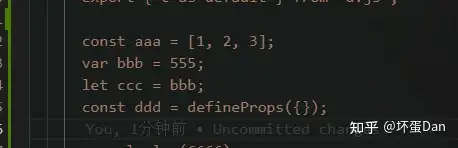
然后我们重新跑一下。
isConst: 变量声明是用的const关键字isCallOf: 代码就不看了,简单的说一下就是判断这个node的赋值是否是一个CallExpression[12]节点。比如:const a = defineProps({});isDefineCall: 用的const声明,然后等式右边用的defineProps[13]、defineEmits[14]又或者是withDefaults[15]Identifier[16]: 赋值的对象,比如const aaa = defineProps({}),这里的aaa就是indentifier,即变量的名字。userReactiveBinding: 表达式右边是否用了reactive[17]。canNeverBeRef: 顾名思义,就是不可能变为ref的节点类型,有以下几种- +
UnaryExpression[18]: 表达式语句中的一元表达式,比如delete xxx;就是一个一元表达式。 - +
BinaryExpression[19]: 表达式语句中的二元表达式,比如const a = b + c,这里的b + c就是一个二元表达式。 - +
ArrayExpression[20]: 这个不多说,大家都懂。 - +
ObjectExpression[21]: 这个也不多说。 - +
FunctionExpression[22]: 这个也不多说。 - +
ArrowFunctionExpression[23]: 这个依旧是不多说,箭头表达式。 - +
UpdateExpression[24]: 更新表达式,比如a++。 - +
ClassExpression[25]:类表达式,上面提到过了。 - +
taggedTemplateExpression[26]: 标记模板文字表达式,很拗口。。找到个大佬的描述[27]。比如
const foo = function(a){ console.log(a); }
foo`test`;- +
SequenceExpression[28]: 序列表达式, 比如: a = 1, b = 2, c = 3;它自身需要递归处理,因为存在多个赋值,并不清楚里面的赋值里有没有ref赋值。 - + 任何
type以Literal结尾的节点类型。 registerBinding: 顾名思义,就是将变量赋值的变量名和关键的几个api绑定到一起ObjectPattern[29]: 如果用了var let const关键字但是却没有变量名,那么这个我们能猜到的就是es6的解构。比如:const { a } = b;ArrayPattern[30]: 同上。walkObjectPattern: 这个方法就不多说了,就是处理解构赋值的默认值这个问题。walkArrayPattern: 同上。
ok,说了一大堆babel的东西,我们来总结下walkDeclaration这个方法。简单的说就是在分门别类。
梳理下逻辑(下面提到的ref、reactive、defineProps、defineEmits、withDefaults均是vue3的api,赋值指的是const a = ref(0)这样。)
- 判断你的类型,如果不是声明变量,那就判断是否是
enum、function、class声明,如果是就直接绑定到bindings中,至于这个bindings是干啥的,简单的说就是准备setup导出的家伙。 - 如果是变量声明,判断是否是在声明解构(对象、数组解构),是则需要进一步判断解构的变量,然后将变量绑定到
bindings中。 - 如果不是声明变量解构,那就是常规变量赋值表达式,有以下几个场景(场景从上到下
if条件判断)
- 用的是
reactive赋值给变量并且是赋值给一个const变量,绑定并标记为setup-reactive-const类型; - 用的是
reactive赋值给变量,但不是const变量,绑定并标记为setup-let类型; - 用的是
defineProps赋值给变量并且是const变量,绑定并标记为setup-reactive-const; - 用的是
defineEmits、withDefaults赋值给变量并且是const变量,绑定并标记为setup-const; - 用的是非
ref``api(上面提到的那几个)并且是赋值给const变量,绑定并标记为setup-const; - 非以上场景,变量是
const变量并且是用ref赋值给变量,绑定并标记为setup-ref; - 非以上场景,变量是
const变量绑定并标记为setup-maybe-ref; - 剩下的场景就都标记为
setup-let;
- 这里还有一个特殊场景:
props的解构,被skip掉了,就不多说了,毕竟reactivity被破坏掉了。
来看下数据
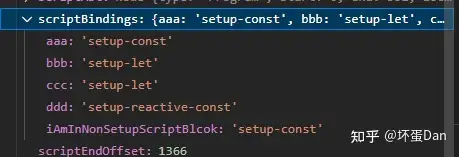
总结#
今天主要是在分析非setup语法糖的script block。也知道了是如何处理import、export以及收集各种变量等东西,然后给他们分门别类。最后将非setup script block的迁移到setup语法糖的script block之前。
参考#
- ^magic-string https://www.npmjs.com/package/magic-string
- ^@babel/parser https://babeljs.io/docs/en/babel-parser
- ^babel-importDeclaration https://babeljs.io/docs/en/babel-types#importdeclaration
- ^babel-importSpecifier https://babeljs.io/docs/en/babel-types#importspecifier
- ^babel-importDefaultSpecifier https://babeljs.io/docs/en/babel-types#importdefaultspecifier
- ^babel-ExportDefaultDeclaration https://babeljs.io/docs/en/babel-types#exportdefaultdeclaration
- ^babel-exportNamedDeclaration https://babeljs.io/docs/en/babel-types#exportnameddeclaration
- ^babel-variableDeclaration https://babeljs.io/docs/en/babel-types#variabledeclaration
- ^functionDeclaration https://babeljs.io/docs/en/babel-types#functiondeclaration
- ^babel-classDeclaration https://babeljs.io/docs/en/babel-types#classdeclaration
- ^@vue/reactivity-transform https://github.com/vuejs/core/tree/main/packages/reactivity-transform
- ^babel-callExpression https://babeljs.io/docs/en/babel-types#callexpression
- ^vue3-defineProps https://vuejs.org/api/sfc-script-setup.html#defineprops-defineemits
- ^vue3-defineEmit https://vuejs.org/api/sfc-script-setup.html#defineprops-defineemits
- ^vue3-withDefaults https://vuejs.org/api/sfc-script-setup.html#typescript-only-features
- ^babel-identifier https://babeljs.io/docs/en/babel-types#identifier
- ^vue3-reactive https://vuejs.org/api/reactivity-core.html#reactive
- ^babel-unaryExpression https://babeljs.io/docs/en/babel-types#unaryexpression
- ^babel-binaryExpression https://babeljs.io/docs/en/babel-types#binaryexpression
- ^babel-arrayExpression https://babeljs.io/docs/en/babel-types#arrayexpression
- ^babel-objectExpression https://babeljs.io/docs/en/babel-types#objectexpression
- ^babel-functionExpression https://babeljs.io/docs/en/babel-types#functionexpression
- ^babel-arrowFunctionExpression https://babeljs.io/docs/en/babel-types#arrowfunctionexpression
- ^babel-updateExpression https://babeljs.io/docs/en/babel-types#updateexpression
- ^babel-classExpression https://babeljs.io/docs/en/babel-types#classexpression
- ^babel-taggedTemplateExpression https://babeljs.io/docs/en/babel-types#taggedtemplateexpression
- ^taggedTemplateExpression http://www.javashuo.com/article/p-bmuslveb-h.html
- ^babel-sequenceExpression https://babeljs.io/docs/en/babel-types#sequenceexpression
- ^babel-objectPattern https://babeljs.io/docs/en/babel-types#objectpattern
- ^babel-arrayPattern https://babeljs.io/docs/en/babel-types#arraypattern
发布于 2022-11-24 09:18・IP 属地广东