
前言#
由于上篇文章中分析完了也只分析了parse.ts文件,这是因为执行调用都不是同一个文件,是不同地方不同时刻调用不同方法的,所以并不能做到一次调试就能全部文件都分析完。所以这篇文章是用来确定后续分析目标的。
正文#
让我们回到vue-loader中,如果你没看过之前的文章可以去看下
所以我们得先回到vue-loader中找到对应的调用 node_modules\vue-loader\dist\index.js
const select_1 = require("./select");
// if the query has a type field, this is a language block request
// e.g. foo.vue?type=template&id=xxxxx
// and we will return early
if (incomingQuery.type) {
  return (0, select_1.selectBlock)(descriptor, id, options, loaderContext, incomingQuery, !!options.appendExtension);
}当request存在type的时候,说明这是一个和block有关的请求
看来第一个进来的是script的请求,那我们就跟着select_1.selectBlock进入到对应的文件中。
node_modules\vue-loader\dist\select.js
const resolveScript_1 = require("./resolveScript");
function selectBlock(descriptor, scopeId, options, loaderContext, query, appendExtension) {
    // template
    if (query.type === `template`) {
        // if we are receiving a query with type it can only come from a *.vue file
        // that contains that block, so the block is guaranteed to exist.
        const template = descriptor.template;
        if (appendExtension) {
            loaderContext.resourcePath += '.' + (template.lang || 'html');
        }
        loaderContext.callback(null, template.content, template.map);
        return;
    }
    // script
    if (query.type === `script`) {
        const script = (0, resolveScript_1.resolveScript)(descriptor, scopeId, options, loaderContext);
        if (appendExtension) {
            loaderContext.resourcePath += '.' + (script.lang || 'js');
        }
        loaderContext.callback(null, script.content, script.map);
        return;
    }
    // styles
    if (query.type === `style` && query.index != null) {
        const style = descriptor.styles[Number(query.index)];
        if (appendExtension) {
            loaderContext.resourcePath += '.' + (style.lang || 'css');
        }
        loaderContext.callback(null, style.content, style.map);
        return;
    }
    // custom
    if (query.type === 'custom' && query.index != null) {
        const block = descriptor.customBlocks[Number(query.index)];
        loaderContext.callback(null, block.content, block.map);
    }
}
先看下进来的数据
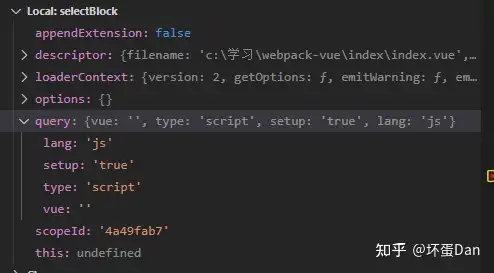
descriptor: 上篇文章我们分析过了,这里就不多说了loaderContext: 这里是webpack的执行上下文,之前的文章里也说过了。query: 请求的参数解析后的结果scopeId: 作用域id,之前文章里也有提到过,也不多说了。
简单的分析下代码
loaderContext.resourcePath: 资源的绝对路径 ,看下数据,至于为什么要给路径加后缀,目前我个人的猜测是为了其它loader也能识别解析。

loaderContext.callback[1]: loader需要你return处理之后的source\content,但是return仅能返回一个参数,那么可以调用loaderContext(this).callback传入多个参数,不过这仅限于同步的,异步的需要调用this.async而不是callback 。
其实看编译输出也是可以的。
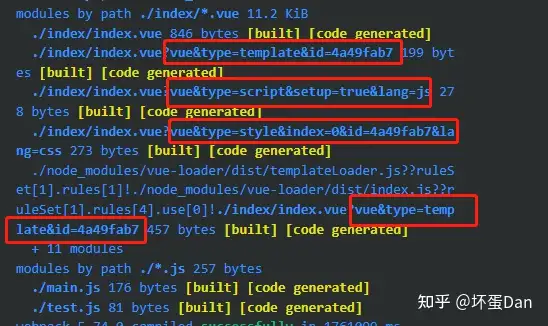
那么来确认下我们后续的分析,根据上面的情况可以切分为template、script、style、customBlock这四部分。
顺序则跟着调试给出的顺序
scripttemplatestylecustomBlock
参考#
- ^webpack-loader https://webpack.js.org/api/loaders/#examples
发布于 2022-11-18 12:46・IP 属地广东