
前言#
上篇我们拉了包,跑通了调试环境,所以现在我们直接来调试。
坏蛋Dan:vue/compiler-sfc源码分析学习1--如何调试
如果不清楚如何调试,可以先看下这篇文章。
另外文章里只是分析主要流程,不会分析每一处,毕竟是一个牛逼的框架~,里面的东西需要兼容到各种场景。
选择测试元--调试入口#
上篇文章里执行的文件是compileScript.spec.ts,看名字就知道是用来测试转换script的,所以我们要换成parse.spec.ts文件测试。
那么该找哪个测试元呢?我们仅是学习分析流程,所以有个壳即可。后面有需要再自己加。
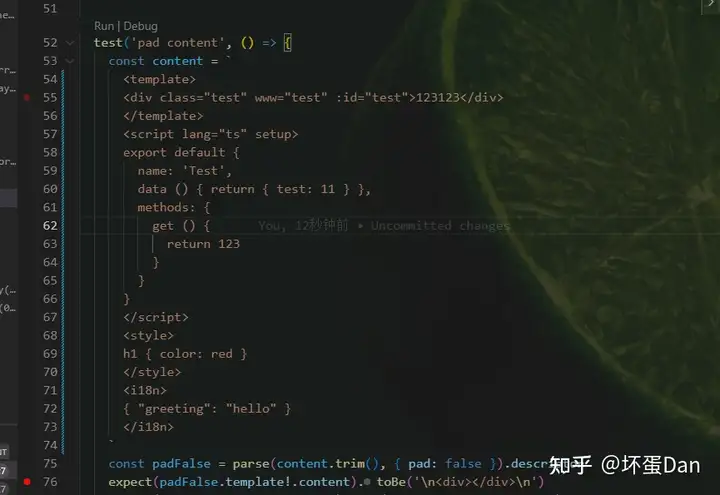
就选这个pad content了。该有的都有template, script, style, customBlock,然后加点自己的代码
调试#
打上断点防止它跑了,然后我们进入到index.ts中发现parse方法是来自parse.ts文件,所以让我们进入src/parse.ts文件中找到parse方法。
先在入口打上断点,看下数据是啥
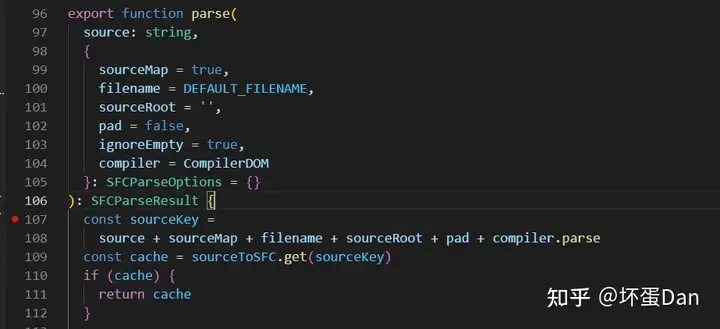
然后在parse.spec.ts中直接F5又或者之前推荐的插件jest runner直接debug。
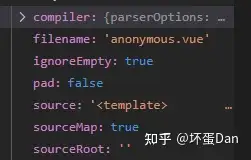
source:自然就是我们的源码,这里截图没法截全。filename: 如果是在vue项目中,这里就会是处理的文件名,但由于我们这里是单元测试,所以只有个默认名。pad: 咱暂时未知是干嘛用的,先mark下。sourceRoot:暂时未知是干嘛的,看名字可能和根文件App.vue有关,先mark一下。compiler:CompilerDOM,也就是@vue/compiler-dom这个包,这个包我们以后再分析。
我们接着往下看。
入口判断缓存和整理数据#
  const sourceKey =
    source + sourceMap + filename + sourceRoot + pad + compiler.parse
  const cache = sourceToSFC.get(sourceKey)
  if (cache) {
    return cache
  }

  const descriptor: SFCDescriptor = {
    filename,
    source,
    template: null,
    script: null,
    scriptSetup: null,
    styles: [],
    customBlocks: [],
    cssVars: [],
    slotted: false,
    shouldForceReload: prevImports => hmrShouldReload(prevImports, descriptor)
  }

const errors: (CompilerError | SyntaxError)[] = []sourceKey: 很好理解,就是获取缓存的key值(喜闻乐见的key值~,生怕会重复)。cache如果已经有缓存的了就直接返回,不用怕里面的内容有更新,如果有更新,key值也必然会更新。descriptor: 一个vue sfc文件对应一个,看结构就是要把template\script\style\customBlock进行拆分shouldForceReload: 这个一看就和热更新有关,我们先mark下来,后面再分析。
接着往下看。
将source转换成ast#
  const ast = compiler.parse(source, {
    // there are no components at SFC parsing level
    isNativeTag: () => true,
    // preserve all whitespaces
    isPreTag: () => true,
    getTextMode: ({ tag, props }, parent) => {
      // all top level elements except <template> are parsed as raw text
      // containers
      if (
        (!parent && tag !== 'template') ||
        // <template lang="xxx"> should also be treated as raw text
        (tag === 'template' &&
          props.some(
            p =>
              p.type === NodeTypes.ATTRIBUTE &&
              p.name === 'lang' &&
              p.value &&
              p.value.content &&
              p.value.content !== 'html'
          ))
      ) {
        return TextModes.RAWTEXT
      } else {
        return TextModes.DATA
      }
    },
    onError: e => {
      errors.push(e)
    }
})这一段目前我们还看不懂,毕竟我们并没有看过@vue/compiler-dom[1]这个包的代码,不知道这个包是干什么用的。
我们可以猜测,ast这个变量名一眼就能猜到这个包的作用,compiler.parse将我们的源代码source转换为ast(abstract syntax tree)抽象语法树[2]。
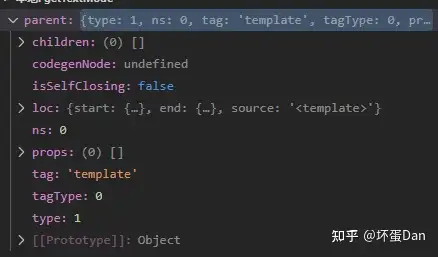
简单分析下getTextMode这个回调,首先看名字这回调的作用是获取text的类型,回调第一个参数是一个ast,第二个参数parent应该也是一个ast,指向当前node的parent node也就是父节点。
看下数据,果然是一个ast。
        (!parent && tag !== 'template') ||
        // <template lang="xxx"> should also be treated as raw text
        (tag === 'template' &&
          props.some(
            p =>
              p.type === NodeTypes.ATTRIBUTE &&
              p.name === 'lang' &&
              p.value &&
              p.value.content &&
              p.value.content !== 'html'
))是根node(这里根node指的是template\script等这四个) 并且不是template或者是template,template的属性(props)中存在lang并且这个lang属性存在且不是html的template都被标记为RAWTEXT这个类型,其余都是DATA类型。
目前我们还未知这两个类型指啥,不过我们可以根据这个判断条件猜测下。
如果template的lang不是html那就被标记为RAWTEXT,我猜测是特殊结构格式才会被标记为RAWTEXT,后面需要特殊处理。 具体我们后面再分析。
我们来看下数据,至于里面具体做了什么我们现在先不分析,知道是转换为ast即可。
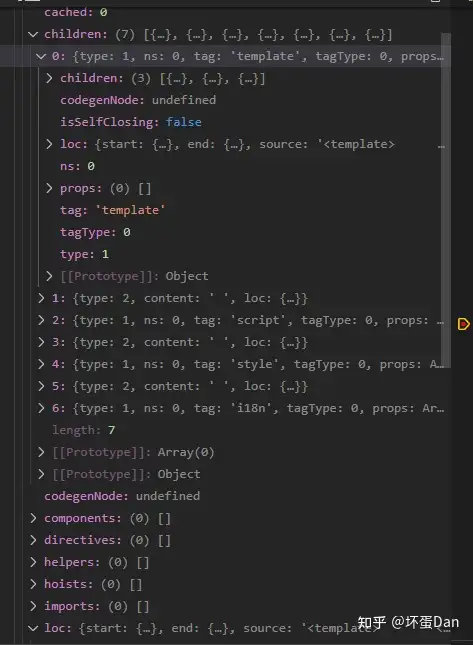
简单的分析下
loc: 如果学过babel或者看过我之前的文章,你应该知道这个是定位代码的,代码在文件的第几行的第几列开始,又在第几行第几列结束。type: 用来表示该节点(node) 的类型,这里我们暂时并不清楚,后面分析compiler-dom这个包的时候再说。codegenNode: 不清楚,mark下。components: 这个很明显就是和子组件相关的。directives: 这个很明显就是和自定义指令相关的。helpers: 暂时未知,mark下。hoists: 未知,老规矩。imports: 引入相关的。children: 该节点(node)的子node。结构都差不多,一个sfc文件大概可以分为前面提到过的四部分template、script、style、customBlock,由此我们可以猜测可能是基于堆栈或者递归的方式处理的source。
然后我们接着往下看。
将四类型节点template、script、style、customeBlock转换成block#
  ast.children.forEach(node => {
    if (node.type !== NodeTypes.ELEMENT) {
      return
    }
    // we only want to keep the nodes that are not empty (when the tag is not a template)
    if (
      ignoreEmpty &&
      node.tag !== 'template' &&
      isEmpty(node) &&
      !hasSrc(node)
    ) {
      return
    }
    switch (node.tag) {
      // ...省略,下面分析
    }
})遍历ast.children。这里仅仅只是遍历,并不做递归处理,所以可以猜测只是处理那四个重要节点。
如果不是element节点(node)或者是空节点(指children是空的~看着相像是命名有问题,但实际上没问题,因为如果children是空的那就说明这个标签闭合时里面没有一丁点东西,自然就是空标签,如果里面有一个space空格字符,那也会被标记为子节点,也不会为空。)且该节点不是template标签且节点自身不存在src这个属性prop,就不处理。
简单地说就是处理对之后“有用“的节点。
在分析tag === 'template'之前,我们来分析下方法createBlock的代码。
 function createBlock(
    node: ElementNode,
    source: string,
    pad: SFCParseOptions['pad']
  ): SFCBlock {
    const type = node.tag
    let { start, end } = node.loc
    let content = ''
    if (node.children.length) {
      start = node.children[0].loc.start
      end = node.children[node.children.length - 1].loc.end
      content = source.slice(start.offset, end.offset)
    } else {
      const offset = node.loc.source.indexOf(`</`)
      if (offset > -1) {
        start = {
          line: start.line,
          column: start.column + offset,
          offset: start.offset + offset
        }
      }
      end = { ...start }
    }
    const loc = {
      source: content,
      start,
      end
    }
    const attrs: Record<string, string | true> = {}
    const block: SFCBlock = {
      type,
      content,
      loc,
      attrs
    }
    if (pad) {
      block.content = padContent(source, block, pad) + block.content
    }
    node.props.forEach(p => {
      if (p.type === NodeTypes.ATTRIBUTE) {
        attrs[p.name] = p.value ? p.value.content || true : true
        if (p.name === 'lang') {
          block.lang = p.value && p.value.content
        } else if (p.name === 'src') {
          block.src = p.value && p.value.content
        } else if (type === 'style') {
          if (p.name === 'scoped') {
            ;(block as SFCStyleBlock).scoped = true
          } else if (p.name === 'module') {
            ;(block as SFCStyleBlock).module = attrs[p.name]
          }
        } else if (type === 'script' && p.name === 'setup') {
          ;(block as SFCScriptBlock).setup = attrs.setup
        }
      }
    })
    return block
}首先是源码(source)截取content,根据ast的loc定位。
然后是对节点的属性props的处理。这里仅处理静态属性NodeTypes.ATTRIBUTE(type === 6),也就是没有动态绑定的。
需要注意的一点是即使你的prop命名是非原有的,不加上v-bind或者:都会被算作type === 6。
比如我这里自己加了个www的属性,在这里还是算ATTRIBUTE。 (包括script的lang、setup以及style的lang、scoped)
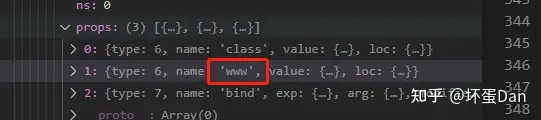
然后是针对这四个节点做处理,统一成block的格式,不同block有不同的格式,比如style多了scoped,script多了setup。
这段很简单没什么好说的,不过最后一段可以看下elseif(type ==='script'&& p.name ==='setup'){;(block as SFCScriptBlock).setup = attrs.setup}。这很明显是用来兼容setup语法糖的。
然后我们回过头来分析下tag === template的场景
case 'template':
        if (!descriptor.template) {
          const templateBlock = (descriptor.template = createBlock(
            node,
            source,
            false
          ) as SFCTemplateBlock)
          templateBlock.ast = node

          // warn against 2.x <template functional>
          if (templateBlock.attrs.functional) {
            const err = new SyntaxError(
              `<template functional> is no longer supported in Vue 3, since ` +
                `functional components no longer have significant performance ` +
                `difference from stateful ones. Just use a normal <template> ` +
                `instead.`
            ) as CompilerError
            err.loc = node.props.find(p => p.name === 'functional')!.loc
            errors.push(err)
          }
        } else {
          errors.push(createDuplicateBlockError(node))
        }
        break
if (!descriptor.template):最外层用if判断是否已经处理过template了,也就是说一个sfc只能有一个template并且有顺序要求。createBlock:前面已经分析过了,这里会变成一个block,来看下数据
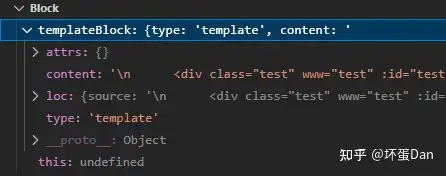
然后就是语法警告,不再支持vue2.x的functional template。
接着我们再来分析tag === 'script'的代码
      case 'script':
        const scriptBlock = createBlock(node, source, pad) as SFCScriptBlock
        const isSetup = !!scriptBlock.attrs.setup
        if (isSetup && !descriptor.scriptSetup) {
          descriptor.scriptSetup = scriptBlock
          break
        }
        if (!isSetup && !descriptor.script) {
          descriptor.script = scriptBlock
          break
        }
        errors.push(createDuplicateBlockError(node, isSetup))
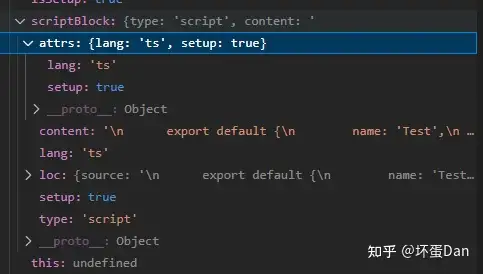
break 没什么好说的,就是转换成block之后做了2.x和3.x的兼容。看下数据
再看下tag === 'style'
      case 'style':
        const styleBlock = createBlock(node, source, pad) as SFCStyleBlock
        if (styleBlock.attrs.vars) {
          errors.push(
            new SyntaxError(
              `<style vars> has been replaced by a new proposal: ` +
                `https://github.com/vuejs/rfcs/pull/231`
            )
          )
        }
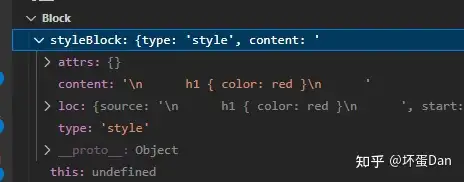
        descriptor.styles.push(styleBlock)
        break
也没什么好说的,看下数据。
最后来看下default也就是customBlock
      default:
        descriptor.customBlocks.push(createBlock(node, source, pad))
break 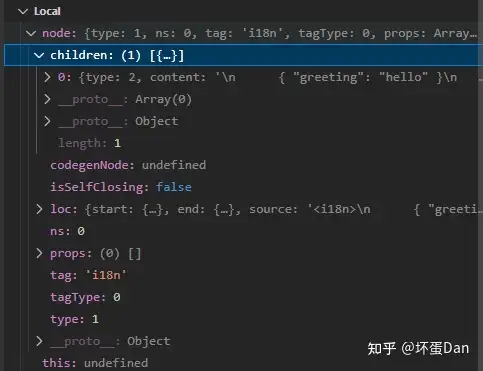
看完代码有些点我们需要注意,一是style、customBlock都会push到对应的数组当中,也就意味着是可以存在多个的。而script和template都是只能存在一个,不同的是script会后面的覆盖前面的,但是允许setup和非setup的两个script同时存在,template则是只拿第一个。
我们接着往下看
针对3.x setup语法糖的语法限制#
  if (descriptor.scriptSetup) {
    if (descriptor.scriptSetup.src) {
      errors.push(
        new SyntaxError(
          `<script setup> cannot use the "src" attribute because ` +
            `its syntax will be ambiguous outside of the component.`
        )
      )
      descriptor.scriptSetup = null
    }
    if (descriptor.script && descriptor.script.src) {
      errors.push(
        new SyntaxError(
          `<script> cannot use the "src" attribute when <script setup> is ` +
            `also present because they must be processed together.`
        )
      )
      descriptor.script = null
    }
}如果用了setup就不允许使用src链接外面的脚本。
支持sourceMap#
   if (sourceMap) {
    const genMap = (block: SFCBlock | null) => {
      if (block && !block.src) {
        block.map = generateSourceMap(
          filename,
          source,
          block.content,
          sourceRoot,
          !pad || block.type === 'template' ? block.loc.start.line - 1 : 0
        )
      }
    }
    genMap(descriptor.template)
    genMap(descriptor.script)
    descriptor.styles.forEach(genMap)
    descriptor.customBlocks.forEach(genMap)
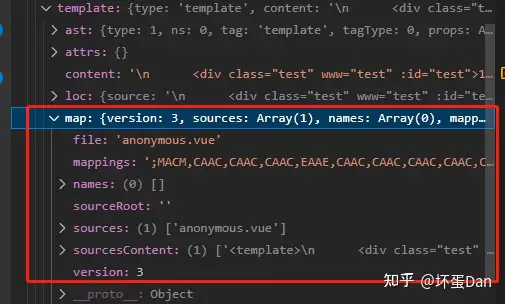
  }
这个就不多说了,直接看下数据即可。
处理css变量#
其实vue2.x就能用原生css变量,但是需要通过:style绑定进入,应该是觉得这样不够优雅,所以给调整成这个样子了。
这里我们并没有用到css变量,所以为了测试下,我们补充下用例。
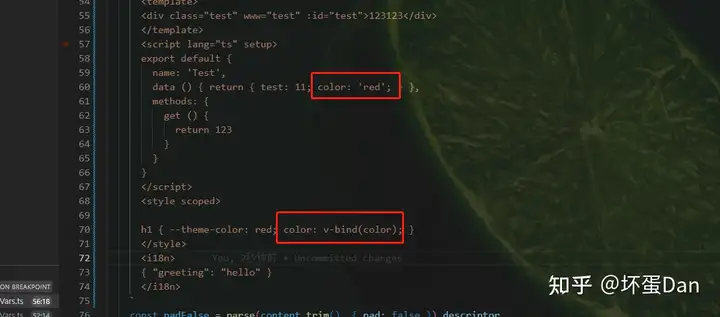
然后我们重新跑一下
export function parseCssVars(sfc: SFCDescriptor): string[] {
  const vars: string[] = []
  sfc.styles.forEach(style => {
    let match
    // ignore v-bind() in comments /* ... */
    const content = style.content.replace(/\/\*([\s\S]*?)\*\//g, '')
    while ((match = vBindRE.exec(content))) {
      const start = match.index + match[0].length
      const end = lexBinding(content, start)
      if (end !== null) {
        const variable = normalizeExpression(content.slice(start, end))
        if (!vars.includes(variable)) {
          vars.push(variable)
        }
      }
    }
  })
  return vars
} 正则去匹配v-bind,判断是否有这个变量了,没有就放到descriptor.vars里面。
然后继续往下看
  // check if the SFC uses :slotted
  const slottedRE = /(?:::v-|:)slotted\(/
  descriptor.slotted = descriptor.styles.some(
    s => s.scoped && slottedRE.test(s.content)
  )

  const result = {
    descriptor,
    errors
  }
  sourceToSFC.set(sourceKey, result)
return result接着是判断是否使用了:slotted[5]
然后拼装数据写入缓存
最后返回。
总结下vue/compiler-sfc/parse方法做了什么#
为啥首先分析这个文件呢?因为这个方法是vue-loader调用的,是解析的入口,也就是之前没有分析的现在补上了,具体可以看下这篇文章。
然后来总结下做了什么。
- 拼接数据
source + sourceMap + filename + sourceRoot + pad + compiler.parse作为key值,读缓存,如果存在则直接叉出去返回,不必担心存在缓存问题,连源码都做key值了。 - 调用
@vue/compiler-dom解析源码,转换成ast。 - 针对
template、script、style、customBlocks将ast转换成block,具体这么做的看上面。 - 对
3.x setup语法糖做用法限制,不允许使用script src=""。 - 生成对应
source map。 - 处理
css vars。 - 存入缓存。
return返回 。
上面有一个点我们绕过的,那就是@vue/compiler-dom做了什么,但是关于@vue/compiler-sfc的文章都不准备将它,只要知道它将source源码转换成ast即可,后面会有专门的文章讲它。
如果觉得对你有帮助的话麻烦点个赞,谢谢!
参考#
- ^@vue/compiler-dom https://github.com/vuejs/core/tree/main/packages/compiler-dom
- ^wiki-abstract syntax tree https://en.wikipedia.org/wiki/Abstract_syntax_tree
- ^vue3.x css vars https://github.com/vuejs/rfcs/blob/sfc-improvements/active-rfcs/0000-sfc-style-variables.md
- ^sfc-css-features https://vuejs.org/api/sfc-css-features.html
- ^sfc-css-features-slotted https://vuejs.org/api/sfc-css-features.html#scoped-css
编辑于 2022-11-21 16:15・IP 属地广东