
前言#
昨天我们配置了环境
坏蛋Dan:rust基础学习--基于Bevy实现扫雷小游戏day1
今天我们来开始完成这个扫雷小游戏
瓦片地图生成(Tile Map Generation)#
这里的瓦片指的是扫雷一块一块的格子,从某种意义上来说应该也算是“瓦片”。
不过在这之前,我们需要知道,扫雷实际上可以看作是一个二维的结构,所以每个瓦片实际上都可以用坐标(x, y)来表示,当然,坐标只是这个瓦片的一部分。
Coordinates#
所以我们来搞一个component来表示这个瓦片。
这些逻辑自然是放到board_plugin里比较好些,因为这样就能保证binary的包保持干净的逻辑(指运行逻辑)。
我们先在board_plugin的src下创建一个components的文件夹,然后在里面创建mod.rs和coordinates.rs两个文件。
这里为啥还要搞个mod.rs呢?还记得我们学packages、crate、module那一节么?rust编译器对资源的路径探索是有规则的,如果我们不想这么搞,也可以直接去掉,但是mod就得是coordinates自己了并且component文件夹也得去掉或者改成components.rs。
扯远了,回到我们的coordinates.rs文件中,我们创建一个Coordinates的struct,字段自然是x和y
use bevy::prelude::Reflect;
// coordinates.rs
use bevy::prelude::Component;
use std::fmt::{self, Display, Formatter};
use std::ops::{Add, Sub};
#[cfg(feature = "debug")]
use bevy_inspector_egui::prelude::*;

#[cfg_attr(feature = "debug", derive(Reflect, InspectorOptions))]
#[cfg_attr(feature = "debug", reflect(InspectorOptions))]
#[derive(Debug, Default, Copy, Clone, Ord, PartialOrd, Eq, PartialEq, Hash, Component)]
pub struct Coordinates {
    pub x: u16,
    pub y: u16,
}

// We want to be able to make coordinates sums..
impl Add for Coordinates {
    type Output = Self;

    fn add(self, rhs: Self) -> Self::Output {
        Self {
            x: self.x + rhs.x,
            y: self.y + rhs.y,
        }
    }
}

// ..and subtractions
impl Sub for Coordinates {
    type Output = Self;

    fn sub(self, rhs: Self) -> Self::Output {
        Self {
            x: self.x.saturating_sub(rhs.x),
            y: self.y.saturating_sub(rhs.y),
        }
    }
}

impl Display for Coordinates {
    fn fmt(&self, f: &mut Formatter<'_>) -> fmt::Result {
        write!(f, "({}, {})", self.x, self.y)
    }
}u16类型就够了,坐标轴没有负方向的(左下角为中心),并且最大得有个限制,不然到时递归直接调用栈溢出了。
至于它头上这一排,除了Component之外都是认识的,这里就不多说了,有需要可以看我之前的文章
而Component则是bevy中用来表示这个struct是一个组件。
然后我们还给这个struct实现了几个trait,这几个trait我们都认识,实现Add和Sub这俩trait是用来支持到时候会使用到的坐标轴位置计算的。
这里相减用的core::num::saturating_sub,是为了防止相减变成负数,超出算0。
而实现Display这个trait是为了重写fmt的逻辑,也就是调整输出的逻辑,实际上如果我们不想重写,直接使用derive里的Debug属性就可以了。
这里是在将coordinate实例自己序列化。
来看下write![2]这个宏的代码
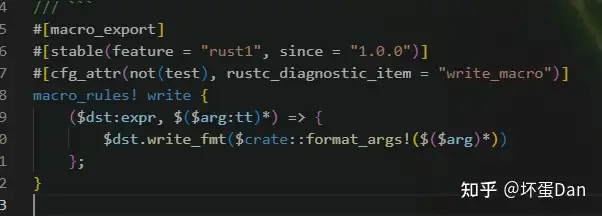
实际上就是给这个writer表达式调用format_args!这个宏拼接字符串和参数然后赋值给writer。

(疑问:这里算是支持重载么?)
需要注意的一点是write!返回的类型是fmt::Result类型的,需要对错误进行处理。
另外这里给struct实现Debug这个trait还有一个好处,那就是支持我们的inspector去侦测它。
然后我们再来定义这个瓦片
tile resource#
我们的这个瓦片分两部分,一个是它的坐标,另一个则是这个瓦片的状态:是炸弹,炸弹的邻居以及为空(也就是非炸弹并且没有和炸弹相邻,即没有被点开或者周围没炸弹的意思)。
你可能会想既然我们定义了一个coordinate的component来表示这个瓦片的一部分,那么这个状态我们也可以用组件来表示吧?
可以,但是这里还有一种类型:资源(resource[3])。
我们先来看下文档中对于资源的描述

可以作为一个单例插入到World[4]里。你可以在system中使用Res或者ResMut访问资源的数据
每个类型的资源从头到尾都只能有一个能被存储到World里。
这个World是个啥?前面有几处地方都提到过了。
我们来看下文档中对于World的描述
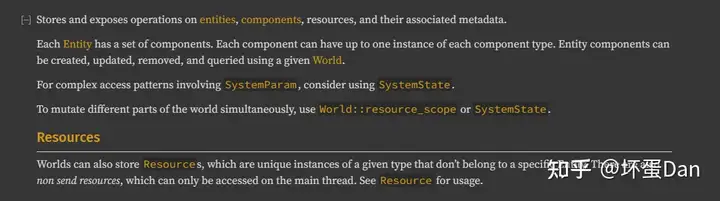
存储和暴露实体、组件、资源和其它关联元数据的操作入口。
实体包含一系列组件。组件自身最多可以拥有一个各组件的实例。通过World,可以增删改查这个实体里的组件。World同样可以存储资源(一个不属于某个特定实体的单例)。
那么为什么选择资源呢?因为我们需要灵活的表示这个瓦片的状态。
如果用组件来表示这个瓦片的状态,那么为了确定这个瓦片的状态,就得有三个组件:是炸弹、炸弹邻居以及空格即还没被点开或者周围没有炸弹。组件自身不能是动态的,不能在某一个时刻变化成另一个状态。
但是也不是不能这么做,上面描述World中就有说到我们可以通过World去增删改查这个实体里的组件,那么删掉这个状态组件,加入另一个状态组件就能改变实体的状态了。
这样有些繁琐,还不如直接用资源,资源是可以动态的,这样瓦片状态也能是动态的了。
另外不使用component的原因是Query(用于组件)只能过滤存在/不存在的,并不能满足我们的状态判断。
ok,扯了这么多,我们来实现这个资源吧。
先在board_plugin的src下面创建一个resources的文件夹, 同样加个mod.rs,也是用module来区分。
然后再创建一个tile.rs文件。
 // tile.rs
#[cfg(feature = "debug")]
use colored::Colorize;

/// Enum describing a Minesweeper tile
#[derive(Debug, Copy, Clone, Eq, PartialEq)]
pub enum Tile {
    /// Is a bomb
    Bomb,
    /// Is a bomb neighbor
    BombNeighbor(u8),
    /// Empty tile
    Empty,
}

impl Tile {
    /// Is the tile a bomb?
    pub const fn is_bomb(&self) -> bool {
        matches!(self, Self::Bomb)
    }

    #[cfg(feature = "debug")]
    pub fn console_output(&self) -> String {
        format!(
            "{}",
            match self {
                Tile::Bomb => "*".bright_red(),
                Tile::BombNeighbor(v) => match v {
                    1 => "1".cyan(),
                    2 => "2".green(),
                    3 => "3".yellow(),
                    _ => v.to_string().red(),
                },
                Tile::Empty => " ".normal(),
            }
        )
    }
}
这里用枚举是非常适合的,这个瓦片就只有三种状态。
另外两个实现的方式咱就不说了,一眼就能知道是什么意思。
那么现在我们的坐标和状态都有了,这个瓦片实体也就具象了。
接下来自然就是要去生成瓦片图了。
tile map#
依旧是在board_plugin/src/resources文件夹下创建一个tile_map.rs文件。
// tile_map.rs
use crate::resources::tile::Tile;
use std::ops::{Deref, DerefMut};

/// Base tile map
#[derive(Debug, Clone)]
pub struct TileMap {
    bomb_count: u16,
    height: u16,
    width: u16,
    map: Vec<Vec<Tile>>,
}

impl TileMap {
    /// Generates an empty map
    pub fn empty(width: u16, height: u16) -> Self {
        let map = (0..height)
            .into_iter()
            .map(|_| (0..width).into_iter().map(|_| Tile::Empty).collect())
            .collect();
        Self {
            bomb_count: 0,
            height,
            width,
            map,
        }
    }

    #[cfg(feature = "debug")]
    pub fn console_output(&self) -> String {
        let mut buffer = format!(
            "Map ({}, {}) with {} bombs:\n",
            self.width, self.height, self.bomb_count
        );
        let line: String = (0..=(self.width + 1)).into_iter().map(|_| '-').collect();
        buffer = format!("{}{}\n", buffer, line);
        for line in self.iter().rev() {
            buffer = format!("{}|", buffer);
            for tile in line.iter() {
                buffer = format!("{}{}", buffer, tile.console_output());
            }
            buffer = format!("{}|\n", buffer);
        }
        format!("{}{}", buffer, line)
    }

    // Getter for `width`
    pub fn width(&self) -> u16 {
        self.width
    }

    // Getter for `height`
    pub fn height(&self) -> u16 {
        self.height
    }

    // Getter for `bomb_count`
    pub fn bomb_count(&self) -> u16 {
        self.bomb_count
    }
}

impl Deref for TileMap {
    type Target = Vec<Vec<Tile>>;

    fn deref(&self) -> &Self::Target {
        &self.map
    }
}

impl DerefMut for TileMap {
    fn deref_mut(&mut self) -> &mut Self::Target {
        &mut self.map
    }
}

/// Delta coordinates for all 8 square neighbors
const SQUARE_COORDINATES: [(i8, i8); 8] = [
    // Bottom left
    (-1, -1),
    // Bottom
    (0, -1),
    // Bottom right
    (1, -1),
    // Left
    (-1, 0),
    // Right
    (1, 0),
    // Top Left
    (-1, 1),
    // Top
    (0, 1),
    // Top right
    (1, 1),
];
代码稍微有些长,不过也很好理解。
我们先看到TileMap这个struct ,它有四个字段
bomb_count: 表示生成的炸弹的个数。height: 高度width: 宽度map: 也就是这个struct的核心,它的类型是Vec>。我前面说到过了,这个tile相当于坐标轴上的一个点,可以用x,y表示,那么自然就是个二维结构。所以这里第一层Vec表示行/列,第二层Vec表示列/行。
然后是它的几个方法,get的就不说了,这里说下empty和console_output。
empty:很简单就是在创建模板,所以Tile初始状态自然都是Empty。console_output:看名字就知道是用来打印输出的。那么打印的是啥呢?是当前整个图的状态,比如有多少炸弹,图上哪个tile是什么状态。
然后再来说下实现的俩trait。
Deref和DerefMut这俩trait咱们之前智能指针那一节有说到过,具体是干啥的就不多说了。
这里是针对map也就是二维图的解引用,后面我们会访问它以及改动它里面的Tile。
然后我们还定义了一个SQUARE_COORDINATES的数组,数组的元素是元组,也就是坐标。
这八个元素分别表示这个tile的邻居tile坐标。
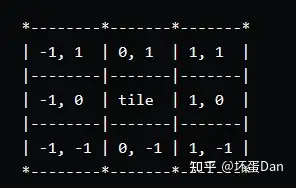
但是这个还只是基础数据,是不能直接使用的,我们得用来和当前tile做坐标计算。
这个时候你应该已经想起了我们给Coordinates实现的Add这个trait,是的,这里就是准备用这个add方法,不过在这之前,我们还有一个问题得先解决,那就是u16和i8类型不一致的问题
impl Add<(i8, i8)> for Coordinates {
    type Output = Self;

    fn add(self, (x, y): (i8, i8)) -> Self::Output {
        Self {
            x: ((self.x as i16) + x as i16) as u16,
            y: ((self.y as i16) + y as i16) as u16,
        }
    }
}这里用as通知编译器这里就是u16的类型,出了事我自己负责。实际上也不会出事。
当然你也可以统一类型,没必要这样。
那么现在我们可以u16 + i8了。
我们来实现获取邻居瓦片的坐标。
use crate::components::Coordinates;

 pub fn safe_square_at(&self, coordinates: Coordinates) -> impl Iterator<Item = Coordinates> {
        SQUARE_COORDINATES
            .iter()
            .copied()
            .map(move |tuple| coordinates + tuple)
    }
那么这里还有个问题,为什么要获取这个瓦片周围的点?
相信大家都玩过扫雷,当前瓦片周围有几个炸弹是会反映到这个瓦片上的,所以这里自然就需要获取周围的瓦片信息。
那么现在我们可以实现确认瓦片状态的代码了
如果不是炸弹,那么就判断周围有几个炸弹
pub fn is_bomb_at(&self, coordinates: Coordinates) -> bool {
    if coordinates.x >= self.width || coordinates.y >= self.height {
        return false;
    };
    self.map[coordinates.y as usize][coordinates.x as usize].is_bomb()
}

pub fn bomb_count_at(&self, coordinates: Coordinates) -> u8 {
    if self.is_bomb_at(coordinates) {
        return 0;
    }
    let res = self
         .safe_square_at(coordinates)
         .filter(|coord| self.is_bomb_at(*coord))
         .count();
    res as u8
}
注意这里我们还做了边界保护,有些靠边的瓦片周围是有部分不存在的,所以需要做限制。
ok ,接下来我们可以来创建随机炸弹了
set bomb#
炸弹的位置自然得是随机的,不然每次一样就没意思了。
还记得我们之前学习的时候在猜数游戏中写的随机数获取吗?当时是基于rand这个包来实现的,这里咱们自然也可以用。
use rand::{thread_rng, Rng};

/// Places bombs and bomb neighbor tiles
pub fn set_bombs(&mut self, bomb_count: u16) {
    self.bomb_count = bomb_count;
    let mut remaining_bombs = bomb_count;
    let mut rng = thread_rng();
    // Place bombs
    while remaining_bombs > 0 {
        let (x, y) = (
            rng.gen_range(0..self.width) as usize,
            rng.gen_range(0..self.height) as usize,
        );
        if let Tile::Empty = self[y][x] {
            self[y][x] = Tile::Bomb;
            remaining_bombs -= 1;
        }
    }
    // Place bomb neighbors
    for y in 0..self.height {
        for x in 0..self.width {
            let coords = Coordinates { x, y };
            if self.is_bomb_at(coords) {
                continue;
            }
            let num = self.bomb_count_at(coords);
            if num == 0 {
                continue;
            }
            let tile = &mut self[y as usize][x as usize];
            *tile = Tile::BombNeighbor(num);
        }
    }
}我们基于rand随机生成bomb。
然后我们这里又用了双重循环去针对炸弹周围的瓦片去改变它的状态。
那么差不多都准备好了,我们来把module都暴露出去。
回到components/mod.rs中,把Coordinates暴露出去。
// board_plugin/components/mod.rs

mod coordinates;
pub use coordinates::Coordinates;然后是resources/mod.rs
// board_plugin/resources/mod.rs

pub(crate) mod tile;
pub(crate) mod tile_map;
现在我们可以用这些方法了。
plugin#
现在我们可以组装了,我们可以写到mine_sweeper/src/main.rs中,但是还记得之前说过的么?那就是基于插件来开发,我们的业务逻辑都放到plugin里面再注册到app里,这样就可以保持简洁了。
进入到board_plugin/src/lib.rs中
 // lib.rs
pub mod components;
pub mod resources;

use bevy::log;
use bevy::prelude::*;
use resources::tile_map::TileMap;

pub struct BoardPlugin;

impl Plugin for BoardPlugin {
    fn build(&self, app: &mut App) {
        app.add_startup_system(Self::create_board);
        log::info!("Loaded Board Plugin");
    }
}

impl BoardPlugin {
    /// System to generate the complete board
    pub fn create_board() {
        let mut tile_map = TileMap::empty(20, 20);
        tile_map.set_bombs(40);
        #[cfg(feature = "debug")]
        log::info!("{}", tile_map.console_output());
    }
}这里没啥好说的,就是在app开始run之前,初始化(业务)环境,20 * 20个瓦片,然后往里面塞40个炸弹。
注意这个时候所有的瓦片的状态都已经确定好了,只是没有展示出来。
然后我们再回到mine_sweeper/src/main.rs中将插件加载进去。
// main.rs
use board_plugin::BoardPlugin;

// ..
.add_plugin(BoardPlugin) 现在我们可以使用cargo run --features debug来查看这个二维图了。
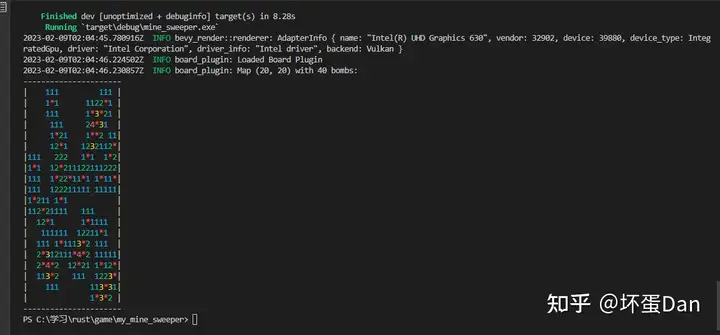
这里还有个问题,就是bevy_inspector_egui的监听并没有正常监听到我们的component,为什么呢?因为这里并没有给它渲染到窗口里。
代码整理#
coordinates.rs
// coordinates.rs
use bevy::prelude::Reflect;
use bevy::prelude::Component;
use std::fmt::{self, Display, Formatter};
use std::ops::{Add, Sub};
#[cfg(feature = "debug")]
use bevy_inspector_egui::prelude::*;

#[cfg_attr(feature = "debug", derive(Reflect, InspectorOptions))]
#[cfg_attr(feature = "debug", reflect(InspectorOptions))]
#[derive(Debug, Default, Copy, Clone, Ord, PartialOrd, Eq, PartialEq, Hash, Component)]
pub struct Coordinates {
    pub x: u16,
    pub y: u16,
}

// We want to be able to make coordinates sums..
impl Add for Coordinates {
    type Output = Self;

    fn add(self, rhs: Self) -> Self::Output {
        Self {
            x: self.x + rhs.x,
            y: self.y + rhs.y,
        }
    }
}

impl Add<(i8, i8)> for Coordinates {
    type Output = Self;

    fn add(self, (x, y): (i8, i8)) -> Self::Output {
        Self {
            x: ((self.x as i16) + x as i16) as u16,
            y: ((self.y as i16) + y as i16) as u16,
        }
    }
}

// ..and subtractions
impl Sub for Coordinates {
    type Output = Self;

    fn sub(self, rhs: Self) -> Self::Output {
        Self {
            x: self.x.saturating_sub(rhs.x),
            y: self.y.saturating_sub(rhs.y),
        }
    }
}

impl Display for Coordinates {
    fn fmt(&self, f: &mut Formatter<'_>) -> fmt::Result {
        write!(f, "({}, {})", self.x, self.y)
    }
}
tile.rs
 // tile.rs
 #[cfg(feature = "debug")]
 use colored::Colorize;

 /// Enum describing a Minesweeper tile
 #[derive(Debug, Copy, Clone, Eq, PartialEq)]
 pub enum Tile {
     /// Is a bomb
     Bomb,
     /// Is a bomb neighbor
     BombNeighbor(u8),
     /// Empty tile
     Empty,
 }

 impl Tile {
     /// Is the tile a bomb?
     pub const fn is_bomb(&self) -> bool {
         matches!(self, Self::Bomb)
     }

     #[cfg(feature = "debug")]
     pub fn console_output(&self) -> String {
         format!(
             "{}",
             match self {
                 Tile::Bomb => "*".bright_red(),
                 Tile::BombNeighbor(v) => match v {
                     1 => "1".cyan(),
                     2 => "2".green(),
                     3 => "3".yellow(),
                     _ => v.to_string().red(),
                 },
                 Tile::Empty => " ".normal(),
             }
         )
     }
 }
tile_map.rs
// tile_map.rs
use crate::resources::tile::Tile;
use std::ops::{Deref, DerefMut};
use crate::components::Coordinates;
use rand::{thread_rng, Rng};

/// Delta coordinates for all 8 square neighbors
const SQUARE_COORDINATES: [(i8, i8); 8] = [
    // Bottom left
    (-1, -1),
    // Bottom
    (0, -1),
    // Bottom right
    (1, -1),
    // Left
    (-1, 0),
    // Right
    (1, 0),
    // Top Left
    (-1, 1),
    // Top
    (0, 1),
    // Top right
    (1, 1),
];

/// Base tile map
#[derive(Debug, Clone)]
pub struct TileMap {
    bomb_count: u16,
    height: u16,
    width: u16,
    map: Vec<Vec<Tile>>,
}

impl TileMap {
    /// Generates an empty map
    pub fn empty(width: u16, height: u16) -> Self {
        let map = (0..height)
            .into_iter()
            .map(|_| (0..width).into_iter().map(|_| Tile::Empty).collect())
            .collect();
        Self {
            bomb_count: 0,
            height,
            width,
            map,
        }
    }

    #[cfg(feature = "debug")]
    pub fn console_output(&self) -> String {
        let mut buffer = format!(
            "Map ({}, {}) with {} bombs:\n",
            self.width, self.height, self.bomb_count
        );
        let line: String = (0..=(self.width + 1)).into_iter().map(|_| '-').collect();
        buffer = format!("{}{}\n", buffer, line);
        for line in self.iter().rev() {
            buffer = format!("{}|", buffer);
            for tile in line.iter() {
                buffer = format!("{}{}", buffer, tile.console_output());
            }
            buffer = format!("{}|\n", buffer);
        }
        format!("{}{}", buffer, line)
    }

    // Getter for `width`
    pub fn width(&self) -> u16 {
        self.width
    }

    // Getter for `height`
    pub fn height(&self) -> u16 {
        self.height
    }

    // Getter for `bomb_count`
    pub fn bomb_count(&self) -> u16 {
        self.bomb_count
    }

    pub fn safe_square_at(&self, coordinates: Coordinates) -> impl Iterator<Item = Coordinates> {
        SQUARE_COORDINATES
            .iter()
            .copied()
            .map(move |tuple| coordinates + tuple)
    }

    pub fn is_bomb_at(&self, coordinates: Coordinates) -> bool {
        if coordinates.x >= self.width || coordinates.y >= self.height {
            return false;
        };
        self.map[coordinates.y as usize][coordinates.x as usize].is_bomb()
    }

    pub fn bomb_count_at(&self, coordinates: Coordinates) -> u8 {
        if self.is_bomb_at(coordinates) {
            return 0;
        }
        let res = self
             .safe_square_at(coordinates)
             .filter(|coord| self.is_bomb_at(*coord))
             .count();
        res as u8
    }

    /// Places bombs and bomb neighbor tiles
    pub fn set_bombs(&mut self, bomb_count: u16) {
        self.bomb_count = bomb_count;
        let mut remaining_bombs = bomb_count;
        let mut rng = thread_rng();
        // Place bombs
        while remaining_bombs > 0 {
            let (x, y) = (
                rng.gen_range(0..self.width) as usize,
                rng.gen_range(0..self.height) as usize,
            );
            if let Tile::Empty = self[y][x] {
                self[y][x] = Tile::Bomb;
                remaining_bombs -= 1;
            }
        }
        // Place bomb neighbors
        for y in 0..self.height {
            for x in 0..self.width {
                let coords = Coordinates { x, y };
                if self.is_bomb_at(coords) {
                    continue;
                }
                let num = self.bomb_count_at(coords);
                if num == 0 {
                    continue;
                }
                let tile = &mut self[y as usize][x as usize];
                *tile = Tile::BombNeighbor(num);
            }
        }
    }
}

impl Deref for TileMap {
    type Target = Vec<Vec<Tile>>;

    fn deref(&self) -> &Self::Target {
        &self.map
    }
}

impl DerefMut for TileMap {
    fn deref_mut(&mut self) -> &mut Self::Target {
        &mut self.map
    }
}


components/mod.rs
mod coordinates;

pub use coordinates::Coordinates;
resources/mod.rs
pub(crate) mod tile;
pub(crate) mod tile_map;
board_plugin/src/lib.rs
 // lib.rs
pub mod components;
pub mod resources;

use bevy::log;
use bevy::prelude::*;
use resources::tile_map::TileMap;

pub struct BoardPlugin;

impl Plugin for BoardPlugin {
    fn build(&self, app: &mut App) {
        app.add_startup_system(Self::create_board);
        log::info!("Loaded Board Plugin");
    }
}

impl BoardPlugin {
    /// System to generate the complete board
    pub fn create_board() {
        let mut tile_map = TileMap::empty(20, 20);
        tile_map.set_bombs(40);
        #[cfg(feature = "debug")]
        log::info!("{}", tile_map.console_output());
    }
}
mine_sweeper/src/main.rs
use bevy::prelude::*;
use bevy::window::{ WindowDescriptor, WindowPlugin };
use board_plugin::BoardPlugin;

#[cfg(feature = "debug")]
use bevy_inspector_egui::quick::WorldInspectorPlugin;

fn main() {
    let mut app = App::new();
    // Window setup
    app
    // Bevy default plugins
    .add_plugins(DefaultPlugins.set(WindowPlugin {
        window: WindowDescriptor {
            title: "Mine Sweeper!".to_string(),
            width: 700.,
            height: 800.,
            ..Default::default()
        },
        ..default()
    }));
    app.add_plugin(BoardPlugin);

    #[cfg(feature = "debug")]
    // Debug hierarchy inspector
    app.add_plugin(WorldInspectorPlugin);

    // Startup system (cameras)
    app.add_startup_system(camera_setup);
    // Run the app
    app.run();
}

fn camera_setup(mut commands: Commands) {
    // 2D orthographic camera
    commands.spawn(Camera2dBundle::default());
} 总结#
这里文档中对于Coordinates这个component的监听是用的bevy_inspector_egui::Inspectable,但是当我运行的时候会直接报错,说这里没这玩意儿。我到官方文档里找,好家伙,关键字都搜不出来。
我的改动是跟着bevy_inspector_egui官方Home来的,可能不对。
我在github上问了下,如果有回复我会回来更新。
补充:还问个蛇,直接跟着官网给的例子改下就好了。
补充#
代码改动#
经过俩小时的摸索,这个Coordinates的侦测相关的代码知道如何处理了。
回到components/coordinates.rs文件中
#[cfg(feature = "debug")]
use bevy_inspector_egui::prelude::*;
#[cfg(feature = "debug")]
use bevy::prelude::Reflect;

#[cfg_attr(feature = "debug", derive(Reflect, InspectorOptions))]
#[cfg_attr(feature = "debug", reflect(InspectorOptions))]
#[cfg_attr(feature = "debug", inspector(validate = |ability| ability.current_charges <= ability.max_charges))]
#[derive(Debug, Default, Copy, Clone, Ord, PartialOrd, Eq, PartialEq, Hash, Component)]
pub struct Coordinates {
    #[cfg_attr(feature = "debug", inspector(min = 0, max = 50))]
    pub x: u16,
    #[cfg_attr(feature = "debug", inspector(min = 0, max = 50))]
    pub y: u16,
}
这样依旧是无法侦测到的,还得注册类型
回到main.rs中
// ...
    #[cfg(feature = "debug")]
    // Debug hierarchy inspector
    app.add_plugin(WorldInspectorPlugin).register_type::<Coordinates>();
// ... 把Coordinates这个类型注册到app里。
参考#
- ^Tile Map Generation https://dev.to/qongzi/bevy-minesweeper-part-2-1hi5
- ^write! https://doc.rust-lang.org/stable/core/macro.write.html
- ^resource https://docs.rs/bevy/0.9.1/bevy/ecs/system/trait.Resource.html
- ^World https://docs.rs/bevy/0.9.1/bevy/ecs/world/struct.World.html
编辑于 2023-02-09 16:49・IP 属地广东