
前言#
前面我们简单的了解下Bevy的结构等
那么今天我们就来使用Bevy实现一个小游戏
这里基于文章:Bevy Minesweeper: Introduction - DEV Community (注:由于引擎太年轻,所以处于高速迭代的过程中,有些东西被废弃了,需要自行选择版本)。
另外之所以选择扫雷,是因为我自己以前写过扫雷小游戏,感兴趣的可以看下。
1714080902120/mine-sweeper: designed with Vue (github.com)
不过当时是还在学vue的时候写的,里面有很多乱七八糟的用法,我看了都想打自己一顿。。
步骤#
这个小游戏准备分四个部分
- 实现扫雷小游戏
- 加入开发工具比如检测图形界面(
inspector gui)、日志记录等 - 基于
bevy的状态系统(state system)和资源实现一个通用插件 - 打包成
webAssembly
配置#
我们先来创建开发环境
mkdir my_mine_sweeper
cd my_mine_sweeper
echo > Cargo.toml
cargo new my_sweeper
cargo new board_plugin --lib这里为啥要分俩crate呢?之前我们入门bevy文章里提到的:bevy中很多东西都是基于plugin来实现的,甚至是我们的game也是plugin。所以这里我们将主要内容放到这个board_plugin中是符合规范的。
然后我们来分别给这俩crate添加依赖
首先是mine_sweeper的Cargo.toml
[package]
name = "mine_sweeper"
version = "0.1.0"
edition = "2021"

# See more keys and their definitions at https://doc.rust-lang.org/cargo/reference/manifest.html

[features]
default = []
debug = ["board_plugin/debug", "bevy-inspector-egui"]

[dependencies]
bevy = "0.9"
board_plugin = { path = "../board_plugin" }

# Hierarchy inspector debug
bevy-inspector-egui = { version = "0.17", optional = true }这里没有参照官方的文档里给的版本,因为太年轻了,有些东西迭代很快,有些api都废弃了。
然后是board_plugin的Cargo.toml
[package]
name = "board_plugin"
version = "0.1.0"
edition = "2021"

# See more keys and their definitions at https://doc.rust-lang.org/cargo/reference/manifest.html

[features]
default = []
debug = ["colored", "bevy-inspector-egui"]

[dependencies]
# Engine
bevy = "0.9"

# Serialization
serde = "1.0"

# Random
rand = "0.8"

# Console Debug
colored = { version = "2.0", optional = true }

# Hierarchy inspector debug
bevy-inspector-egui = { version = "0.17", optional = true }
serde - crates.io: Rust Package Registry 用于序列化Rust中的数据结构。
random - crates.io: Rust Package Registry 这个就不多说了,我们之前用过。
colored - crates.io: Rust Package Registry 类似nodejs中的color模块,给打印到终端的数据上色。
bevy-inspector-egui - crates.io: Rust Package Registry 用来侦测bevy引擎,有些类似vscode打断点调试时左下角的调用栈。
然后还有一点,我们这里用的workspace,所以一定要在最外层的Cargo.toml加上resolver = "2",不然找不到路径。
[workspace]
members = [
  "mine_sweeper",
  "board_plugin"
]
resolver = "2"
然后这里就配置完了。
然后我们来给mine_sweeper的main.rs加点东西
use bevy::prelude::*;
use bevy::window::{ WindowDescriptor, WindowPlugin };

#[cfg(feature = "debug")]
use bevy_inspector_egui::quick::WorldInspectorPlugin;

fn main() {
    let mut app = App::new();
    // Window setup
    app
    // Bevy default plugins
    .add_plugins(DefaultPlugins.set(WindowPlugin {
        window: WindowDescriptor {
            title: "Mine Sweeper!".to_string(),
            width: 700.,
            height: 800.,
            ..Default::default()
        },
        ..default()
    }));

    #[cfg(feature = "debug")]
    // Debug hierarchy inspector
    app.add_plugin(WorldInspectorPlugin);

    // Startup system (cameras)
    app.add_startup_system(camera_setup);
    // Run the app
    app.run();
}

fn camera_setup(mut commands: Commands) {
    // 2D orthographic camera
    commands.spawn(Camera2dBundle::default());
}
#[cfg(feature = "debug")]表示这行代码仅用于debug场景。WindowDescriptor[2]这个和文档中给的代码使用方式不一样,不能直接用了,得以plugin的方式注册到app中。看用法就知道是用来配置窗口信息的,用法见【注释2】

需要在WindowPlugin注册之前配置

Camera2dBundle[5]:创建一个2d的camera。文档压根没有解释。。。Commands:一个主要的ECS工具,所有对于世界编辑器(world editing)system都可以通过它去创建/删除实体、将组件加到某个实体、移除资源等。spawn[6]方法是创建一个entity,也就是一个实体,这个Camera2dBundle::default()就是一个bundle。我们可以通过entity.insert添加component等。
一些之前文章了解过的这里就不解释了。
这里做的事情主要是在初始化环境
- 设置窗口的宽高名字等
- 创建
bevy监听模板(debug时有效) - 创建
2d的正交视图camera(2D orthographic camera)。
这里其实一直有一个疑问我没有提出,就是参数的选择性,我们可以自由添加和选择函数的参数,这和我们之前学的函数参数是必须确定的是不一样的。
对这里我个人的猜测是这个add_system等方法中带有宏操作。(但从代码的角度来看貌似并没有)
如果有知道的大佬可以评论区说一下,不胜感激!
不过有些参数是只有ECS才能用的
Commands[7]**:**一个指令队列可以有效地改变world。Resources由Res[8]或者ResMut[9]包裹(比如assets、window等插入到resource里的)。Component Queries: 也就是Query[10]Event items:EventWriter[11]和EventReader[12]
ok,我们来跑一下
cargo run --features debug 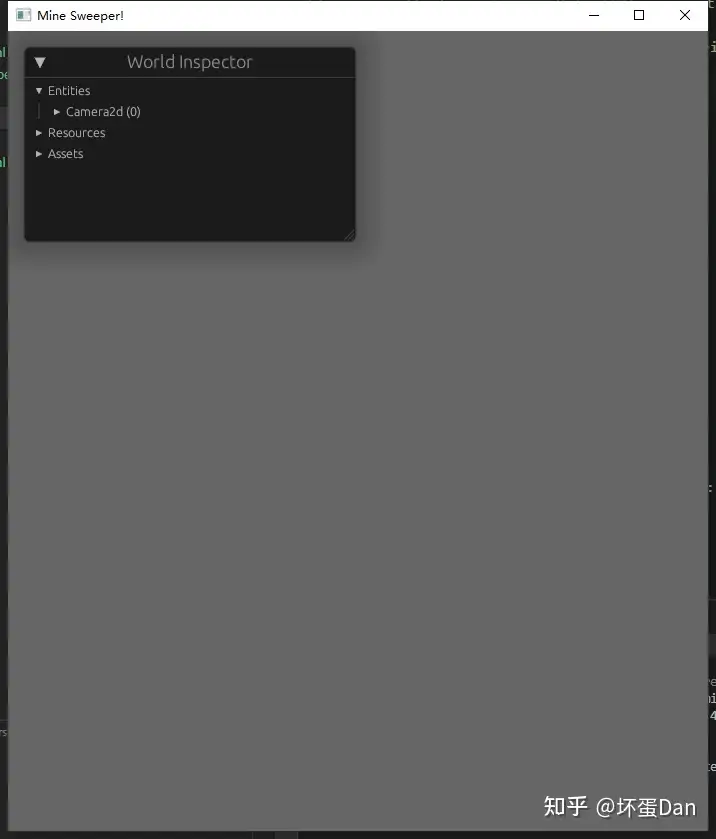
正常,如果你的不正常,请确认包版本是否有问题,尽量多逛下官方github,看看有没有类似issue,由于rust和基于rust的bevy以及一些列相关的包都比较年轻,所以迭代可能会出现breaking updates以及一些包之间兼容性问题。
总结#
今天我们主要是初始化环境,没有具体逻辑。
参考#
- ^setup https://dev.to/qongzi/bevy-minesweeper-part-1-534c
- ^WindowPlugins-Example https://github.com/bevyengine/bevy/blob/latest/examples/window/window_settings.rs
- ^WindowPlugin https://docs.rs/bevy/0.9.1/bevy/window/struct.WindowPlugin.html
- ^WorldInspectorPlugin https://docs.rs/bevy-inspector-egui/0.17.0/bevy_inspector_egui/quick/struct.WorldInspectorPlugin.html
- ^Camera2dBundle https://docs.rs/bevy/0.9.1/bevy/core_pipeline/core_2d/struct.Camera2dBundle.html
- ^Commands::spawn https://docs.rs/bevy/0.9.1/bevy/ecs/system/struct.Commands.html#method.spawn
- ^Commands https://docs.rs/bevy/0.9.1/bevy/ecs/system/struct.Commands.html
- ^Res https://docs.rs/bevy/0.9.1/bevy/ecs/system/struct.Res.html
- ^ResMut https://docs.rs/bevy/0.9.1/bevy/ecs/system/struct.ResMut.html
- ^Query https://docs.rs/bevy/0.9.1/bevy/ecs/system/struct.Query.html
- ^EventWriter https://docs.rs/bevy/0.9.1/bevy/ecs/event/struct.EventWriter.html
- ^EventReader https://docs.rs/bevy/0.9.1/bevy/ecs/event/struct.EventReader.html
编辑于 2023-02-08 15:01・IP 属地广东