
前言#
昨天我们创建好了整个tile map
坏蛋Dan:rust基础学习--基于Bevy实现扫雷小游戏day2
但是并没有将它渲染到窗口里
渲染到窗口里#
既然是需要渲染到窗口里的,自然就少不了布局和样式设计。
我们的这个插件board_plugin需要暴露以下的入口供自定义:
tilp map的属性(宽、高、有多少炸弹)tile之间的间距。- 自定义
tile的大小或者根据窗口自适应大小 - 自定义扫雷小游戏内容在窗口中的位置或者直接放到中间,提供偏移值入口。
- 可选的安全不覆盖起始区域(
Optional safe uncovered start zone)
这些个选项可以组合成一个资源。
选项 as 资源#
那么开搞吧~
先在board_plugin/src/resources文件夹中创建一个board_options.rs文件
// board_options.rs
use bevy::prelude::Vec3;
use serde::{Deserialize, Serialize};

/// Tile size options
#[derive(Debug, Clone, Serialize, Deserialize, Resource)]
pub enum TileSize {
    /// Fixed tile size
    Fixed(f32),
    /// Window adaptative tile size
    Adaptive { min: f32, max: f32 },
}

/// Board position customization options
#[derive(Debug, Clone, Serialize, Deserialize, Resource)]
pub enum BoardPosition {
    /// Centered board
    Centered { offset: Vec3 },
    /// Custom position
    Custom(Vec3),
}

/// Board generation options. Must be used as a resource
// We use serde to allow saving option presets and loading them at runtime
#[derive(Debug, Clone, Serialize, Deserialize, Resource)]
pub struct BoardOptions {
    /// Tile map size
    pub map_size: (u16, u16),
    /// bomb count
    pub bomb_count: u16,
    /// Board world position
    pub position: BoardPosition,
    /// Tile world size
    pub tile_size: TileSize,
    /// Padding between tiles
    pub tile_padding: f32,
    /// Does the board generate a safe place to start
    pub safe_start: bool,
}这些都是选项,其中Serialize[2]和Deserialize[3]这俩都来自serde[4]
Serialize和Deserialize的作用是相反的,Serialize方法用于将一个数据结构转换成任何其它数据结构。
这里为啥要用它们呢?因为这些选项是在窗口里交互的,所以得放到runtime才行。
Vec3[5] 一个三维的struct:x: f32, y: f32, z: f32。这里需要mark下,因为对于我们这个游戏来说2d就够了,所以需要留意下后面是怎么用的,会有什么效果。
然后我们来给这些个选项设置默认值,一般选项都是得有默认值的。
我们之前在附录里学到过一个派生属性Default,我们可以基于这个Default来实现默认值。
不过直接使用Default属性的默认值是编译器固定的,在这里对于我们来说不太友好,所以我们来使用Default这个trait 来自定义默认值
impl Default for TileSize {
    fn default() -> Self {
        Self::Adaptive {
            min: 10.0,
            max: 50.0,
        }
    }
}

impl Default for BoardPosition {
    fn default() -> Self {
        Self::Centered {
            offset: Default::default(),
        }
    }
}

impl Default for BoardOptions {
    fn default() -> Self {
        Self {
            map_size: (15, 15),
            bomb_count: 30,
            position: Default::default(),
            tile_size: Default::default(),
            tile_padding: 0.,
            safe_start: false,
        }
    }
}ok,现在选项这块就基本搞定了,不说完整了,但是该有的样子都有了。
然后再把这个资源暴露出去
resources/mod.rs
pub(crate) mod tile;
pub(crate) mod tile_map;

mod board_options;
pub use board_options::*;然后我们来使用,参考WindowDescriptor,我们在main.rs中进行配置,这种不算是业务逻辑,是属于环境初始化(配置)的。
use bevy::prelude::*;
use bevy::window::{ WindowDescriptor, WindowPlugin };
use board_plugin::BoardPlugin;
use board_plugin::resources::BoardOptions;
    // ...
    app.insert_resource(BoardOptions {
        map_size: (20, 20),
        bomb_count: 40,
        tile_padding: 3.0,
        ..Default::default()
    });

    app.add_plugin(BoardPlugin);
    // ...
}注意这里如果要insert_resource,那么你这个insert进去的东西就得是实现Resource这个trait的。
渲染#
接下来就是实现展示这个过程了,这属于业务逻辑相关的了,根据ECS开发思维,这块自然就是放到system里的。
我们回到board_plugin/src/lib.rs文件中改动这个create_board方法。
impl BoardPlugin {
    /// Computes a tile size that matches the window according to the tile map size
    fn adaptative_tile_size(
        window: Res<Windows>,
        (min, max): (f32, f32),      // Tile size constraints
        (width, height): (u16, u16), // Tile map dimensions
    ) -> f32 {
        let window = window.get_primary().expect("get window primary error");

        let max_width = window.width() / width as f32;
        let max_heigth = window.height() / height as f32;
        max_width.min(max_heigth).clamp(min, max)
    }

    /// System to generate the complete board
    pub fn create_board(
        mut commands: Commands,
        board_options: Option<Res<BoardOptions>>,
        window: Res<Windows>,
    ) {
        let options = match board_options {
            None => BoardOptions::default(), // If no options is set we use the default one
            Some(o) => o.clone(),
        };
        // Tilemap generation
        let mut tile_map = TileMap::empty(options.map_size.0, options.map_size.1);
        tile_map.set_bombs(options.bomb_count);
        #[cfg(feature = "debug")]
        // Tilemap debugging
        log::info!("{}", tile_map.console_output());

        let tile_size = match options.tile_size {
            TileSize::Fixed(v) => v,
            TileSize::Adaptive { min, max } => Self::adaptative_tile_size(
                window,
                (min, max),
                (tile_map.width(), tile_map.height()),
            ),
        };

        // We deduce the size of the complete board
        let board_size = Vec2::new(
            tile_map.width() as f32 * tile_size,
            tile_map.height() as f32 * tile_size,
        );
        log::info!("board size: {}", board_size);
        // We define the board anchor position (bottom left)
        let board_position = match options.position {
            BoardPosition::Centered { offset } => {
                Vec3::new(-(board_size.x / 2.), -(board_size.y / 2.), 0.) + offset
            }
            BoardPosition::Custom(p) => p,
        };

        commands
            .spawn(SpatialBundle {
                visibility: Visibility::VISIBLE,
                transform: Transform::from_translation(board_position.into()),
                ..Default::default()
            })
            .insert(Name::new("Board"))
            .with_children(|parent| {
                // We spawn the board background sprite at the center of the board, since the sprite pivot is centered
                parent
                    .spawn(SpriteBundle {
                        sprite: Sprite {
                            color: Color::WHITE,
                            custom_size: Some(board_size),
                            ..Default::default()
                        },
                        transform: Transform::from_xyz(board_size.x / 2., board_size.y / 2., 0.),
                        ..Default::default()
                    })
                    .insert(Name::new("Background"));

                for (y, line) in tile_map.iter().enumerate() {
                    for (x, tile) in line.iter().enumerate() {
                        parent
                            .spawn(SpriteBundle {
                                sprite: Sprite {
                                    color: Color::GRAY,
                                    custom_size: Some(Vec2::splat(
                                        tile_size - options.tile_padding as f32,
                                    )),
                                    ..Default::default()
                                },
                                transform: Transform::from_xyz(
                                    (x as f32 * tile_size) + (tile_size / 2.),
                                    (y as f32 * tile_size) + (tile_size / 2.),
                                    1.,
                                ),
                                ..Default::default()
                            })
                            .insert(Name::new(format!("Tile ({}, {})", x, y)))
                            // We add the `Coordinates` component to our tile entity
                            .insert(Coordinates {
                                x: x as u16,
                                y: y as u16,
                            });
                    }
                }
            });
    }
}- 获取
options,也就是我们之前设置的选项资源 - 生成瓦片图以及炸弹(
debug模式下终端打印出图) - 然后获取瓦片的
size,也就是宽高,自适应的需要计算窗口和图的比例。
这里简单的说下计算的逻辑。
我们的窗口是width: 700和height: 800。
min和max则是自适应的瓦片的最大值和最小值。
而瓦片的board也就是整个扫雷的大小,是跟着瓦片个数来计算的,这里存的是一个元组,分别代表行多少个瓦片和列多少个瓦片,我们在main.rs中设置的是20 * 20。
那么整个扫雷的大小运算逻辑就是 瓦片size * 20 * 20。
那么三组数据都已经有了,如果不是自适应,那就是fix size * 20 * 20。
如果是自适应,计算逻辑在adaptative_tile_size方法中。
首先是获取获取每个瓦片的宽高在这个窗口中的比值,也就是用窗口的宽/高 除以 瓦片行/列个数得到的值。接着两者选其最小的作为基础值,这样渲染就不会溢出。不过这里还需要考虑瓦片的最大最小值,如果这个比值小于瓦片最小值,那么返回瓦片最小值,同理大于时返回瓦片最大值(值必须限制在最大值最小值之间,所以称之为夹紧)。
board_size自然就是这个比值 * 瓦片行 * 瓦片列。
Vec2和Vec3类似,创建的是二维的{ x: f32, y: f32 }。
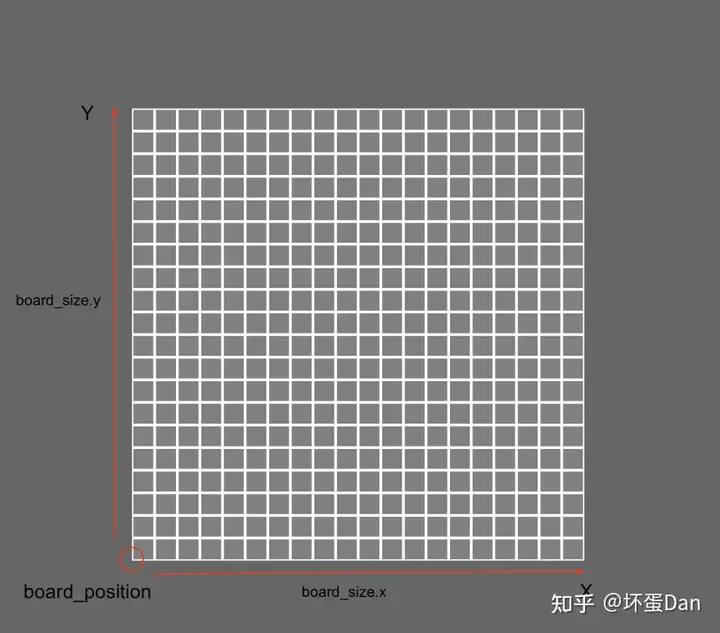
- 定位,参照点也就是坐标轴中心
(0, 0),如果是自定义,那就直接拿自定义的作为初始位置。如果不是就是默认中心,中心距离左下角的距离正好就是(-board_size.x / 2, -board_size.y / 2)这里带上负号的原因是我们是参照中心点距离(0, 0)的位置向(0, 0)做平移,自然就是往x, y负方向平移。
- 既然选项都已经获取完毕了并且也都计算完了,那就可以开始渲染了。
基于commands.spawn创建一个实体
SpatialBundle:一个bundle,bundle这个trait使得实体拥有插入/移除组件的能力,它可以理解为自身带有好几个component的实体模板,可以直接套进来使用它的component,这个bundle里面有几个component:
Visibility:控制这个实体的显隐ComputedVisibility:通过算法计算出来这个实体是否需要隐/显示,以及是否需要被提取出来用于渲染。Transform:它的属性有些类似css中的transform属性,比如translate、rotate、scale,它是用于描述这个实体的位置。GlobalTransform:和Transform类似,不过它是用来描述这个实体在它所在参考系(reference frame)里的位置。
GlobalTransform和Transform的区别在于前者用于get,后者用于set,你想获取这个实体的位置,你就用GlobalTransform,而如果是想替换或者移动这个实体,就用Transform。
Visibility::VISIBLE:创建一个visibility的组件,它是visible的。Transform::from_translation:创建一个transform组件,除了translation属性不是默认值,其它都是默认值。board_position.into:这个方法来自于Info这个trait。而这个trait一般用法和From这个trait相反。From<a>表示从A变成自己B,而Into</a><a>则是将自己B变成A。来看个例子了解下怎么使用
#[cfg(test)]
mod tests {
    use std::fmt::format;

    #[test]
    fn test_from () {
        #[derive(Debug, PartialEq, Eq)]
        struct A {
            name: String,
        }
        #[derive(Debug, PartialEq, Eq)]
        struct B {
            desc: String,
        }

        impl From<A> for B {
            fn from(value: A) -> Self {
                Self {
                    desc: format(format_args!("hi i am {}", value.name))
                }
            }
        }

        let a = A {
            name: String::from("dan")
        };

        let b = B {
            desc: String::from("hi i am dan")
        };

        let b_from_a = B::from(a);

        assert_eq!(b, b_from_a);
    }

    #[test]
    fn test_into () {

        #[derive(Debug, PartialEq, Eq)]
        struct A {
            name: String,
        }
        #[derive(Debug, PartialEq, Eq)]
        struct B {
            desc: String,
        }

        impl Into<B> for A {
            fn into(self) -> B {
                B {
                    desc: format(format_args!("hi i am {}", self.name))
                }
            }
        }

        let a = A {
            name: String::from("dan")
        };

        let b = B {
            desc: String::from("hi i am dan")
        };

        let a_into_b: B = a.into();

        assert_eq!(a_into_b, b);

    }
}test_from方法中我们将A的实例a变成了B的实例。test_into方法中我们也是将A的实例a变成了b的实例。
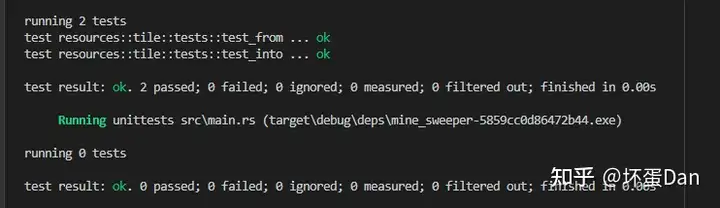
两者的不同点在于调用者,test_from中调用from方法的是B,而test_into中调用into方法的是A的实例a。
这里有一点需要注意,不能在给B实现From</a><a>的同时给A实现Into<b>,即使理论上可行,依旧是会报错的。
扯远了,回到我们的代码中
在创建完整个扫雷的实体之后,我们插入了一个Name的组件。这个组件有俩字段,hash表示唯一标识符,而name自然就是这个实体在app中的名字。
with_children方法接收一个闭包,这些个闭包会被传入add_children方法中。
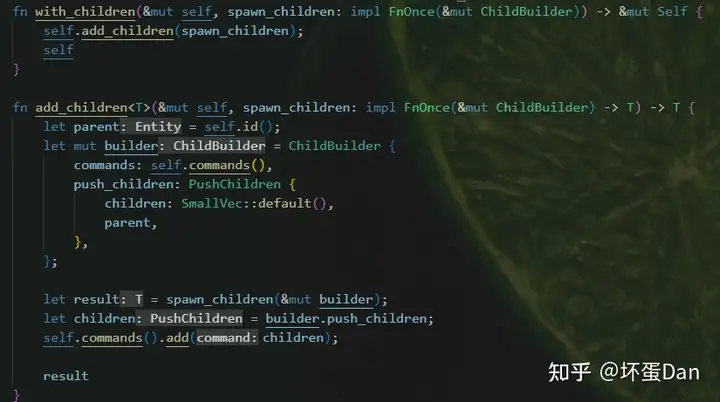
它会为每一个闭包创建一个ChildBuilder[6]实例,然后存入自身的commands中。
ChildBuilder会把当前的children都构建到实体当中。
PushChildren[7] 用于将children push到当前实体的children里面
有些绕,但是结合代码应该就比较清晰了,这里先是把PushChildren放到了ChildBuilder实例里面,然后这个ChildBuilder的实例被传入spawn_children也就是我们传入的闭包里面,执行完之后再把这个ChildBuilder实例的push_children也就是PushChildren实例拿出来再放到实体的commands里面。
所以实际上ChildBuilder只是个临时工具而已,用来传递PushChildren。
那么回到我们的闭包当中,它有一个参数是parent,也就是ChildBuilder实例。
然后我们又调用了spawn这个方法生成一个新的实体

这个spawn和前面的commands.spawn不是同一个,这个是ChildBuilder自己的。它里面调用了commands.spawn方法创建一个实体,然后存储这个实体的id到PushChildren实例的children字段里面,这个children字段是一个vector。
然后返回这个实体。
- 然后设置这个实体的名字:
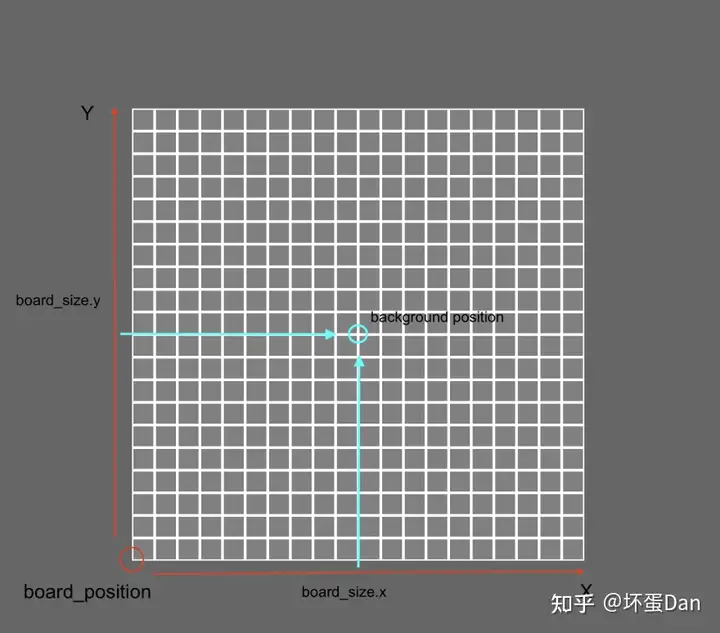
Background,看名字也就知道这是我们扫雷的背景,白色,这里还做了transform操作,为什么呢?因为这个背景的初始位置不对,是以坐标轴中心为背景中心的,所以还得往俩轴正方向迁移才行。
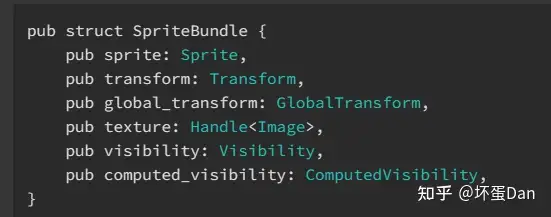
SpriteBundle: 前面说过bundle可以看作是模板,里面包含了好几个组件,这个就不解释里面的东西了,看下都有啥即可。
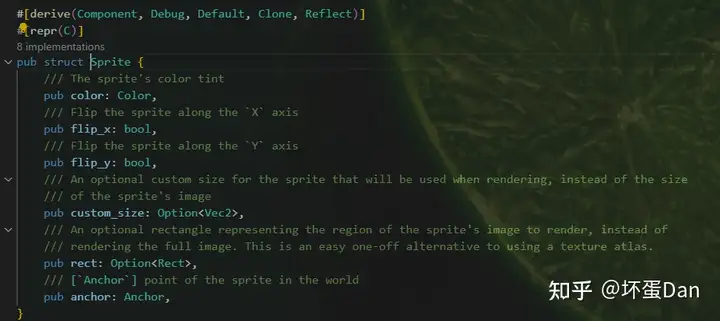
Sprite[8]: 同上,看下即可。
背景搞好了,该轮到我们的瓦片了,二维结构自然是双层的遍历,这里用迭代器替代for性能会好很多, 之前学迭代器的时候也有说到过,它在编译阶段会被展开而不是for循环处理,所以耗时少很多。
瓦片也是一个实体。
瓦片初始化状态都是gray也就是灰色的,也就是没有被点开的时候。
splat:创建一个矩形,这里还需要去掉padding占的空间,也就是内边距。from_xzy:这方法没啥好说的,就是from_transition,但是值是vec3::new(x, y, z)。表示三维空间偏移量。
最后再把我们的Coordinates作为组件插入到瓦片实体里。
那么现在已经是可以渲染到窗口里了。
我们来运行下
cargo run --features debug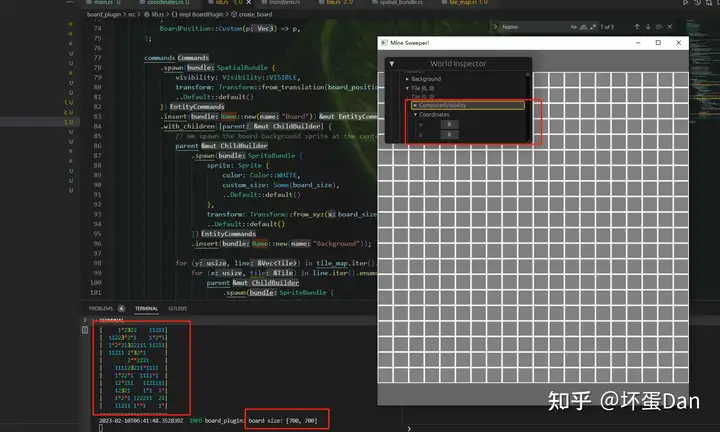
正常,不过需要过一遍侦测的所有组件,看下是否都正常。
我这里仅看了Coordinates,因为文档里的版本过低,有些api都已经被废弃,所以我自己摸索了好一会才完成。
现在渲染了,下一步就该轮到实现交互了。
代码#
main.rs#
use bevy::prelude::*;
use bevy::window::{ WindowDescriptor, WindowPlugin };


#[cfg(feature = "debug")]
use bevy_inspector_egui::quick::WorldInspectorPlugin;
#[cfg(feature = "debug")]
use board_plugin::{ components::Coordinates };

use board_plugin::{ BoardPlugin, resources::BoardOptions };

fn main() {
    let mut app = App::new();
    // Window setup
    app
    // Bevy default plugins
    .add_plugins(DefaultPlugins.set(WindowPlugin {
        window: WindowDescriptor {
            title: "Mine Sweeper!".to_string(),
            width: 700.,
            height: 800.,
            ..Default::default()
        },
        ..default()
    }));

    app.insert_resource(BoardOptions {
        map_size: (20, 20),
        bomb_count: 40,
        tile_padding: 3.0,
        ..Default::default()
    });

    app.add_plugin(BoardPlugin);

    #[cfg(feature = "debug")]
    // Debug hierarchy inspector
    app.add_plugin(WorldInspectorPlugin).register_type::<Coordinates>();

    // Startup system (cameras)
    app.add_startup_system(camera_setup);
    // Run the app
    app.run();
}

fn camera_setup(mut commands: Commands) {
    // 2D orthographic camera
    commands.spawn(Camera2dBundle::default());
}
lib.rs#
// lib.rs
pub mod components;
pub mod resources;

use bevy::log;
use bevy::prelude::*;
use resources::tile_map::TileMap;
use resources::BoardOptions;
use resources::BoardPosition;
use resources::TileSize;

use components::Coordinates;

pub struct BoardPlugin;

impl Plugin for BoardPlugin {
    fn build(&self, app: &mut App) {
        app.add_startup_system(Self::create_board);
        log::info!("Loaded Board Plugin");
    }
}

impl BoardPlugin {
    /// Computes a tile size that matches the window according to the tile map size
    fn adaptative_tile_size(
        window: Res<Windows>,
        (min, max): (f32, f32),      // Tile size constraints
        (width, height): (u16, u16), // Tile map dimensions
    ) -> f32 {
        let window = window.get_primary().expect("get window primary error");

        let max_width = window.width() / width as f32;
        let max_heigth = window.height() / height as f32;
        max_width.min(max_heigth).clamp(min, max)
    }

    /// System to generate the complete board
    pub fn create_board(
        mut commands: Commands,
        board_options: Option<Res<BoardOptions>>,
        window: Res<Windows>,
    ) {
        let options = match board_options {
            None => BoardOptions::default(), // If no options is set we use the default one
            Some(o) => o.clone(),
        };
        // Tilemap generation
        let mut tile_map = TileMap::empty(options.map_size.0, options.map_size.1);
        tile_map.set_bombs(options.bomb_count);
        #[cfg(feature = "debug")]
        // Tilemap debugging
        log::info!("{}", tile_map.console_output());

        let tile_size = match options.tile_size {
            TileSize::Fixed(v) => v,
            TileSize::Adaptive { min, max } => Self::adaptative_tile_size(
                window,
                (min, max),
                (tile_map.width(), tile_map.height()),
            ),
        };

        // We deduce the size of the complete board
        let board_size = Vec2::new(
            tile_map.width() as f32 * tile_size,
            tile_map.height() as f32 * tile_size,
        );
        log::info!("board size: {}", board_size);
        // We define the board anchor position (bottom left)
        let board_position = match options.position {
            BoardPosition::Centered { offset } => {
                Vec3::new(-(board_size.x / 2.), -(board_size.y / 2.), 0.) + offset
            }
            BoardPosition::Custom(p) => p,
        };

        commands
            .spawn(SpatialBundle {
                visibility: Visibility::VISIBLE,
                transform: Transform::from_translation(board_position.into()),
                ..Default::default()
            })
            .insert(Name::new("Board"))
            .with_children(|parent| {
                // We spawn the board background sprite at the center of the board, since the sprite pivot is centered
                parent
                    .spawn(SpriteBundle {
                        sprite: Sprite {
                            color: Color::WHITE,
                            custom_size: Some(board_size),
                            ..Default::default()
                        },
                        transform: Transform::from_xyz(board_size.x / 2., board_size.y / 2., 0.),
                        ..Default::default()
                    })
                    .insert(Name::new("Background"));

                for (y, line) in tile_map.iter().enumerate() {
                    for (x, tile) in line.iter().enumerate() {
                        parent
                            .spawn(SpriteBundle {
                                sprite: Sprite {
                                    color: Color::GRAY,
                                    custom_size: Some(Vec2::splat(
                                        tile_size - options.tile_padding as f32,
                                    )),
                                    ..Default::default()
                                },
                                transform: Transform::from_xyz(
                                    (x as f32 * tile_size) + (tile_size / 2.),
                                    (y as f32 * tile_size) + (tile_size / 2.),
                                    1.,
                                ),
                                ..Default::default()
                            })
                            .insert(Name::new(format!("Tile ({}, {})", x, y)))
                            // We add the `Coordinates` component to our tile entity
                            .insert(Coordinates {
                                x: x as u16,
                                y: y as u16,
                            });
                    }
                }
            });
    }
}coordinates.rs#
// coordinates.rs
use bevy::prelude::Component;
use std::fmt::{self, Display, Formatter};
use std::ops::{Add, Sub};

#[cfg(feature = "debug")]
use bevy_inspector_egui::prelude::*;
#[cfg(feature = "debug")]
use bevy::prelude::Reflect;

#[cfg_attr(feature = "debug", derive(Reflect, InspectorOptions))]
#[cfg_attr(feature = "debug", reflect(InspectorOptions))]
#[cfg_attr(feature = "debug", inspector(validate = |ability| ability.current_charges <= ability.max_charges))]
#[derive(Debug, Default, Copy, Clone, Ord, PartialOrd, Eq, PartialEq, Hash, Component)]
pub struct Coordinates {
    #[cfg_attr(feature = "debug", inspector(min = 0, max = 50))]
    pub x: u16,
    #[cfg_attr(feature = "debug", inspector(min = 0, max = 50))]
    pub y: u16,
}

// We want to be able to make coordinates sums..
impl Add for Coordinates {
    type Output = Self;

    fn add(self, rhs: Self) -> Self::Output {
        Self {
            x: self.x + rhs.x,
            y: self.y + rhs.y,
        }
    }
}

impl Add<(i8, i8)> for Coordinates {
    type Output = Self;

    fn add(self, (x, y): (i8, i8)) -> Self::Output {
        Self {
            x: ((self.x as i16) + x as i16) as u16,
            y: ((self.y as i16) + y as i16) as u16,
        }
    }
}

// ..and subtractions
impl Sub for Coordinates {
    type Output = Self;

    fn sub(self, rhs: Self) -> Self::Output {
        Self {
            x: self.x.saturating_sub(rhs.x),
            y: self.y.saturating_sub(rhs.y),
        }
    }
}

impl Display for Coordinates {
    fn fmt(&self, f: &mut Formatter<'_>) -> fmt::Result {
        write!(f, "({}, {})", self.x, self.y)
    }
}
tile.rs#
// tile.rs
#[cfg(feature = "debug")]
use colored::Colorize;

/// Enum describing a Minesweeper tile
#[derive(Debug, Copy, Clone, Eq, PartialEq)]
pub enum Tile {
    /// Is a bomb
    Bomb,
    /// Is a bomb neighbor
    BombNeighbor(u8),
    /// Empty tile
    Empty,
}

impl Tile {
    /// Is the tile a bomb?
    pub const fn is_bomb(&self) -> bool {
        matches!(self, Self::Bomb)
    }

    #[cfg(feature = "debug")]
    pub fn console_output(&self) -> String {
        format!(
            "{}",
            match self {
                Tile::Bomb => "*".bright_red(),
                Tile::BombNeighbor(v) => match v {
                    1 => "1".cyan(),
                    2 => "2".green(),
                    3 => "3".yellow(),
                    _ => v.to_string().red(),
                },
                Tile::Empty => " ".normal(),
            }
        )
    }
} tile_map.rs#
// tile_map.rs
use crate::resources::tile::Tile;
use std::ops::{Deref, DerefMut};
use crate::components::Coordinates;
use rand::{thread_rng, Rng};

/// Delta coordinates for all 8 square neighbors
const SQUARE_COORDINATES: [(i8, i8); 8] = [
    // Bottom left
    (-1, -1),
    // Bottom
    (0, -1),
    // Bottom right
    (1, -1),
    // Left
    (-1, 0),
    // Right
    (1, 0),
    // Top Left
    (-1, 1),
    // Top
    (0, 1),
    // Top right
    (1, 1),
];

/// Base tile map
#[derive(Debug, Clone)]
pub struct TileMap {
    bomb_count: u16,
    height: u16,
    width: u16,
    map: Vec<Vec<Tile>>,
}

impl TileMap {
    /// Generates an empty map
    pub fn empty(width: u16, height: u16) -> Self {
        let map = (0..height)
            .into_iter()
            .map(|_| (0..width).into_iter().map(|_| Tile::Empty).collect())
            .collect();
        Self {
            bomb_count: 0,
            height,
            width,
            map,
        }
    }

    #[cfg(feature = "debug")]
    pub fn console_output(&self) -> String {
        let mut buffer = format!(
            "Map ({}, {}) with {} bombs:\n",
            self.width, self.height, self.bomb_count
        );
        let line: String = (0..=(self.width + 1)).into_iter().map(|_| '-').collect();
        buffer = format!("{}{}\n", buffer, line);
        for line in self.iter().rev() {
            buffer = format!("{}|", buffer);
            for tile in line.iter() {
                buffer = format!("{}{}", buffer, tile.console_output());
            }
            buffer = format!("{}|\n", buffer);
        }
        format!("{}{}", buffer, line)
    }

    // Getter for `width`
    pub fn width(&self) -> u16 {
        self.width
    }

    // Getter for `height`
    pub fn height(&self) -> u16 {
        self.height
    }

    // Getter for `bomb_count`
    pub fn bomb_count(&self) -> u16 {
        self.bomb_count
    }

    pub fn safe_square_at(&self, coordinates: Coordinates) -> impl Iterator<Item = Coordinates> {
        SQUARE_COORDINATES
            .iter()
            .copied()
            .map(move |tuple| coordinates + tuple)
    }

    pub fn is_bomb_at(&self, coordinates: Coordinates) -> bool {
        if coordinates.x >= self.width || coordinates.y >= self.height {
            return false;
        };
        self.map[coordinates.y as usize][coordinates.x as usize].is_bomb()
    }

    pub fn bomb_count_at(&self, coordinates: Coordinates) -> u8 {
        if self.is_bomb_at(coordinates) {
            return 0;
        }
        let res = self
             .safe_square_at(coordinates)
             .filter(|coord| self.is_bomb_at(*coord))
             .count();
        res as u8
    }

    /// Places bombs and bomb neighbor tiles
    pub fn set_bombs(&mut self, bomb_count: u16) {
        self.bomb_count = bomb_count;
        let mut remaining_bombs = bomb_count;
        let mut rng = thread_rng();
        // Place bombs
        while remaining_bombs > 0 {
            let (x, y) = (
                rng.gen_range(0..self.width) as usize,
                rng.gen_range(0..self.height) as usize,
            );
            if let Tile::Empty = self[y][x] {
                self[y][x] = Tile::Bomb;
                remaining_bombs -= 1;
            }
        }
        // Place bomb neighbors
        for y in 0..self.height {
            for x in 0..self.width {
                let coords = Coordinates { x, y };
                if self.is_bomb_at(coords) {
                    continue;
                }
                let num = self.bomb_count_at(coords);
                if num == 0 {
                    continue;
                }
                let tile = &mut self[y as usize][x as usize];
                *tile = Tile::BombNeighbor(num);
            }
        }
    }
}

impl Deref for TileMap {
    type Target = Vec<Vec<Tile>>;

    fn deref(&self) -> &Self::Target {
        &self.map
    }
}

impl DerefMut for TileMap {
    fn deref_mut(&mut self) -> &mut Self::Target {
        &mut self.map
    }
}board_options.rs#
// board_options.rs
use bevy::prelude::{Vec3, Resource};
use serde::{Deserialize, Serialize};

/// Tile size options
#[derive(Debug, Clone, Serialize, Deserialize, Resource)]
pub enum TileSize {
    /// Fixed tile size
    Fixed(f32),
    /// Window adaptative tile size
    Adaptive { min: f32, max: f32 },
}

/// Board position customization options
#[derive(Debug, Clone, Serialize, Deserialize, Resource)]
pub enum BoardPosition {
    /// Centered board
    Centered { offset: Vec3 },
    /// Custom position
    Custom(Vec3),
}

/// Board generation options. Must be used as a resource
// We use serde to allow saving option presets and loading them at runtime
#[derive(Debug, Clone, Serialize, Deserialize, Resource)]
pub struct BoardOptions {
    /// Tile map size
    pub map_size: (u16, u16),
    /// bomb count
    pub bomb_count: u16,
    /// Board world position
    pub position: BoardPosition,
    /// Tile world size
    pub tile_size: TileSize,
    /// Padding between tiles
    pub tile_padding: f32,
    /// Does the board generate a safe place to start
    pub safe_start: bool,
}


impl Default for TileSize {
    fn default() -> Self {
        Self::Adaptive {
            min: 10.0,
            max: 50.0,
        }
    }
}

impl Default for BoardPosition {
    fn default() -> Self {
        Self::Centered {
            offset: Default::default(),
        }
    }
}

impl Default for BoardOptions {
    fn default() -> Self {
        Self {
            map_size: (15, 15),
            bomb_count: 30,
            position: Default::default(),
            tile_size: Default::default(),
            tile_padding: 0.,
            safe_start: false,
        }
    }
}剩下的几个就不说了,都是导入导出的mod.rs
总结#
今天我们实现了把瓦片图渲染到窗口里,但是暂时还不能交互。
参考#
- ^render-in-screen https://dev.to/qongzi/bevy-minesweeper-part-3-1a9a
- ^Serialize https://docs.rs/serde/latest/serde/trait.Serialize.html
- ^Deserialize https://docs.rs/serde/latest/serde/trait.Deserialize.html
- ^serde https://serde.rs/
- ^Vec3 https://docs.rs/bevy/0.9.1/bevy/prelude/struct.Vec3.html
- ^ChildBuilder https://docs.rs/bevy/0.9.1/bevy/prelude/struct.ChildBuilder.html
- ^PushChildren https://docs.rs/bevy/0.9.1/bevy/prelude/struct.PushChildren.html
- ^Sprite https://docs.rs/bevy/0.9.1/bevy/sprite/index.html
编辑于 2023-02-10 14:57・IP 属地广东