
前言#
昨天我们知道了如何连接数据库
今天我们来用这些数据写一个web demo。
vintage jazz records#
我们来搞个小demo,关于古典爵士的记录
将包含以下几部分:
- 设计
API端点(endpoints) - 初始化项目
- 数据初始化
- 写一个处理器(
handler)来返回所有的items - 写一个处理器来新增
item - 写一个处理器来返回特定的
item
设计API端点#
也就是设计接口
我们总共需要三个接口:
/albums/:Get类型用于获取所有album数据。/addAlbums/:Post类型用于新增album。/albums/:id:用于根据id获取对应的album。
初始化项目#
我们创建一个名为web-service-gin的文件夹,然后进去初始化。
mkdir web-service-gin
cd web-service-gin
go mod init example/web-service-gin 数据初始化#
这里我们先用假数据来模拟,后面我们再接入之前数据库里的数据。
在main.go文件中
type album struct {
	ID     string  `json:"id"`
	Title  string  `json:"title"`
	Artist string  `json:"artist"`
	Price  float64 `json:"price"`
}

var albums = []album{
	{ID: "1", Title: "Blue Train", Artist: "John Coltrane", Price: 56.99},
	{ID: "2", Title: "Jeru", Artist: "Gerry Mulligan", Price: 17.99},
	{ID: "3", Title: "Sarah Vaughan and Clifford Brown", Artist: "Sarah Vaughan", Price: 39.99},
}
Get all接口#
我们需要完成几部分:
- 接收请求
- 返回响应
先来看代码
package main

import (
	"net/http"

	"github.com/gin-gonic/gin"
)

type album struct {
	ID     string  `json:"id"`
	Title  string  `json:"title"`
	Artist string  `json:"artist"`
	Price  float64 `json:"price"`
}

var albums = []album{
	{ID: "1", Title: "Blue Train", Artist: "John Coltrane", Price: 56.99},
	{ID: "2", Title: "Jeru", Artist: "Gerry Mulligan", Price: 17.99},
	{ID: "3", Title: "Sarah Vaughan and Clifford Brown", Artist: "Sarah Vaughan", Price: 39.99},
}

func getAlbums(c *gin.Context) {
	c.IndentedJSON(http.StatusOK, albums)
}
func main() {
	router := gin.Default()
	router.GET("/albums", getAlbums)

	router.Run("localhost:8080")
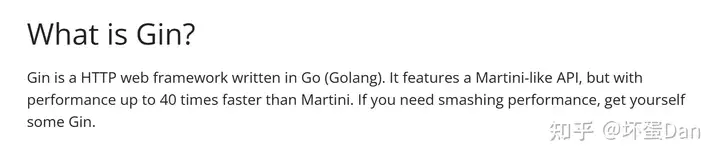
}Gin[1]:简单地说就是golang比较流行的web框架。
gin.Context:gin上下文,它里面携带了请求信息,序列化JSON等,比较核心的一个字段。Context.IndentedJSON[2]: 将我们这里的albums这个struct序列化处理,然后返回响应。开发阶段可以用Context.JSON,这样方便数据带有格式比较方便debugger等。gin.Default:初始化gin路由。router.GET:注册/albums这个路径和处理器。router.Run:将路由添加到http.Server并且开启Server。
然后我们来执行下这块代码
go get .
go run .
然后访问下对应的路径
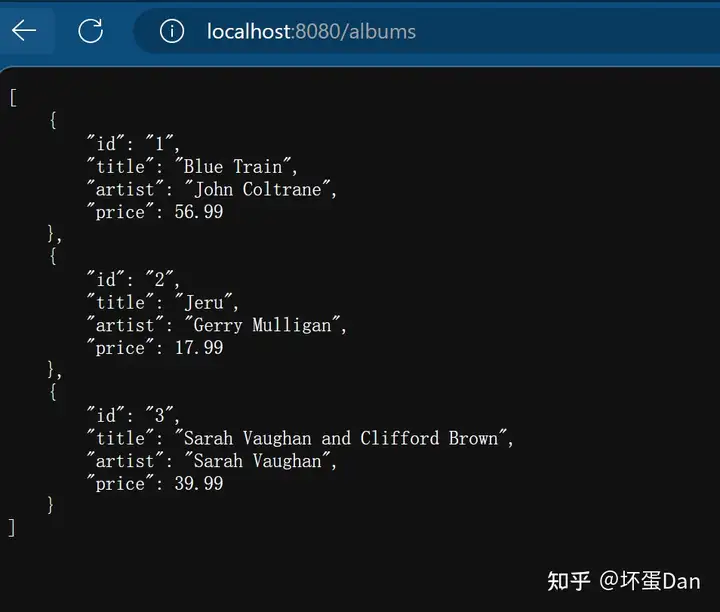
当然,咱也可以不需要浏览器,直接用curl[3],在这里你可以简单的理解为是一个无头浏览器,它可以解析我们传入的url,不过功能比无头浏览器强很多,基本上电脑都内置了(window10以上)。
curl http://localhost:8080/albums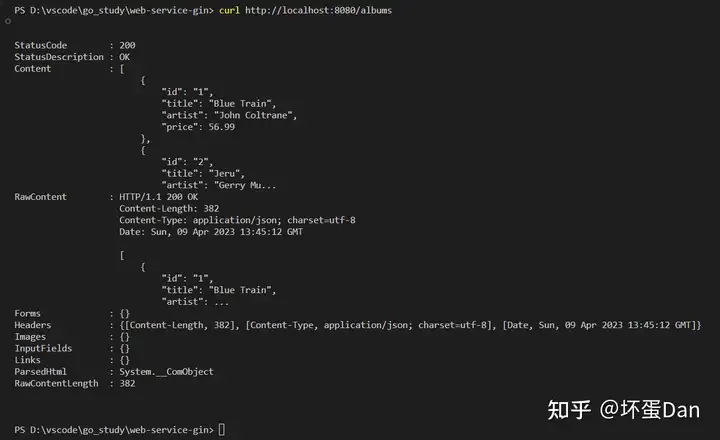
POST addAlbums接口#
直接来看下代码
func postAlbums(c *gin.Context) {
    var newAlbum album

    // Call BindJSON to bind the received JSON to
    // newAlbum.
    if err := c.BindJSON(&newAlbum); err != nil {
        return
    }

    // Add the new album to the slice.
    albums = append(albums, newAlbum)
    c.IndentedJSON(http.StatusCreated, newAlbum)
}

func main() {
    router := gin.Default()
    router.GET("/albums", getAlbums)
    router.POST("/addAlbums", postAlbums)

    router.Run("localhost:8080")
}Context.BindJSON[4]:将请求体赋值给newAlbum。
然后我们来测试下,不过这回我们只能是通过curl来实现了,或者我们可以写另一个脚本或者使用postman等。
我们这就直接使用curl来实现即可。
curl http://localhost:8080/addAlbums \
    --include \
    --header "Content-Type: application/json" \
    --request "POST" \
--data '{"id": "4","title": "The Modern Sound of Betty Carter","artist": "Betty Carter","price": 49.99}' 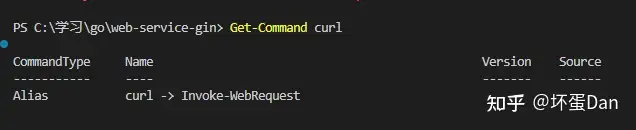
不过对于powerShell来说,它实际上执行的是这个Invoke-WebRequest,所以上面的指令对使用powerShell的用户来说不可行。
我们需要从powerShell切换到cmd,另外还需要把这里的curl改为curl.exe
但是这样还是不行的,因为有格式问题,json格式在这里遇到空格就会有解析错误的问题,所以没办法我们改用另一种方式,把这里的data抽出来放到同目录下的一个test.json文件中
{
  "id": "4",
  "title": "The Modern Sound of Betty Carter",
  "artist": "Betty Carter",
  "price": 49.99
}
然后终端运行
curl.exe --include --data @test.json -H "Content-Type:application/json" -X "POST" http://localhost:8080/addAlbums 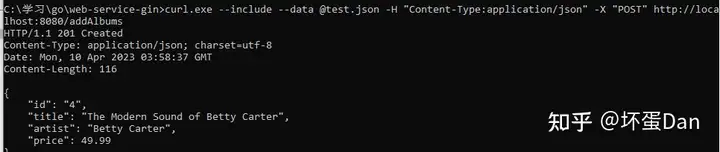
这回就成功了
然后再访问http:localhost:8080/albums
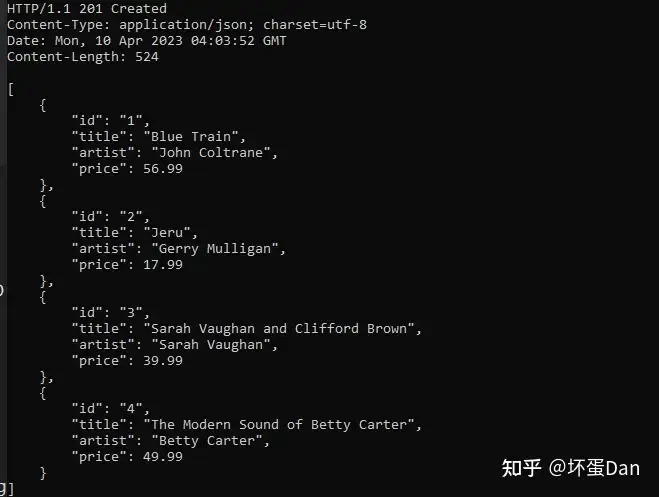
可以看到数据是正常插入了
Get one接口#
func getAlbumByID(c *gin.Context) {
    id := c.Param("id")

    // Loop over the list of albums, looking for
    // an album whose ID value matches the parameter.
    for _, a := range albums {
        if a.ID == id {
            c.IndentedJSON(http.StatusOK, a)
            return
        }
    }
    c.IndentedJSON(http.StatusNotFound, gin.H{"message": "album not found"})
}

func main() {
	router := gin.Default()
	router.GET("/albums", getAlbums)
	router.GET("/albums/:id", getAlbumByID)
	router.POST("/addAlbums", postAlbums)

	router.Run("localhost:8080")
}
这个就不用多说了。
我们来跑一下
go run .然后curl或者直接浏览器试一下(window用户自觉带上.exe)
curl http://localhost:8080/albums/2
完整代码#
package main

import (
	"net/http"

	"github.com/gin-gonic/gin"
)

type album struct {
	ID     string  `json:"id"`
	Title  string  `json:"title"`
	Artist string  `json:"artist"`
	Price  float64 `json:"price"`
}

var albums = []album{
	{ID: "1", Title: "Blue Train", Artist: "John Coltrane", Price: 56.99},
	{ID: "2", Title: "Jeru", Artist: "Gerry Mulligan", Price: 17.99},
	{ID: "3", Title: "Sarah Vaughan and Clifford Brown", Artist: "Sarah Vaughan", Price: 39.99},
}

func getAlbums(c *gin.Context) {
	c.IndentedJSON(http.StatusOK, albums)
}
func postAlbums(c *gin.Context) {
	var newAlbum album

	// Call BindJSON to bind the received JSON to
	// newAlbum.
	if err := c.BindJSON(&newAlbum); err != nil {
		return
	}
	// Add the new album to the slice.
	albums = append(albums, newAlbum)
	c.IndentedJSON(http.StatusCreated, albums)
}

func getAlbumByID(c *gin.Context) {
	id := c.Param("id")

	// Loop over the list of albums, looking for
	// an album whose ID value matches the parameter.
	for _, a := range albums {
		if a.ID == id {
			c.IndentedJSON(http.StatusOK, a)
			return
		}
	}
	c.IndentedJSON(http.StatusNotFound, gin.H{"message": "album not found"})
}

func main() {
	router := gin.Default()
	router.GET("/albums", getAlbums)
	router.GET("/albums/:id", getAlbumByID)
	router.POST("/addAlbums", postAlbums)

	router.Run("localhost:8080")
}接入数据库#
连接mysql#
那么基础代码我们就都实现了,现在我们来接入数据库。
先来实现第一步,连接数据库,回到我们的代码中
package main

import (
	"database/sql"
	"fmt"
	"log"
	"net/http"
	"strconv"

	"github.com/gin-gonic/gin"
	"github.com/go-sql-driver/mysql"
)

type Album struct {
	ID     int64   `json:"id"`
	Title  string  `json:"title"`
	Artist string  `json:"artist"`
	Price  float64 `json:"price"`
}

var albums = []Album{}

var _isDirty = true // 用于get all的时候判断是否需要重新获取

var db *sql.DB

func connectToDB() {
	// Capture connection properties.
	cfg := mysql.Config{
		User:                 "root",
		Passwd:               "123456",
		Net:                  "tcp",
		Addr:                 "127.0.0.1:3306",
		DBName:               "recordings",
		AllowNativePasswords: true,
	}
	// Get a database handle.
	var err error
	db, err = sql.Open("mysql", cfg.FormatDSN())
	if err != nil {
		log.Fatal(err)
	}

	pingErr := db.Ping()
	if pingErr != nil {
		log.Fatal(pingErr)
	}
	fmt.Println("Connected!")
}这里我调整了Album的字段类型,让它和数据库的对齐。
然后去掉了原来数据的内容。
然后我们main函数中引入
func main() {
	connectToDB()

	router := gin.Default()
	router.GET("/albums", getAlbums)
	router.GET("/albums/:id", getAlbumByID)
	router.POST("/addAlbums", postAlbums)

	router.Run("localhost:8080")
}
然后运行下看下是否正常连接

正常连接
实现Query all#
然后我们来修改下前面写的getAlbums方法,让它从mysql里面拿到真实的数据
type Album struct {
	ID     int64   `json:"id"`
	Title  string  `json:"title"`
	Artist string  `json:"artist"`
	Price  float64 `json:"price"`
}

var albums = []Album{}

var _isDirty = true // 用于get all的时候判断是否需要重新获取

var db *sql.DB

func getAlbums(c *gin.Context) {
	// _isDirty为true时重新连接数据库
	if _isDirty {
		allAlbums, err := db.Query("SELECT * FROM album")

		if err != nil {
			c.JSON(http.StatusInternalServerError, nil)
			fmt.Errorf("query all albums error. %e", err)
			return
		}
		// 断开连接,避免对源数据造成污染。
		defer allAlbums.Close()

		for allAlbums.Next() {
			var alb Album
			if err := allAlbums.Scan(&alb.ID, &alb.Title, &alb.Artist, &alb.Price); err != nil {
				c.JSON(http.StatusInternalServerError, nil)
				fmt.Errorf("something wrong when get allAlbums")
				return
			}
			albums = append(albums, alb)
		}
		_isDirty = false
	}

	c.IndentedJSON(http.StatusOK, albums)
}这里面的内容和昨天的那篇文章内容差不多,不过这里不需要where的条件,直接SELELCT *即可。
然后我还做了一个简单的优化,_isDirty字段用来判断是否需要重新获取数据,如果为false则表示当前数据是最新的,不需要再去请求数据库里的数据。
然后我们重新跑一下项目,访问http://localhost:8080/albums
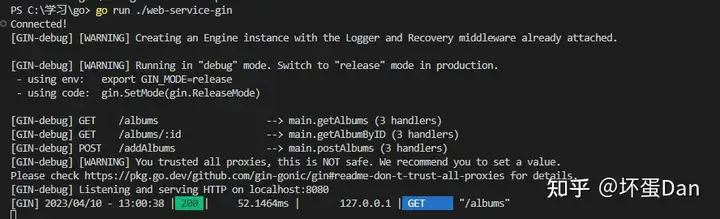
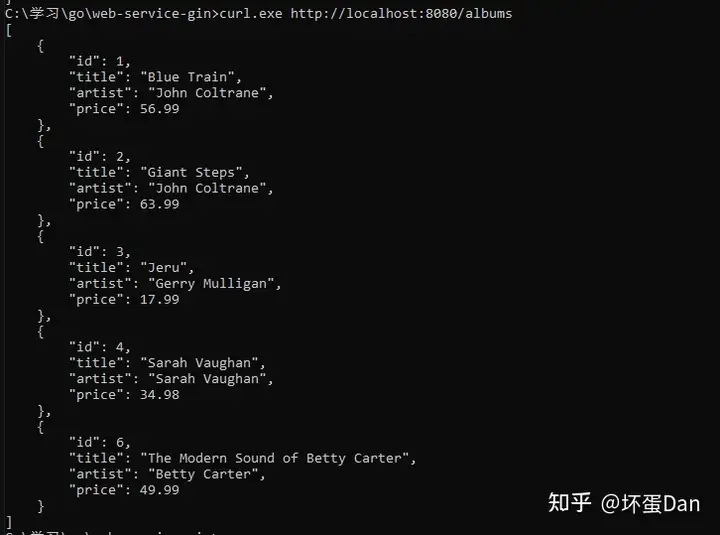
可以看到数据成功的获取到了。
实现Query one#
然后我们来实现下通过id来查询对应的album。
func getAlbumByID(c *gin.Context) {
	id := c.Param("id")
	// 如果此时的数据是最新的
	if !_isDirty {
		if len(albums) > 0 {
			for _, album := range albums {
				if strconv.Itoa(int(album.ID)) == id {
					c.IndentedJSON(http.StatusOK, album)
					return
				}
			}
		}
	}
	var alb Album
	// 如果数据中找不到就去数据库中找
	album := db.QueryRow("SELECT * FROM album WHERE id = ?", id)

	if err := album.Scan(&alb.ID, &alb.Title, &alb.Artist, &alb.Price); err != nil {
		fmt.Println("something wrong when copy value")
		c.JSON(http.StatusInternalServerError, nil)
		return
	}

	c.IndentedJSON(http.StatusOK, alb)

}
如果本地已经有缓存数据,那么就不去数据库里查了。
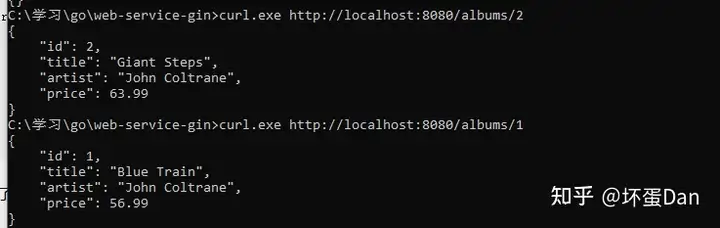
查找正常。
实现Add#
func postAlbums(c *gin.Context) {
	var newAlbum Album

	// Call BindJSON to bind the received JSON to
	// newAlbum.
	if err := c.BindJSON(&newAlbum); err != nil {
		return
	}

	_, err := db.Exec("INSERT INTO album (title, artist, price) VALUES (?, ?, ?)", newAlbum.Title, newAlbum.Artist, newAlbum.Price)

	if err != nil {
		fmt.Println("insert into db error", err)
		return
	}

	_isDirty = true // 将_isDirty置为true表示当前数据不是最新的,下次getall的时候就会去请求数据库拉取最新的数据

	c.IndentedJSON(http.StatusCreated, newAlbum)
}这里没啥好说的,和之前的基本一样,不过有一点就是我这里将_isDirty置为true,表示当前本地数据不是最新的,那么下次get all的时候就会去请求数据库拉取最新的数据。
在运行之前我们还需要改下test.json文件中的字段,id是不需要的,去掉。
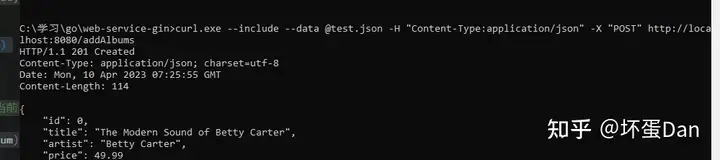
插入成功
然后再去get all
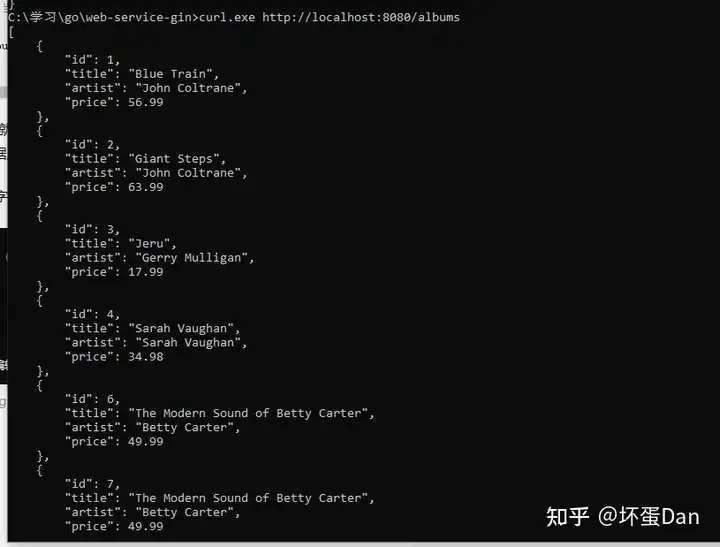
可以看到是最新的。
实现Edit#
这个是我们之前没有写过的,不过来都来了,增删改查怎么着都得过一遍。
func editAlbums(c *gin.Context) {
	var alb Album
	if err := c.BindJSON(&alb); err != nil {
		fmt.Println("something error when copy", err)
		return
	}
	fmt.Println(alb.Title, alb.Artist, alb.Price, alb.ID)
	_, err := db.Exec("UPDATE album SET title=?, artist=?, price=? WHERE id=?", alb.Title, alb.Artist, alb.Price, alb.ID)

	if err != nil {
		fmt.Println("insert into db error", err)
		return
	}

	_isDirty = true // 将_isDirty置为true表示当前数据不是最新的,下次getall的时候就会去请求数据库拉取最新的数据

	c.IndentedJSON(http.StatusCreated, alb)
}和add的基本一样,除了SQL语句不同。
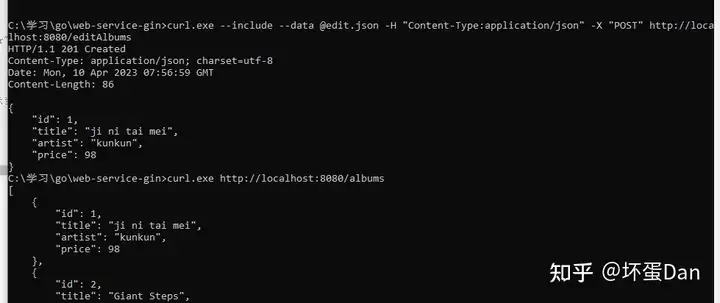
别忘了json文件中加上id并且得是int类型的,这次我们是用id来查找需要更新的对象。
bug#
我们前面写的缓存逻辑实际上是有问题的,albums里面的数据并没有清除,也就是说每次都是append,这样就会存在重复的数据,我们来改下
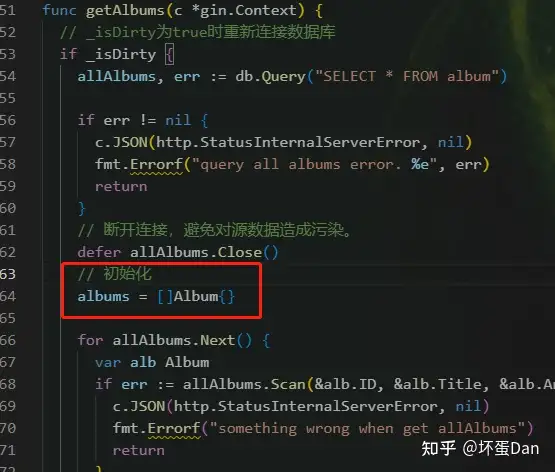
加上初始化逻辑即可。
实现Del#
type DelBody struct {
	Id string `json:"id"`
}

func delAlbum(c *gin.Context) {
	var reqBody DelBody

	bind_err := c.BindJSON(&reqBody)
	if bind_err != nil {
		fmt.Println("something wrong when bing data", bind_err)
		return
	}

	id := reqBody.Id

	_, err := db.Exec("DELETE FROM album WHERE id=?", id)

	if err != nil {
		fmt.Println("something wrong when delete album", err)
		return
	}

	_isDirty = true

	c.IndentedJSON(http.StatusOK, "delete success")
}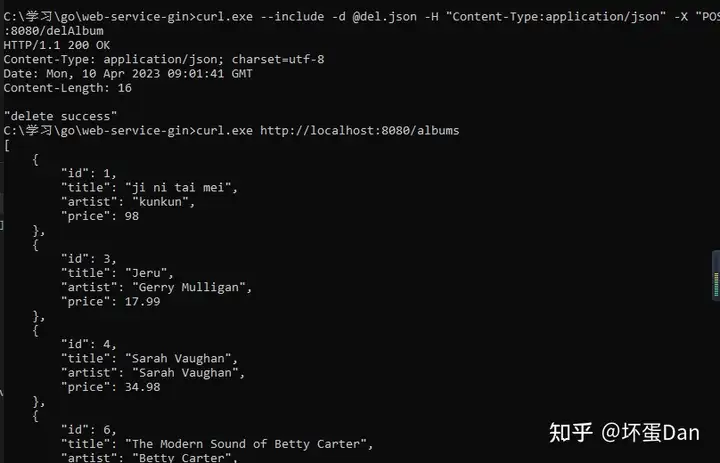
删除id为2的album
总结#
powerShell真的好多事。。。另外curl在window系统里一直没法直接传递数据,得用文件的方式来读取数据,如果有知道如何处理的大佬可以评论区说一下,不胜感激~
参考#
- ^Gin https://gin-gonic.com/docs/
- ^Context.IndentJSON https://pkg.go.dev/github.com/gin-gonic/gin#Context.IndentedJSON
- ^curl https://curl.se/docs/
- ^Contenxt.BindJSON https://pkg.go.dev/github.com/gin-gonic/gin#Context.BindJSON
发布于 2023-04-10 17:08・IP 属地广东