
前言#
昨天我们写了第一个hello world
坏蛋Dan:go基础学习--day2: Getting Start
今天我们来写我们第一个module
正文#
我们准备来搞俩module,一个library以及一个app用来调用这个library。
我们的步骤包含下面几步:
init俩module- 从
app module里调用library module里的方法 - 返回一个
error并且处理这个error - 基于
slices返回一个随机的gretting - 使用
Go内置测试单元特性编写测试代码 - 编译和安装
application,编译和在本地install我们的代码
初始化环境#
我们先创建一个文件夹day3,然后初始化
mkdir day3
mkdir day3/greetings
cd day3/greetings
go mod init example.com/greetings然后创建一个greetings.go的文件
package greetings

import "fmt"

// Hello returns a greeting for the named person.
func Hello(name string) string {
	// Return a greeting that embeds the name in a message.
	message := fmt.Sprintf("Hi, %v. Welcome!", name)
	return message
}这里我们定义了一个Hello的function,关键字func func_name(param param_type) return_type {}
大家应该都不会陌生,不过这里有个特殊的点就是函数参数的类型定义不需要:符号。
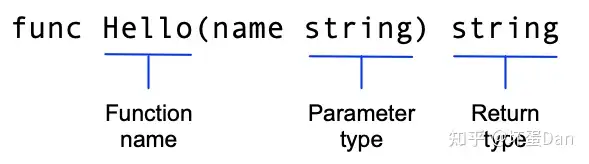
注意这里用了大写字母开头的Hello,这样这个函数就可以被其它包所调用,一般称之为export name[2]
另外这里还有我们没见过的语法:= ,实际上这是类型定义 + 初始赋值的语法糖写法。
相当于
var message string
message = fmt.Sprintf("Hi, %v. Welcome!", name)我们还调用了fmt这个包的Sprintf方法,它返回一个format之后的string,%v里的v自然就是verb,动态的。
创建另一个module#
我们再来搞个module来调用咱这个Hello方法。
cd ../
mkdir hello
cd hello
go mod init example.com/hello然后创建hello.go
package main

import (
    "fmt"

    "example.com/greetings"
)

func main() {
    // Get a greeting message and print it.
    message := greetings.Hello("Gladys")
    fmt.Println(message)
} main是我们的app入口,我们既需要声明package main,也需要声明main函数。
我们引入了greetings的包,引用了里面Hello的函数传入Gladys字符串之后将返回的值赋值给了message变量,然后打印它。
但是现在是会报错的,因为我们的greetings的包并没有发布到Go tools上,所以引入自然是找不到的。
当然,这里也有方法来引入。
go mod edit -replace example.com/greetings=../greetings 将引用的路径改为本地路径
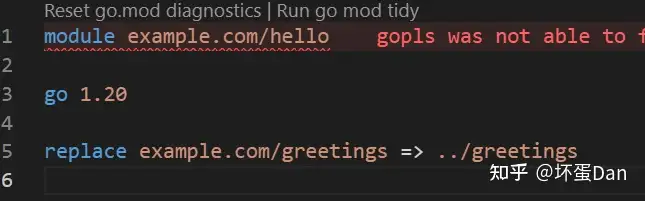
然后我们重新go mod tidy

现在可以了,当我们运行go run .的时候,会打印出这个message

不过我们这里还有一个IDE拓展报错的问题,比如这样

这是因为我们的工作区里有多个go module项目,我们可以通过配置go.work来解决这个问题
相关链接:tools/workspace.md at master · golang/tools (github.com)
不过需要注意,这是1.18引入的,只适用于1.18+的go module
我们回到day3目录中
go work init
go work use ./greetings ./hello 此时会在day3目录中引用这俩包,相当于rust的workspace的Cargo.toml。
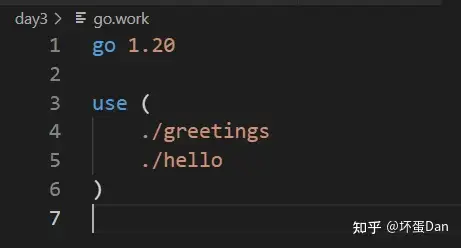
现在应该不会报错了
return and handle an error[4]
我们来给Hello方法加一个判断空值的场景,如果是空值,返回一个空字符和一个error
回到greetings.go文件中
package greetings

import (
	"errors"
	"fmt"
)

// Hello returns a greeting for the named person.
func Hello(name string) (string, error) {
	// If no name was given, return an error with a message.
	if name == "" {
		return "", errors.New("empty name")
	}

	// If a name was received, return a value that embeds the name
	// in a greeting message.
	message := fmt.Sprintf("Hi, %v. Welcome!", name)
	return message, nil
}这里我们引入了errors[5]这个标准库里的包,当判断传入的name是一个空字符的话,这个时候就会调用errors.New[6]方法返回一个error类型的数据以及一个空字符串。
nil表示没有错误的意思。

我们将字符串和error一起返回,类似元组的方式,具体可以看:https://golang.google.cn/doc/effective_go.html#multiple-returns
然后我们回到hello.go文件中
package main

import (
    "fmt"
    "log"

    "example.com/greetings"
)

func main() {
    // Set properties of the predefined Logger, including
    // the log entry prefix and a flag to disable printing
    // the time, source file, and line number.
    log.SetPrefix("greetings: ")
    log.SetFlags(0)

    // Request a greeting message.
    message, err := greetings.Hello("")
    // If an error was returned, print it to the console and
    // exit the program.
    if err != nil {
        log.Fatal(err)
    }

    // If no error was returned, print the returned message
    // to the console.
    fmt.Println(message)
} 我们引入了标准库中log[7] 这个包,这个包一看就是用来打印之类的。
Fatal方法会终止程序

当我们传入空字符串给Hello方法的时候,我们的程序会立即终止

现在流程打通了,我们来开始实现具体的逻辑了。
return a random greeting[8]
我们要从一组问候语中随机返回一个问候语,所以这里就需要有可存储问候语的地方。我们这里选择切片slice[9]而不是array数组,因为我们希望这个问候语个数是动态的,可以runtime的时候由别人增删。
我们回到greetings.go文件中
 package greetings

import (
	"errors"
	"fmt"
	"math/rand"
	"time"
)

// Hello returns a greeting for the named person.
func Hello(name string) (string, error) {
	// If no name was given, return an error with a message.
	if name == "" {
		return name, errors.New("empty name")
	}
	// Create a message using a random format.
	message := fmt.Sprintf(randomFormat(), name)
	return message, nil
}

// init sets initial values for variables used in the function.
func init() {
	rand.New(rand.NewSource(time.Now().UnixNano()))
}

// randomFormat returns one of a set of greeting messages. The returned
// message is selected at random.
func randomFormat() string {
	// A slice of message formats.
	formats := []string{
		"Hi, %v. Welcome!",
		"Great to see you, %v!",
		"Hail, %v! Well met!",
	}

	// Return a randomly selected message format by specifying
	// a random index for the slice of formats.
	return formats[rand.Intn(len(formats))]
}
我们这里引入了两个包:
init方法会被自动调用,想了解更多的请看:https://golang.google.cn/doc/effective_go.html#initrandomFormat方法中rand.Intn通过formats的长度来返回一个随机整数,这个整数在0-formats.len之间。
这里可以看到slice的定义方式是通过{}来包裹的。
然后我们回到hello.go文件中,我们把之前传入Hello的空字符串换成其它随便一个字符串
然后运行go run .
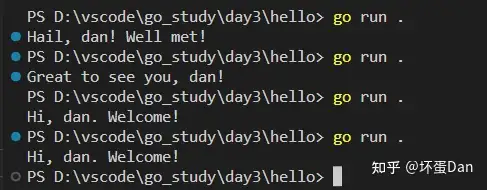
返回问候语给更多的人#
我们来改下我们的代码,让它可以一次给多个人打招呼。
我们回到greetings.go文件
package greetings

import (
	"errors"
	"fmt"
	"math/rand"
	"time"
)

// Hello returns a greeting for the named person.
func Hello(name string) (string, error) {
	// If no name was given, return an error with a message.
	if name == "" {
		return name, errors.New("empty name")
	}
	// Create a message using a random format.
	message := fmt.Sprintf(randomFormat(), name)
	return message, nil
}

// Hellos returns a map that associates each of the named people
// with a greeting message.
func Hellos(names []string) (map[string]string, error) {
	// A map to associate names with messages.
	messages := make(map[string]string)
	// Loop through the received slice of names, calling
	// the Hello function to get a message for each name.
	for _, name := range names {
		message, err := Hello(name)
		if err != nil {
			return nil, err
		}
		// In the map, associate the retrieved message with
		// the name.
		messages[name] = message
	}
	return messages, nil
}

// Init sets initial values for variables used in the function.
func init() {
	rand.New(rand.NewSource(time.Now().UnixNano()))
}

// randomFormat returns one of a set of greeting messages. The returned
// message is selected at random.
func randomFormat() string {
	// A slice of message formats.
	formats := []string{
		"Hi, %v. Welcome!",
		"Great to see you, %v!",
		"Hail, %v! Well met!",
	}

	// Return one of the message formats selected at random.
	return formats[rand.Intn(len(formats))]
}我们接收了一个slice名字切片,然后创建一个map[13]:messages,map的类型定义map[key_type]value_type,也就是key是string和value是string的一个map。
我们用for遍历这个names切片,然后调用Hello方法获取随机的招呼,之后再存储在messages这个map中。
最后我们将这个map返回出去。
注意这里的_也就是占位符,占位的原来是index,和rust中一样,如果我们不需要,可以直接用占位符替代。
然后我们再来修改下hello.go文件
package main

import (
    "fmt"
    "log"

    "example.com/greetings"
)

func main() {
    // Set properties of the predefined Logger, including
    // the log entry prefix and a flag to disable printing
    // the time, source file, and line number.
    log.SetPrefix("greetings: ")
    log.SetFlags(0)

    // A slice of names.
    names := []string{"Gladys", "Samantha", "Darrin"}

    // Request greeting messages for the names.
    messages, err := greetings.Hellos(names)
    if err != nil {
        log.Fatal(err)
    }
    // If no error was returned, print the returned map of
    // messages to the console.
    fmt.Println(messages)
} 这里没啥好说的,创建一个map,然后调用greetings.Hellos。
最后我们运行下go run .

编写测试代码#
我们回到greetings文件夹中,我们新建greetings_test.go文件
 package greetings

import (
    "testing"
    "regexp"
)

// TestHelloName calls greetings.Hello with a name, checking
// for a valid return value.
func TestHelloName(t *testing.T) {
    name := "Gladys"
    want := regexp.MustCompile(`\b`+name+`\b`)
    msg, err := Hello("Gladys")
    if !want.MatchString(msg) || err != nil {
        t.Fatalf(`Hello("Gladys") = %q, %v, want match for %#q, nil`, msg, err, want)
    }
}

// TestHelloEmpty calls greetings.Hello with an empty string,
// checking for an error.
func TestHelloEmpty(t *testing.T) {
    msg, err := Hello("")
    if msg != "" || err == nil {
        t.Fatalf(`Hello("") = %q, %v, want "", error`, msg, err)
    }
}文件名字带上_test告诉go编译器这是个带有测试代码的文件。
测试函数名规范是Test开头,它的参数是一个指针,指向testing包的type T[15] 。我也不知道是个啥。。。
可以用它输出log等。
Fatalf[16] 用来打印输出。
我们可以用go test[17]来执行测试代码

然后我们来传递错误的数据,来看下错误的输出
修改下Hello方法
// Hello returns a greeting for the named person.
func Hello(name string) (string, error) {
	// If no name was given, return an error with a message.
	if name == "" {
		return name, errors.New("empty name")
	}
	// Create a message using a random format.
	message := fmt.Sprintf(randomFormat())
	return message, nil
} 我们去掉了传递给randomFormat的name参数 ,然后重新运行go test

编译和安装#
和其他语言一样,go编译指令也是build[18] 。go编译器会将我们的代码编译成可执行的二进制文件。
这个可执行文件在不同操作系统中也是不一样的,在window操作系统中会生成.exe文件。
我们先进入hello文件夹中,执行go build
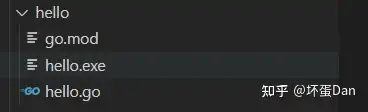
然后执行./hello.exe执行这个文件

然后我们来自定义安装的路径,默认应该是在user/go/bin/hello.exe,我们换一个地方,这样方便好找。
$ export PATH=$PATH:/path/to/your/install/directory // mac/linux
$addPath='C:\path\to\your\install\directory' // window 当然,不一定是c盘,我们可以放到D:\path\golang\install文件夹里$addPath='D:\golang\install' 环境变量加好了,我们来设置go的执行路径指向我们刚设置好的路径。
go env -w GOBIN=D:\golang\install 
这样就设置成功了。
我们来运行下go install
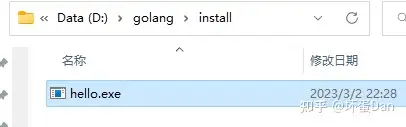
现在它就被下载到对应的位置去了,此时我们hello文件夹里的hello.exe文件就不见了。
当然,这是install,我们开发的时候还是build\run即可。
参考#
- ^create-a-go-module https://golang.google.cn/doc/tutorial/create-module
- ^export name https://golang.google.cn/tour/basics/3
- ^call your code form another module https://golang.google.cn/doc/tutorial/call-module-code
- ^return-and-handle-an-error https://golang.google.cn/doc/tutorial/handle-errors
- ^errors https://pkg.go.dev/errors
- ^errors.New https://pkg.go.dev/errors/#example-New
- ^log https://pkg.go.dev/log
- ^return a random greeting https://golang.google.cn/doc/tutorial/random-greeting
- ^Go slice https://blog.golang.org/slices-intro
- ^math/rand https://pkg.go.dev/math/rand
- ^time https://pkg.go.dev/time
- ^return a greeting for multiple people https://golang.google.cn/doc/tutorial/greetings-multiple-people
- ^Go map https://blog.golang.org/maps
- ^add a test https://golang.google.cn/doc/tutorial/add-a-test
- ^type T https://pkg.go.dev/testing#T
- ^Fatalf https://pkg.go.dev/testing/#T.Fatalf
- ^test command https://golang.google.cn/cmd/go/#hdr-Test_packages
- ^build https://golang.google.cn/cmd/go/#hdr-Compile_packages_and_dependencies
编辑于 2023-04-07 17:01・IP 属地广东