
前言#
我们刚确认了分析流程
坏蛋Dan:vue runtime源码分析学习——day3:确定后续分析流程
当然,也有可能在不同地方使用不同方式分析。。。
入口#
createApp这个方法在@vue/runtime-dom[1]这个包里面
也是作为我们开发者项目的入口
在看代码之前先确定下测试用例
选择测试用例#
packages\vue\__tests__\index.spec.ts直接选择第一个就好,这会没有特殊要求
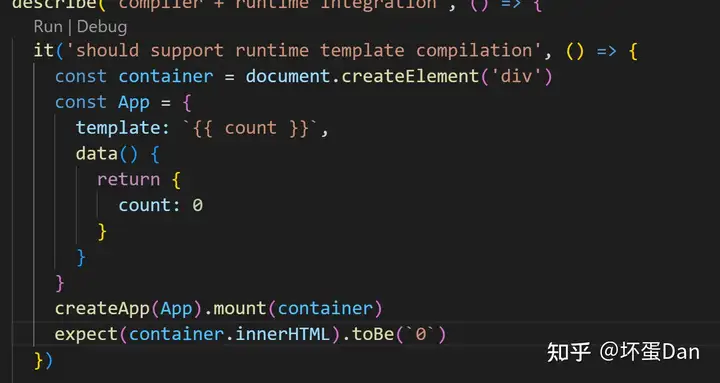
注意,这里在模拟client的环境,document.createElement就是client的东西,只有jest.config 中配置的testEevironment是jsdom时才能使用,并且要搭配jsdom这个包。
createApp#
export const createApp = ((...args) => {
  const app = ensureRenderer().createApp(...args)

  if (__DEV__) {
    injectNativeTagCheck(app)
    injectCompilerOptionsCheck(app)
  }

  const { mount } = app
  app.mount = (containerOrSelector: Element | ShadowRoot | string): any => {
    const container = normalizeContainer(containerOrSelector)
    if (!container) return

    const component = app._component
    if (!isFunction(component) && !component.render && !component.template) {
      // __UNSAFE__
      // Reason: potential execution of JS expressions in in-DOM template.
      // The user must make sure the in-DOM template is trusted. If it's
      // rendered by the server, the template should not contain any user data.
      component.template = container.innerHTML
      // 2.x compat check
      if (__COMPAT__ && __DEV__) {
        for (let i = 0; i < container.attributes.length; i++) {
          const attr = container.attributes[i]
          if (attr.name !== 'v-cloak' && /^(v-|:|@)/.test(attr.name)) {
            compatUtils.warnDeprecation(
              DeprecationTypes.GLOBAL_MOUNT_CONTAINER,
              null
            )
            break
          }
        }
      }
    }

    // clear content before mounting
    container.innerHTML = ''
    const proxy = mount(container, false, container instanceof SVGElement)
    if (container instanceof Element) {
      container.removeAttribute('v-cloak')
      container.setAttribute('data-v-app', '')
    }
    return proxy
  }

  return app
}) as CreateAppFunction<Element>ensureRenderer:这个方法我们放到下面去分析。这里看名字是创建一个renderer也就是渲染器。injectNativeTagCheck:这个方法代码就不看了,就是给这个app的config字段(这字段是一个对象),用Object.defineProperty给它绑定一个isNativeTag的方法,这个方法用来检测这个tag是否是符合要求的,在这里app就是一个组件,所以这里是用来检测app的tag是不是原生的tag。原生tag有两种:1.svg: https://developer.mozilla.org/en-US/docs/Web/SVG/Element; 2.html: https://developer.mozilla.org/en-US/docs/Web/HTML/Element。injectCompilerOptionsCheck:这玩意儿是用来检测runtime-only是否还在用compiler相关的东西,比如app.config.compilerOptions,这个是runtime-compiler才会访问的,然后给出警告。
注意injectCompilerOptionsCheck和injectNativeTagCheck都是dev only的,也就是说prod版本不会有检测。一般也不需要,因为如果你这组件的tag不符合,在dev阶段应该就已经测试出来了。至于为啥都要用Object.defineProperty来绑定,大概是防止被覆盖掉了。重写set或者writable置为false。
normalizeContainer:这个代码也没啥好看的。如果你这个传入的selector是一个string,那么就调用document.querySelector获取对应的dom并返回,否则直接返回。
这里面做的事情挺好理解的:
- 调用
ensureRenderer,生成渲染器并缓存 - 调用渲染器的
createApp,生成app实例 - 封装
app的mount方法:
- 获取挂载
dom对象,也就是container; - 清空它的所有子
dom; - 兼容
2.x写法,3.x不支持在挂载对象上使用指令,3.x中它被视为template之外的部分; - 调用原来
app的mount方法挂载到挂载对象上,并创建代理对象; - 去掉挂载对象的
v-cloak[2],因为此时渲染完毕了; - 返回代理对象
- **注意:**如果
app,在这里也就是我们的component如果没有render function,也没有template,那么它会直接使用原来container的innerHTML作为它的template。
而ensureRenderer、createApp以及mount三个方法我们接下来再分析。
ensureRenderer#
function ensureRenderer() {
  return (
    renderer ||
    (renderer = createRenderer<Node, Element | ShadowRoot>(rendererOptions))
  )
}

export function createRenderer<
  HostNode = RendererNode,
  HostElement = RendererElement
>(options: RendererOptions<HostNode, HostElement>) {
  return baseCreateRenderer<HostNode, HostElement>(options)
}

// overload 1: no hydration
function baseCreateRenderer<
  HostNode = RendererNode,
  HostElement = RendererElement
>(options: RendererOptions<HostNode, HostElement>): Renderer<HostElement>

// overload 2: with hydration
function baseCreateRenderer(
  options: RendererOptions<Node, Element>,
  createHydrationFns: typeof createHydrationFunctions
): HydrationRenderer

// implementation
function baseCreateRenderer(
  options: RendererOptions,
  createHydrationFns?: typeof createHydrationFunctions
): any {
  // ...省略一堆方法
  return {
    render,
    hydrate,
    createApp: createAppAPI(render, hydrate)
  }
}baseCreateRenderer开头三个名字一样的function,之前有提到过这是typescript提供的一种重载,可以支持不同参数。
baseCreateRenderer这个方法非常非常长,有将近2000行,所以这里就不贴出来了,到时候我们有遇到我们再具体分析。
这里我们要分析的是createApp这个方法,而它使用了createAppApi、render这俩方法
我们先来看下createAppApi
let uid = 0

export function createAppAPI<HostElement>(
  render: RootRenderFunction<HostElement>,
  hydrate?: RootHydrateFunction
): CreateAppFunction<HostElement> {
  return function createApp(rootComponent, rootProps = null) {
    if (!isFunction(rootComponent)) {
      rootComponent = { ...rootComponent }
    }

    if (rootProps != null && !isObject(rootProps)) {
      __DEV__ && warn(`root props passed to app.mount() must be an object.`)
      rootProps = null
    }

    const context = createAppContext()
    const installedPlugins = new Set()

    let isMounted = false

    const app: App = (context.app = {
      _uid: uid++,
      _component: rootComponent as ConcreteComponent,
      _props: rootProps,
      _container: null,
      _context: context,
      _instance: null,

      version,

      get config() {
        return context.config
      },

      set config(v) {
        if (__DEV__) {
          warn(
            `app.config cannot be replaced. Modify individual options instead.`
          )
        }
      },

      use(plugin: Plugin, ...options: any[]) {
        if (installedPlugins.has(plugin)) {
          __DEV__ && warn(`Plugin has already been applied to target app.`)
        } else if (plugin && isFunction(plugin.install)) {
          installedPlugins.add(plugin)
          plugin.install(app, ...options)
        } else if (isFunction(plugin)) {
          installedPlugins.add(plugin)
          plugin(app, ...options)
        } else if (__DEV__) {
          warn(
            `A plugin must either be a function or an object with an "install" ` +
              `function.`
          )
        }
        return app
      },

      mixin(mixin: ComponentOptions) {
        if (__FEATURE_OPTIONS_API__) {
          if (!context.mixins.includes(mixin)) {
            context.mixins.push(mixin)
          } else if (__DEV__) {
            warn(
              'Mixin has already been applied to target app' +
                (mixin.name ? `: ${mixin.name}` : '')
            )
          }
        } else if (__DEV__) {
          warn('Mixins are only available in builds supporting Options API')
        }
        return app
      },

      component(name: string, component?: Component): any {
        if (__DEV__) {
          validateComponentName(name, context.config)
        }
        if (!component) {
          return context.components[name]
        }
        if (__DEV__ && context.components[name]) {
          warn(`Component "${name}" has already been registered in target app.`)
        }
        context.components[name] = component
        return app
      },

      directive(name: string, directive?: Directive) {
        if (__DEV__) {
          validateDirectiveName(name)
        }

        if (!directive) {
          return context.directives[name] as any
        }
        if (__DEV__ && context.directives[name]) {
          warn(`Directive "${name}" has already been registered in target app.`)
        }
        context.directives[name] = directive
        return app
      },

      mount(
        rootContainer: HostElement,
        isHydrate?: boolean,
        isSVG?: boolean
      ): any {
        if (!isMounted) {
          // #5571
          if (__DEV__ && (rootContainer as any).__vue_app__) {
            warn(
              `There is already an app instance mounted on the host container.\n` +
                ` If you want to mount another app on the same host container,` +
                ` you need to unmount the previous app by calling \`app.unmount()\` first.`
            )
          }
          const vnode = createVNode(
            rootComponent as ConcreteComponent,
            rootProps
          )
          // store app context on the root VNode.
          // this will be set on the root instance on initial mount.
          vnode.appContext = context

          // HMR root reload
          if (__DEV__) {
            context.reload = () => {
              render(cloneVNode(vnode), rootContainer, isSVG)
            }
          }

          if (isHydrate && hydrate) {
            hydrate(vnode as VNode<Node, Element>, rootContainer as any)
          } else {
            render(vnode, rootContainer, isSVG)
          }
          isMounted = true
          app._container = rootContainer
          // for devtools and telemetry
          ;(rootContainer as any).__vue_app__ = app

          if (__DEV__ || __FEATURE_PROD_DEVTOOLS__) {
            app._instance = vnode.component
            devtoolsInitApp(app, version)
          }

          return getExposeProxy(vnode.component!) || vnode.component!.proxy
        } else if (__DEV__) {
          warn(
            `App has already been mounted.\n` +
              `If you want to remount the same app, move your app creation logic ` +
              `into a factory function and create fresh app instances for each ` +
              `mount - e.g. \`const createMyApp = () => createApp(App)\``
          )
        }
      },

      unmount() {
        if (isMounted) {
          render(null, app._container)
          if (__DEV__ || __FEATURE_PROD_DEVTOOLS__) {
            app._instance = null
            devtoolsUnmountApp(app)
          }
          delete app._container.__vue_app__
        } else if (__DEV__) {
          warn(`Cannot unmount an app that is not mounted.`)
        }
      },

      provide(key, value) {
        if (__DEV__ && (key as string | symbol) in context.provides) {
          warn(
            `App already provides property with key "${String(key)}". ` +
              `It will be overwritten with the new value.`
          )
        }

        context.provides[key as string | symbol] = value

        return app
      }
    })

    if (__COMPAT__) {
      installAppCompatProperties(app, context, render)
    }

    return app
  }
}这个createAppAPI的方法是runtime-core里的方法。
它返回一个createApp的方法,这样render/hydrate就会被缓存了。
createAppContext:看下代码,记下这些字段,后面我们会遇到
export function createAppContext(): AppContext {
  return {
    app: null as any,
    config: {
      isNativeTag: NO,
      performance: false,
      globalProperties: {},
      optionMergeStrategies: {},
      errorHandler: undefined,
      warnHandler: undefined,
      compilerOptions: {}
    },
    mixins: [],
    components: {},
    directives: {},
    provides: Object.create(null),
    optionsCache: new WeakMap(),
    propsCache: new WeakMap(),
    emitsCache: new WeakMap()
  }
}app中的属性相信大家看着都眼熟,方法也是。
use:这个相信大家都很熟悉,在我们使用vuex/vue-router的时候就需要先app.use才能使用,实际上这是在注册,而注册的规范是实现install这个方法,类似webpack需要插件实现apply的方法。当然,install不是必要的,如果你不想写对象的形式,直接传入一个函数也是可以的,它将作为install方法注册安装到插件集合中。具体可以看官方的文档:Plugins | Vue.js (vuejs.org),注意这里把app返回了,这也就是为什么可以链式调用的原因。mixin:这个也是老熟人了,全局注册的mixin会被应用于所有的组件,当组件create的时候就会注册,而且是最先注册,要符合组件自身的mixin优先级高的理念。当然,3.x中已经不推荐了mixin,只有在支持option api的情况下才可以使用,关键key就是__FETAURE_OPTIONS_API__。component:也是熟人,注册全局组件就是在这。directive:同上,注册全局指令。unmount:isMounted是一个闭包缓存的标志位,用于判断是否已经渲染到html中了。先调用render方法将当前dom在container中注销。如果侦测到vue-devTool,调用devtoolsUnmountApp方法注销当前dom在devtool里面的注册。然后移除当前dom的container对当前dom的引用,避免内存泄漏。provide[3]: 就是将provide的内容注册到context中。这个context贯穿整个app,所以多深的组件多可以inject到。installAppCompatProperties:这个方法是用于兼容v2的一些方法指令的,比如filter等。这里就不看了,以后兼容性的代码我们就不看了。
**mount**注意这里用的是createVNode,而不是createVNodeCall。这里创建的是一个VNode节点,而我们之前分析的compiler-core用的是createVNodeCall,创建的是一个函数,函数调用后才会返回一个VNode,辅助函数就是createVNode。
然后这里使我们第一次在runtime阶段遇到reload,也就是热更新相关的功能,这个和我们正vue-loader中发现的热更新代码是有关联的。
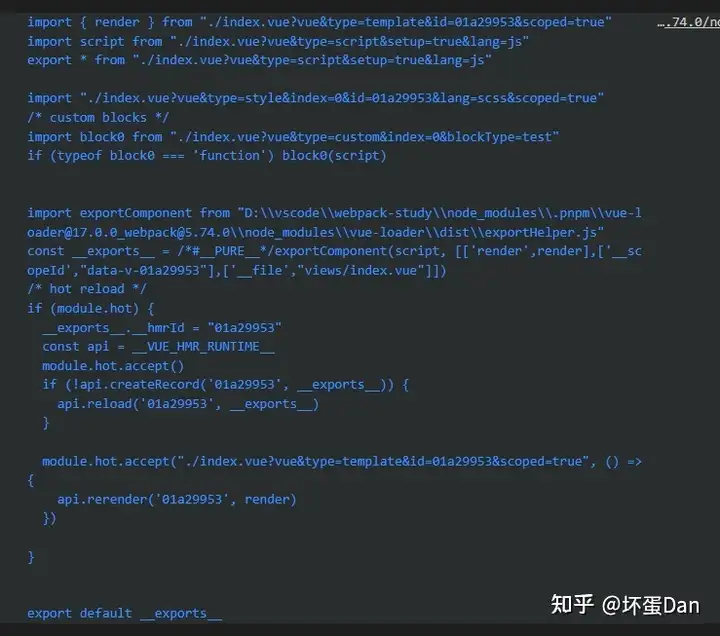
可以看到vue-loader中的__VUE_HMR_RUNTIME__是目标对象,它的reload方法和我们这里的reload应该是同一个,不过它没有接受参数,为什么呢?因为这个是根组件,它的reload自然不需要确认是哪个组件。
render方法我们先不分析,等下开个一级标题,内容较多。createVNode:这个方法我们这里也不分析,放下面,就是基于VNodeCall节点创建Vnode。cloneVNode:这个方法暂时就不看代码了,后面我们有空再说,简单的说就是将这个节点的所有数据都clone一遍,注意是deep的,当然,没有用JSON.stringify这种操作,这种操作也是很危险的,因为有些数据在parse回来会有问题。 这里采用的是递归处理。hydrate:这个暂时不清楚是什么东西,mark下。devtoolsInitApp:就是将当前的app组件注册到devTool里面,这样能被vue-devTool捕获,用于调试等。
这个mount方法是app挂载的核心入口,这里核心就两件事:
- 将
vnodecall也就是render function转换成vnode。 - 将
vnode通过patch打补丁到html上,方法是render。
这就是从js变成html的过程。
那么这个app就创建好了。
等到createApp.mount的时候,vnodecall就变成vnode然后再变成真实dom。
这里我们暂时不看vnode的生成也就是createVnode方法里面做了什么,看一下一个vnode结构即可。
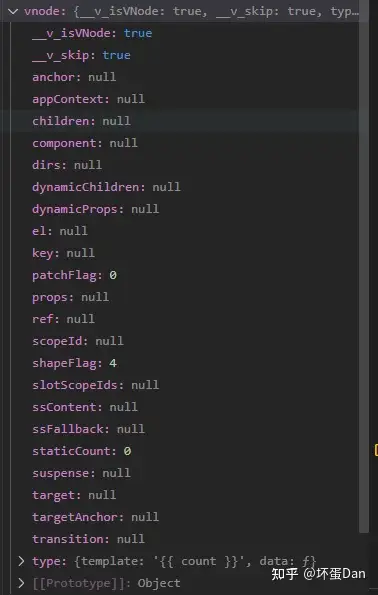
记住这个vnode的结构,我们开发的时候会经常遇到。
render#
  const render: RootRenderFunction = (vnode, container, isSVG) => {
    if (vnode == null) {
      if (container._vnode) {
        unmount(container._vnode, null, null, true)
      }
    } else {
      patch(container._vnode || null, vnode, container, null, null, null, isSVG)
    }
    flushPreFlushCbs()
    flushPostFlushCbs()
    container._vnode = vnode
}注意这里的unmount,如果已经有_vnode了,这个时候就意味着已经是patch到浏览器上的真实dom了。如果此时当前vnode变成了null,那么它就应该在真实dom中被移除了。
如果没有直接patch。
同样patch方法我这里也不准备说,因为这个方法是核心之一,负责diff,然后渲染。
flushPreFlushCbs:代码就不看了,这里我们暂时还不知道是在做什么,后面如果直到了再贴代码分析。简单的说就是处理队列中有pre == true属性的回调。flushPostFlushCbs:这里同上一样不贴代码,简单的说就是将一些pending状态的回调放到activePostFlushCbs里面并且根据id进行排序。如果此时还有active的回调,那就return,但是如果没有此时并没有,那就挨个处理。这里可以猜测是和$nextTick有关的,每一个tick都有回调需要处理,如果没处理完就放到一起下一个tick再处理。
最后再把vnode重新赋值给container._vnode,这个container是真实dom。
因为patch的原因,此时vnode已经被转换为真实dom并渲染到浏览器上去了。
这里注意一点,container._vnode这一步缓存的旧的vnode,每次patch都会被更新。
而patch就是比对的这个container._vnode和传入的最新的vnode。
以前看别人的教程,都没有提到这一步,导致我一直很疑惑旧的vnode从哪里来的。
总结#
今天分析的有些水,但createApp大体流程应该是可以知道了的。
- 获取真实
dom,也就是我们需要挂载的app的根节点,一般都是#app。 - 组装
appContext,这里面包含了一些api,比如use、mount、umount等。 createApp返回appContext实例。use方法中调用传入的插件的install方法,然后将插件注册到全局的installPlugins中。mount方法中接收vnodecall也就是sfc被处理成的render function,在这里进行被转换成vnode。然后调用render方法。render方法中调用patch方法对新的vnode进行diff操作,这个操作涉及到真实dom,此时已经从vnode变成真实dom了,也就是通过document.createElement方法生成的dom,并且被append/innerHTML到浏览器上的container里面。
参考#
- ^@vue/runtime-dom https://github.com/vuejs/core/tree/main/packages/runtime-dom
- ^vue_v-cloak https://vuejs.org/api/built-in-directives.html#v-cloak
- ^vue-provide-inject https://vuejs.org/guide/components/provide-inject.html#provide-inject
发布于 2023-02-17 15:32・IP 属地广东