
前言#
昨天我们找到了入口,今天我们就跟着入口开启分析学习template之旅。
坏蛋Dan:vue/compiler-sfc源码分析学习--part3:如何处理template--day1
选择测试单元#
没啥好说的,我们先在__tests__文件夹中创建个vue文件,然后复制到单元测试文件中,争取这个测试单元小而全。
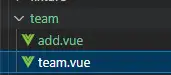
其中add.vue是team.vue的组件,这是一个展示happy小组成员的组件,也可以添加人员,上限10人
<template>
  <div class="wrapper">
    <Add @handleAdd="handleAdd" :team-max-num="teamMaxNum" />
    <div class="team_name">here are team worker of team: {{ teamName }}</div>
    <div v-for="item in list" :key="item.id">
      <p>hi! i am {{ item.name }},</p>
      <p>i am {{ item.age }} age old,</p>
      <p>my job is {{ item.job }},</p>
      <p @click="handleChangeColor">i am glad to met you!</p>
      <p v-if="item.gender === 'man'">Do you like van♂ you xi?</p>
      <p v-else>You don't love me anymore</p>
    </div>
    <div class="total">total: {{ totalNum }}</div>
    <div class="max">the upper limit is {{ teamMaxNum }}</div>
  </div>
</template>

<script setup>
import { reactive, ref, computed } from "vue";
import Add from './add.vue';
const color = ref("#000");
const data = await getData();
const list = reactive(data);
const totalNum = computed(() => list.length);
const { teamName, teamMaxNum } = defineProps({
  teamName: {
    type: String,
    default: "happy",
  },
  teamMaxNum: {
    type: Number,
    default: 10,
  },
});


function getData() {
  return [
    {
      id: 0,
      name: "jack",
      age: 18,
      gender: "man",
      job: "IT",
    },
    {
      id: 1,
      name: "dan",
      age: 28,
      gender: "man",
      job: "IT",
    },
    {
      id: 2,
      name: "marry",
      age: 18,
      gender: "female",
      job: "IT",
    },
  ];
}
function handleChangeColor() {
  color.value = "#0fe";
}

function handleAdd (item) {
  if (list.length >= teamMaxNum) {
    alert('here is upper limit!');
    return
  }
  list.push(item);
}

</script>

<style lang="scss" scoped>
.wrapper {
  color: v-bind(color);
}
</style>而add.vue代码如下
<template>
  <div class="add_mem_box">
    <div>name: <input type="text" ref="memInput" v-model="man.name" /></div>
    <div>
      age: <input type="number" name="age" id="age" v-model="man.age" />
    </div>
    <div>
      gender:
      <input
        type="checkbox"
        id="man"
        name="man"
        v-model="man.gender"
        checked
        value="man"
      />
      <label for="man">man</label>
      <input
        type="checkbox"
        id="female"
        name="female"
        v-model="man.gender"
        value="female"
      />
      <label for="female">female</label>
    </div>
    <div>job: <input type="text" v-model="man.job" /></div>
    <div class="btn" @click="handleAdd">save</div>
  </div>
</template>

<script setup>
const man = reactive({
  name: '',
  age: -1,
  gender: 'man',
  job: ''
})
const props = defineProps({
  teamMaxNum: {
    type: Number,
    default: 10
  }
})

const emits = defineEmits(['handleAdd'])

function handleAdd() {
  emits('handleAdd', man)
}
</script>

<style lang="scss" scoped></style>
ok,现在去到我们的compileTemplate.spec.ts文件中。
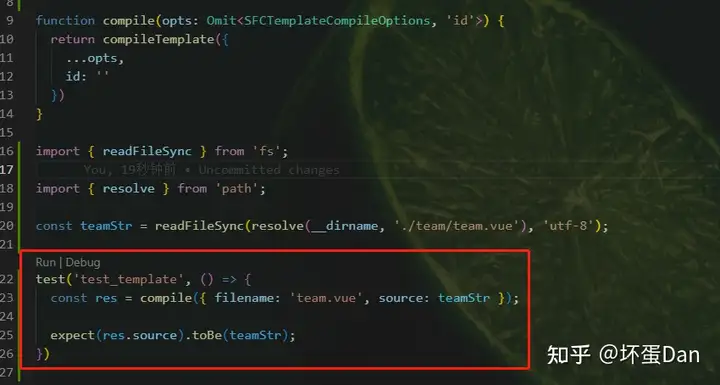
然后debug试下
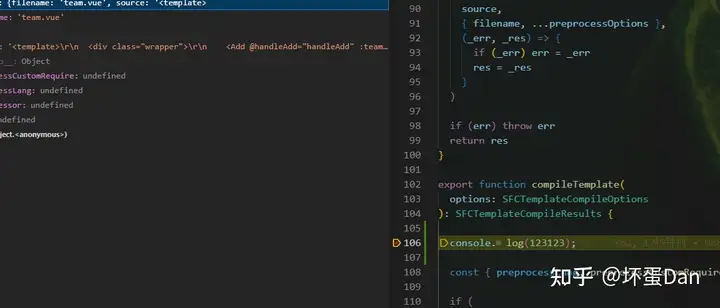
成功!
不过目前不清楚里面的逻辑有没有问题,毕竟这块代码我没放到浏览器中跑过,所以并不清楚有没有问题。
不过怕啥,后面有问题咱再调整。
另外肯定有些地方得二选一或者三选一的,所以后面可能会切换其它测试单元用于调试。
compileTemplate函数#
我们这里不分析ssr的情况。
export function compileTemplate(
  options: SFCTemplateCompileOptions
): SFCTemplateCompileResults {

  const { preprocessLang, preprocessCustomRequire } = options

  if (
    (__ESM_BROWSER__ || __GLOBAL__) &&
    preprocessLang &&
    !preprocessCustomRequire
  ) {
    throw new Error(
      `[@vue/compiler-sfc] Template preprocessing in the browser build must ` +
        `provide the \`preprocessCustomRequire\` option to return the in-browser ` +
        `version of the preprocessor in the shape of { render(): string }.`
    )
  }

  const preprocessor = preprocessLang
    ? preprocessCustomRequire
      ? preprocessCustomRequire(preprocessLang)
      : __ESM_BROWSER__
      ? undefined
      : consolidate[preprocessLang as keyof typeof consolidate]
    : false
  if (preprocessor) {
    try {
      return doCompileTemplate({
        ...options,
        source: preprocess(options, preprocessor)
      })
    } catch (e: any) {
      return {
        code: `export default function render() {}`,
        source: options.source,
        tips: [],
        errors: [e]
      }
    }
  } else if (preprocessLang) {
    return {
      code: `export default function render() {}`,
      source: options.source,
      tips: [
        `Component ${options.filename} uses lang ${preprocessLang} for template. Please install the language preprocessor.`
      ],
      errors: [
        `Component ${options.filename} uses lang ${preprocessLang} for template, however it is not installed.`
      ]
    }
  } else {
    return doCompileTemplate(options)
  }
}__ESM_BROWSER__: 当前是否是支持ESM的浏览器__GLOBAL__: 全局变量,具体还不知道是啥preprocessLang: 说实话我并不清楚这个字段是用于干啥的,只能是通过代码和名字推测这个是用来预处理template的,在开始编译template之前。preprocessCustomRequire: 预处理函数,格式得是{ render(): string }这样。consolidate这是一个包@vue/consolidate[1] 。这是一个用于合并模板引擎的库,它把这些个模板的库合并到一起去了,你可以调用里面的任何一种模板引擎来预处理template
那么这一大段就没什么好说的了,简单的说就是判断开发者是否使用了其它开发语言(比如coffeeScript[2]),如果有这里就需要预处理了,会先预处理template,然后才会调用doCompileTemplate方法处理后续。
doCompileTemplate#
function doCompileTemplate({
  filename,
  id,
  scoped,
  slotted,
  inMap,
  source,
  ssr = false,
  ssrCssVars,
  isProd = false,
  compiler = ssr ? (CompilerSSR as TemplateCompiler) : CompilerDOM,
  compilerOptions = {},
  transformAssetUrls
}: SFCTemplateCompileOptions): SFCTemplateCompileResults {
  const errors: CompilerError[] = []
  const warnings: CompilerError[] = []

  let nodeTransforms: NodeTransform[] = []
  if (isObject(transformAssetUrls)) {
    const assetOptions = normalizeOptions(transformAssetUrls)
    nodeTransforms = [
      createAssetUrlTransformWithOptions(assetOptions),
      createSrcsetTransformWithOptions(assetOptions)
    ]
  } else if (transformAssetUrls !== false) {
    nodeTransforms = [transformAssetUrl, transformSrcset]
  }

  if (ssr && !ssrCssVars) {
    warnOnce(
      `compileTemplate is called with \`ssr: true\` but no ` +
        `corresponding \`cssVars\` option.\`.`
    )
  }
  if (!id) {
    warnOnce(`compileTemplate now requires the \`id\` option.\`.`)
    id = ''
  }

  const shortId = id.replace(/^data-v-/, '')
  const longId = `data-v-${shortId}`

  let { code, ast, preamble, map } = compiler.compile(source, {
    mode: 'module',
    prefixIdentifiers: true,
    hoistStatic: true,
    cacheHandlers: true,
    ssrCssVars:
      ssr && ssrCssVars && ssrCssVars.length
        ? genCssVarsFromList(ssrCssVars, shortId, isProd, true)
        : '',
    scopeId: scoped ? longId : undefined,
    slotted,
    sourceMap: true,
    ...compilerOptions,
    nodeTransforms: nodeTransforms.concat(compilerOptions.nodeTransforms || []),
    filename,
    onError: e => errors.push(e),
    onWarn: w => warnings.push(w)
  })

  // inMap should be the map produced by ./parse.ts which is a simple line-only
  // mapping. If it is present, we need to adjust the final map and errors to
  // reflect the original line numbers.
  if (inMap) {
    if (map) {
      map = mapLines(inMap, map)
    }
    if (errors.length) {
      patchErrors(errors, source, inMap)
    }
  }

  const tips = warnings.map(w => {
    let msg = w.message
    if (w.loc) {
      msg += `\n${generateCodeFrame(
        source,
        w.loc.start.offset,
        w.loc.end.offset
      )}`
    }
    return msg
  })

  return { code, ast, preamble, source, errors, tips, map }
}
代码稍微有些长,但是很容易理解。
处理资源路径#
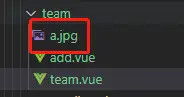
transformAssetsUrls: 处理资源链接,比如这种~assets/xxx.png,由于我们的代码中没有这东西,所以我们调整下测试单元
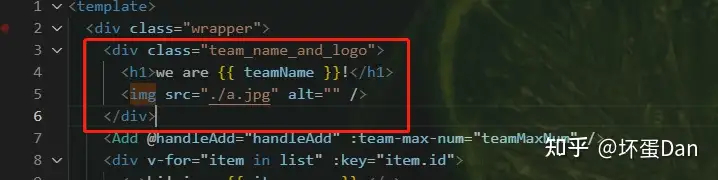
normalizeOptions: 来看下代码
export const normalizeOptions = (
  options: AssetURLOptions | AssetURLTagConfig
): Required<AssetURLOptions> => {
  if (Object.keys(options).some(key => isArray((options as any)[key]))) {
    // legacy option format which directly passes in tags config
    return {
      ...defaultAssetUrlOptions,
      tags: options as any
    }
  }
  return {
    ...defaultAssetUrlOptions,
    ...options
  }

export const defaultAssetUrlOptions: Required<AssetURLOptions> = {
  base: null,
  includeAbsolute: false,
  tags: {
    video: ['src', 'poster'],
    source: ['src'],
    img: ['src'],
    image: ['xlink:href', 'href'],
    use: ['xlink:href', 'href']
  }
}defaultAssetUrlOptions: 这里面都是可能使用到本地资源的属性。createAssetUrlTransformWithOptions: 这块代码放到"其它"中,就不影响这边了,要不然一贴代码上下拉的太长找不到说的地方了,简单的说下就是处理可能带有链接的属性,比如src、href等,毕竟引用的资源有很多种情况。createSrcsetTransformWithOptions: 同上,简单的说就是单独处理img的srcset属性,具体分析在"其它"中。compiler.compile: 这里的compiler指的是@vue/compiler-dom[3] 。简单说一下,template转换为render function这一步骤就是在这个包里面做的,但我们现在不去分析这个包,以后再单独去分析,这里只需要知道把源码source转换为render function即可。
简单的说一下。。。没什么好说的。。就是调用@vue/compiler-dom转换成render function然后返回。
来看下最终的数据
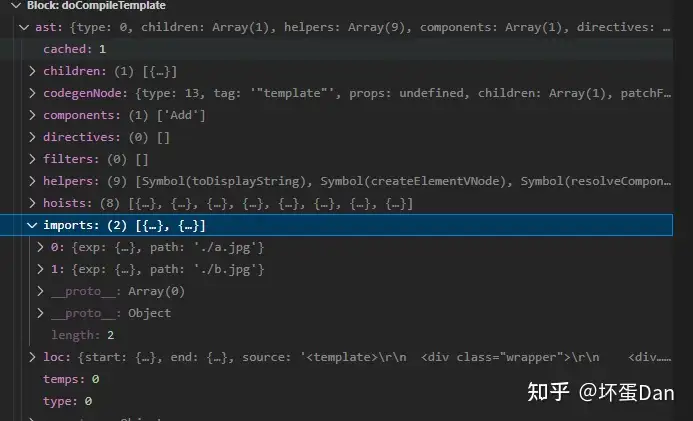
由于最终的代码太长,截图截不全,所以这里就直接以代码的形式展示出来了。
import {
  toDisplayString as _toDisplayString,
  createElementVNode as _createElementVNode,
  resolveComponent as _resolveComponent,
  createVNode as _createVNode,
  renderList as _renderList,
  Fragment as _Fragment,
  openBlock as _openBlock,
  createElementBlock as _createElementBlock,
  createCommentVNode as _createCommentVNode
} from "vue";
import _imports_0 from './ a.jpg';
import _imports_1 from './ b.jpg';
const _hoisted_1 = _imports_0 + ' 1x, ' + _imports_1 + ' 2x';
const _hoisted_2 = {
  class: "wrapper"
};
const _hoisted_3 = {
  class: "team_name_and_logo"
};
const _hoisted_4 = /*#__PURE__*/ _createElementVNode("img", {
  src: _imports_0,
  alt: "",
  srcset: _hoisted_1
}, null, -1 /* HOISTED */ );
const _hoisted_5 = {
  key: 0
};
const _hoisted_6 = {
  key: 1
};
const _hoisted_7 = {
  class: "total"
};
const _hoisted_8 = {
  class: "max"
};
export function render(_ctx, _cache) {
  const _component_Add = _resolveComponent("Add");
  return (
    _openBlock(),
    _createElementBlock("template", null,
      [_createElementVNode("div", _hoisted_2,
        [_createElementVNode("div", _hoisted_3,
            [_createElementVNode("h1", null, "we are " + _toDisplayString(_ctx.teamName) + "!", 1 /* TEXT */ ), _hoisted_4]),
          _createVNode(_component_Add, {
            onHandleAdd: _ctx.handleAdd,
            "team-max-num": _ctx.teamMaxNum
          }, null, 8 /* PROPS */ , ["onHandleAdd", "team-max-num"]),
          (_openBlock(true),
            _createElementBlock(_Fragment, null,
              _renderList(_ctx.list, (item) => {
                return (_openBlock(), _createElementBlock("div", {
                    key: item.id
                  },
                  [_createElementVNode("p", null, "hi! i am " + _toDisplayString(item.name) + ",", 1 /* TEXT */ ),
                    _createElementVNode("p", null, "i am " + _toDisplayString(item.age) + " age old,", 1 /* TEXT */ ),
                    _createElementVNode("p", null, "my job is " + _toDisplayString(item.job) + ",", 1 /* TEXT */ ),
                    _createElementVNode("p", {
                      onClick: _cache[0] || (_cache[0] = (...args) => (_ctx.handleChangeColor && _ctx.handleChangeColor(...args)))
                    }, "i am glad to met you!"), (item.gender === 'man') ? (_openBlock(), _createElementBlock("p", _hoisted_5, "Do you like van♂ you xi?")) : (_openBlock(), _createElementBlock("p", _hoisted_6, "You don't love me anymore"))
                  ]))
              }), 128 /* KEYED_FRAGMENT */ )),
              _createElementVNode("div", _hoisted_7, "total: " + _toDisplayString(_ctx.totalNum), 1 /* TEXT */ ), _createElementVNode("div", _hoisted_8, "the upper limit is " + _toDisplayString(_ctx.teamMaxNum), 1 /* TEXT */ )
        ])
      ]
    )
  )
}这就是一大段runtime的js代码,从这里你也应该能看出来template其实到最后也就是一段js代码。
这段代码会在浏览器执行的某个过程中执行。
其中_createElementBlock等都是一些runtime辅助函数。
其它#
createAssetUrlTransformWithOptions#
先看下代码
export const createAssetUrlTransformWithOptions = (
  options: Required<AssetURLOptions>
): NodeTransform => {
  return (node, context) =>
    (transformAssetUrl as Function)(node, context, options)
}


export const transformAssetUrl: NodeTransform = (
  node,
  context,
  options: AssetURLOptions = defaultAssetUrlOptions
) => {
  if (node.type === NodeTypes.ELEMENT) {
    if (!node.props.length) {
      return
    }

    const tags = options.tags || defaultAssetUrlOptions.tags
    const attrs = tags[node.tag]
    const wildCardAttrs = tags['*']
    if (!attrs && !wildCardAttrs) {
      return
    }

    const assetAttrs = (attrs || []).concat(wildCardAttrs || [])
    node.props.forEach((attr, index) => {
      if (
        attr.type !== NodeTypes.ATTRIBUTE ||
        !assetAttrs.includes(attr.name) ||
        !attr.value ||
        isExternalUrl(attr.value.content) ||
        isDataUrl(attr.value.content) ||
        attr.value.content[0] === '#' ||
        (!options.includeAbsolute && !isRelativeUrl(attr.value.content))
      ) {
        return
      }

      const url = parseUrl(attr.value.content)
      if (options.base && attr.value.content[0] === '.') {
        // explicit base - directly rewrite relative urls into absolute url
        // to avoid generating extra imports
        // Allow for full hostnames provided in options.base
        const base = parseUrl(options.base)
        const protocol = base.protocol || ''
        const host = base.host ? protocol + '//' + base.host : ''
        const basePath = base.path || '/'

        // when packaged in the browser, path will be using the posix-
        // only version provided by rollup-plugin-node-builtins.
        attr.value.content =
          host +
          (path.posix || path).join(basePath, url.path + (url.hash || ''))
        return
      }

      // otherwise, transform the url into an import.
      // this assumes a bundler will resolve the import into the correct
      // absolute url (e.g. webpack file-loader)
      const exp = getImportsExpressionExp(url.path, url.hash, attr.loc, context)
      node.props[index] = {
        type: NodeTypes.DIRECTIVE,
        name: 'bind',
        arg: createSimpleExpression(attr.name, true, attr.loc),
        exp,
        modifiers: [],
        loc: attr.loc
      }
    })
  }
}
其实没必要看代码,这个注释已经能说明一切了

但是学习嘛,当然是要了解里面的勾勾弯弯才好。
NodeTypes.ELEMENT: 这个表示的是节点的类型,我们后面还会接触到,比如ATTRIBUTE等。而ELEMENT对应的type值是1。tag:这个是标签名的意思,比如<a>123</a>,这个a既是标签名。NodeTypes.ATTRIBUTE: 表示的是属性节点,type == 6isExternalUrl: 一看就知道是判断是否是外部链接,这种不用理会,至于跨域的问题就是开发者自己的问题了。
const externalRE = /^(https?:)?\/\//
export function isExternalUrl(url: string): boolean {
  return externalRE.test(url)
} isDataUrl: 链接也有可能是直接接入的base64,这种也是不必理会的。
const dataUrlRE = /^\s*data:/i
export function isDataUrl(url: string): boolean {
  return dataUrlRE.test(url)
}
attr.value.content[0] === '#'这种是判断是否是锚点,比如<a href="#target"></a>,点击不会发生跳转,只会触发页面滚动。isRelativeUrl: 是否是使用相对路径,比如用了~或者别名@之类的。
export function isRelativeUrl(url: string): boolean {
  const firstChar = url.charAt(0)
  return firstChar === '.' || firstChar === '~' || firstChar === '@'
} parseUrl: 代码就不看了,调用node的url模块的parse[4]方法解析urlgetImportsExpressionExp: 这个方法咱就不看代码了,因为这里面涉及到了webpack等工具对资源处理的问题,比如file-loader把图片名字做了hash化,这个时候就得继续分析了。但是我们的环境做不到这个。。。。
简单的总结下createAssetUrlTransformWithOptions这个方法做了什么。
- 返回一个回调,回调中调用
transformAssetUrl方法 - 判断属性节点的情况,以下情况不需要处理
- 外部链接,比如一些线上资源
base64硬编码,也不需要处理a标签锚点,不需要处理- 又不是绝对路径又不是相对路径(比如
~@/assets/xx) - 该属性不属于需要处理的属性
- 空值
- 该节点不是属性节点
-
如果识别到是
.开头的路径,并且存在base路径(暂时不清楚这个数据从哪来),那就帮你拼接为绝对路径,这种情况下不需要去改动节点类型,因为路径只是一个静态路径。 -
如果不是上面的场景,那就有可能是
require(xxx.png)这种,这种引用的静态资源,而静态资源有可能被一些插件或者loader处理过了,比如webpack的file-loader[5] 。

翻译过来就是默认处理成后缀保持一致但是名字是根据内容转换成的hash值。
这种情况下就需要替换掉这里的这个资源路径了。
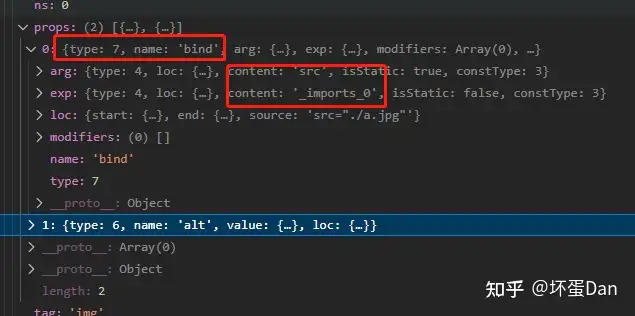
调用getImportsExpressionExp方法,将文件路径变成__import_[index][hash]的名字, 然后存放到context.imports中,这个context应该是组件实例对象。这里的index默认会在context.imports中找一样的,如果找不到就放最后。
- 如果是场景4,需要改写这个节点的类型为
NodeTypes.DIRECTIVE,对应type === 7。因为是动态导入的文件,所以需要重命名为bind。
来看下处理后的数据
createSrcsetTransformWithOptions#
const escapedSpaceCharacters = /( |\\t|\\n|\\f|\\r)+/g

export const createSrcsetTransformWithOptions = (
  options: Required<AssetURLOptions>
): NodeTransform => {
  return (node, context) =>
    (transformSrcset as Function)(node, context, options)
}

export const transformSrcset: NodeTransform = (
  node,
  context,
  options: Required<AssetURLOptions> = defaultAssetUrlOptions
) => {
  if (node.type === NodeTypes.ELEMENT) {
    if (srcsetTags.includes(node.tag) && node.props.length) {
      node.props.forEach((attr, index) => {
        if (attr.name === 'srcset' && attr.type === NodeTypes.ATTRIBUTE) {
          if (!attr.value) return
          const value = attr.value.content
          if (!value) return
          const imageCandidates: ImageCandidate[] = value.split(',').map(s => {
            // The attribute value arrives here with all whitespace, except
            // normal spaces, represented by escape sequences
            const [url, descriptor] = s
              .replace(escapedSpaceCharacters, ' ')
              .trim()
              .split(' ', 2)
            return { url, descriptor }
          })

          // data urls contains comma after the encoding so we need to re-merge
          // them
          for (let i = 0; i < imageCandidates.length; i++) {
            const { url } = imageCandidates[i]
            if (isDataUrl(url)) {
              imageCandidates[i + 1].url =
                url + ',' + imageCandidates[i + 1].url
              imageCandidates.splice(i, 1)
            }
          }

          const shouldProcessUrl = (url: string) => {
            return (
              !isExternalUrl(url) &&
              !isDataUrl(url) &&
              (options.includeAbsolute || isRelativeUrl(url))
            )
          }
          // When srcset does not contain any qualified URLs, skip transforming
          if (!imageCandidates.some(({ url }) => shouldProcessUrl(url))) {
            return
          }

          if (options.base) {
            const base = options.base
            const set: string[] = []
            let needImportTransform = false

            imageCandidates.forEach(candidate => {
              let { url, descriptor } = candidate
              descriptor = descriptor ? ` ${descriptor}` : ``
              if (url[0] === '.') {
                candidate.url = (path.posix || path).join(base, url)
                set.push(candidate.url + descriptor)
              } else if (shouldProcessUrl(url)) {
                needImportTransform = true
              } else {
                set.push(url + descriptor)
              }
            })

            if (!needImportTransform) {
              attr.value.content = set.join(', ')
              return
            }
          }

          const compoundExpression = createCompoundExpression([], attr.loc)
          imageCandidates.forEach(({ url, descriptor }, index) => {
            if (shouldProcessUrl(url)) {
              const { path } = parseUrl(url)
              let exp: SimpleExpressionNode
              if (path) {
                const existingImportsIndex = context.imports.findIndex(
                  i => i.path === path
                )
                if (existingImportsIndex > -1) {
                  exp = createSimpleExpression(
                    `_imports_${existingImportsIndex}`,
                    false,
                    attr.loc,
                    ConstantTypes.CAN_STRINGIFY
                  )
                } else {
                  exp = createSimpleExpression(
                    `_imports_${context.imports.length}`,
                    false,
                    attr.loc,
                    ConstantTypes.CAN_STRINGIFY
                  )
                  context.imports.push({ exp, path })
                }
                compoundExpression.children.push(exp)
              }
            } else {
              const exp = createSimpleExpression(
                `"${url}"`,
                false,
                attr.loc,
                ConstantTypes.CAN_STRINGIFY
              )
              compoundExpression.children.push(exp)
            }
            const isNotLast = imageCandidates.length - 1 > index
            if (descriptor && isNotLast) {
              compoundExpression.children.push(` + ' ${descriptor}, ' + `)
            } else if (descriptor) {
              compoundExpression.children.push(` + ' ${descriptor}'`)
            } else if (isNotLast) {
              compoundExpression.children.push(` + ', ' + `)
            }
          })

          let exp: ExpressionNode = compoundExpression
          if (context.hoistStatic) {
            exp = context.hoist(compoundExpression)
            exp.constType = ConstantTypes.CAN_STRINGIFY
          }

          node.props[index] = {
            type: NodeTypes.DIRECTIVE,
            name: 'bind',
            arg: createSimpleExpression('srcset', true, attr.loc),
            exp,
            modifiers: [],
            loc: attr.loc
          }
        }
      })
    }
  }
}srcset[6]: 一般用在响应式页面上,由于开发者并不能限制用户打开时的浏览器大小,所以也就有了响应式页面。但是图片这玩意儿很难去搞自适应,只能是按照宽高比去缩小,但缩小过程中可能排版就乱了或者pm(天煞的pm)觉得这玩意儿在这个分辨率下丑滴很,这个时候一般你就得再放一张图,然后判断这个分辨率下再去展示并且隐藏原来的图。 这时srcset也就突出来了,你不需要去写一堆if判断或者css样式,它可以存放多张图片链接,用,分隔,然后会在特定的范围内使用其中一个链接的图片,当然你还需要指定范围,不然啥时候切换候选。
"images/team-photo.jpg 1x, images/team-photo-retina.jpg 2x, images/team-photo-full 2048w"其中1x等价于1.0x表示在屏幕像素比为1的时候使用,2048w表示在2048宽度下使用。
其他就不多说了,感兴趣的请自行看文档
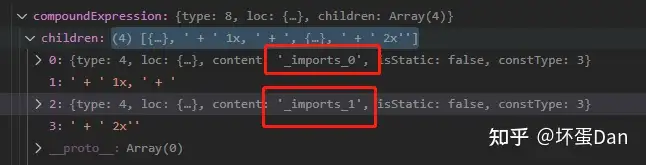
由于我们的例子里并没有这个属性,所以我们加上试下

然后回到我们的代码中。
代码中没啥难点的,直接说下做了什么。
首先判断你这个节点是否是属性节点,然后判断你这个节点是否是srcset。
然后做法和上面差不多了,都是对路径的处理。
总结#
也没啥好总结的。。。compileTemplate核心在@vue/compiler-dom上。
不过有一点需要说下就是预处理template,如果用了其它模板引擎,那么就需要预处理template然后再转换成render function。
参考#
- ^@vue/consolidate https://www.npmjs.com/package/@vue/consolidate
- ^coffeeScript http://coffeescript.org/
- ^@vue/compiler-dom https://github.com/vuejs/core/tree/main/packages/compiler-dom
- ^node-url-parse https://nodejs.org/docs/latest-v17.x/api/url.html#urlparseurlstring-parsequerystring-slashesdenotehost
- ^webpack-loader-file-loader https://www.npmjs.com/package/file-loader
- ^HTML5-IMG-SRCSET https://developer.mozilla.org/zh-CN/docs/Web/API/HTMLImageElement/srcset
编辑于 2022-12-12 16:31・IP 属地广东