
前言#
昨天分析完了如何处理部分内置指令,虽然有几个指令没头没脑
坏蛋Dan:vue/compiler-dom源码分析学习--day3: 转换指令
今天我们来分析最后一部分,字符串化hoist节点。
找到调用入口#
字符串化静态节点的代码是放在@vue/compiler-dom里的,但是确认静态节点和收集是在@vue/compiler-core[1]这个包里面
所以我们得先找到调用的地方,这样分析起来才不会没头没脑(额,指令那篇就没这么做。。)。
首先,我们在compiler-dom/index.ts中调用的方法是baseCompile,来自packages\compiler-core\src\compile.ts中,所以我们跟着进去看下。
// we name it `baseCompile` so that higher order compilers like
// @vue/compiler-dom can export `compile` while re-exporting everything else.
export function baseCompile(
  template: string | RootNode,
  options: CompilerOptions = {}
): CodegenResult {
  //...省略无关代码

  transform(
    ast,
    extend({}, options, {
      prefixIdentifiers,
      nodeTransforms: [
        ...nodeTransforms,
        ...(options.nodeTransforms || []) // user transforms
      ],
      directiveTransforms: extend(
        {},
        directiveTransforms,
        options.directiveTransforms || {} // user transforms
      )
    })
  )
  // ...省略无关代码
} 可以看到这里调用了一个transform的方法,并且把包含stringifyStatic这个方法的options也传了进去。
export function transform(root: RootNode, options: TransformOptions) {
  // ...省略无关代码
  if (options.hoistStatic) {
    hoistStatic(root, context)
  }
  // ...省略无关代码
} 我们明显发现了hoistStatic,静态提升的关键字眼,我们并没有传入相关参数,但是这个字段是true
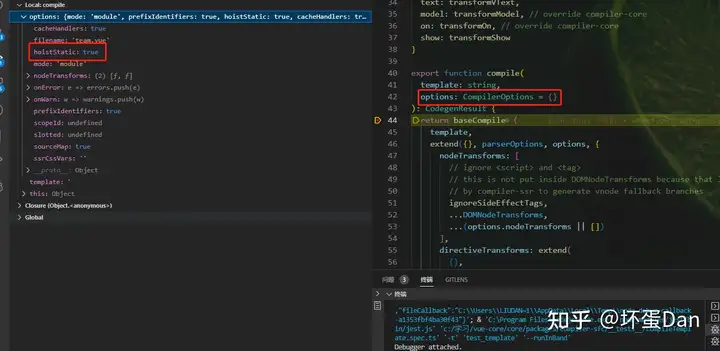
还记得我们的测试用例在哪吗?在@vue/compiler-sfc/__tests__/compileTemplate.spec.ts。
是的,参数就是从那边传过来的。
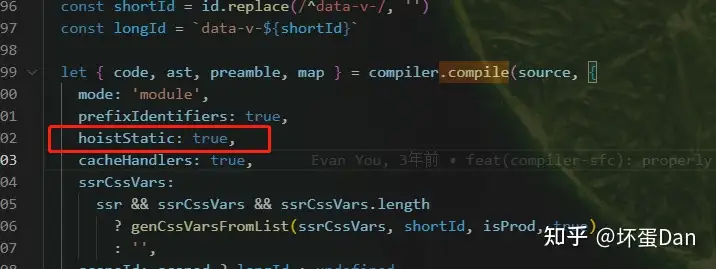
那么我们先进入到hoistStatic.ts文件中看下
export function hoistStatic(root: RootNode, context: TransformContext) {
  walk(
    root,
    context,
    // Root node is unfortunately non-hoistable due to potential parent
    // fallthrough attributes.
    isSingleElementRoot(root, root.children[0])
  )
} 再跟着看下这个walk的代码
function walk(
  node: ParentNode,
  context: TransformContext,
  doNotHoistNode: boolean = false
) {
  //...省略

  if (hoistedCount && context.transformHoist) {
    context.transformHoist(children, context, node)
  }

  //...省略
}
中奖!
什么是静态提升(static hoisting)#
大家应该都知道我们的template会转换成virtual-dom,而这个过程中会发现你的很多代码都是静态的,比如
<div>
  <div>foo</div> <!-- hoisted -->
  <div>bar</div> <!-- hoisted -->
  <div>{{ dynamic }}</div>
</div>
这块模板中,只有带有{{ dynamic }}的这个div是需要动态变化的,而foo和bar到死都不会再变了。
所以在patch的时候diff操作遇到他们实际上是可以直接跳过的,因为他们都不会变,节点比较过程中它们完全没必要比对。
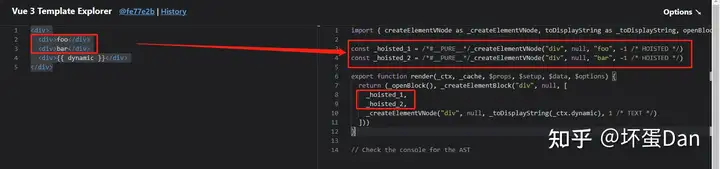
所以直接把他们的生成函数抽出来放到render function之外,这样render function每次call它们都不需要再重新生成。并且diff的时候也跳过了他们。
这样提高了性能。
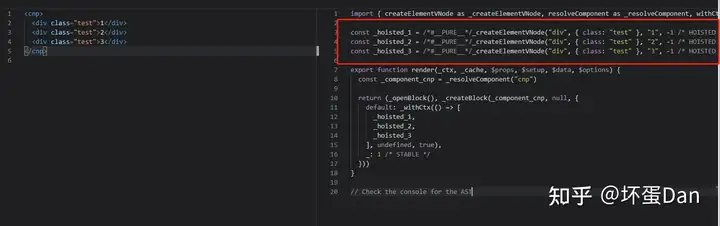
我们来看下输出的render function
我们再来看下没有静态提升的
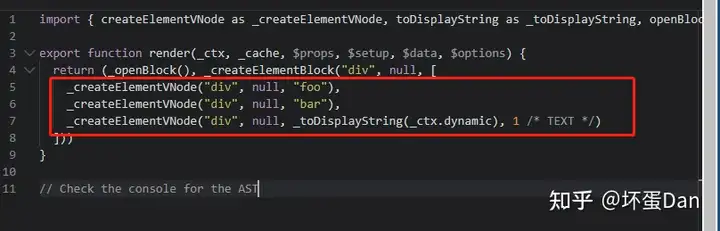
可以看到这里每次都会重新调用_createElementVNode这个辅助函数生成vnode。
另外如果这个wrapper也是一个static的节点,那么这一块template都会被当作static vnode,都会被hoist。
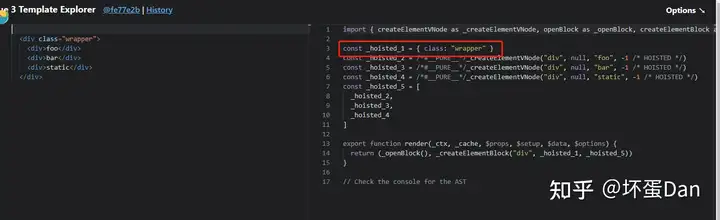
这个时候,_createElementBlock的时候会直接调用innerHTML直接将他们以字符串的形式拼接到父dom中。 同样的,它们对应的真实dom在渲染后也会被cache 。
另外如果这块dom其他地方也有使用的话,是不会重新createElement的,而是cloneNode[3]
那么静态提升就简单的说到这,我们开始分析代码。
stringifyStatic#
为什么前面需要确定入口呢?因为得知道是什么节点会被传入这个stringifyStatic的方法中。
其实我们把这个留到分析@vue/compiler-core的时候会比较连贯,但是这块装换成字符串的方法又是放到这个@vue/compiler-dom的包里的,所以自然有它的道理。
我们先分析完如何字符串化之后再去分析core包时就能直接跳过这块逻辑了。
我在想我是不是应该反过来先分析core包。。。然而我是从外层一步步到底层(compiler-sfc到compiler-dom之后准备到compiler-core)
但是都这样了,箭在弦上不得不发。
扯远了,回到我们代码
先看下什么时候会进入这个方法中,首先staticHoist这个option自然不能少
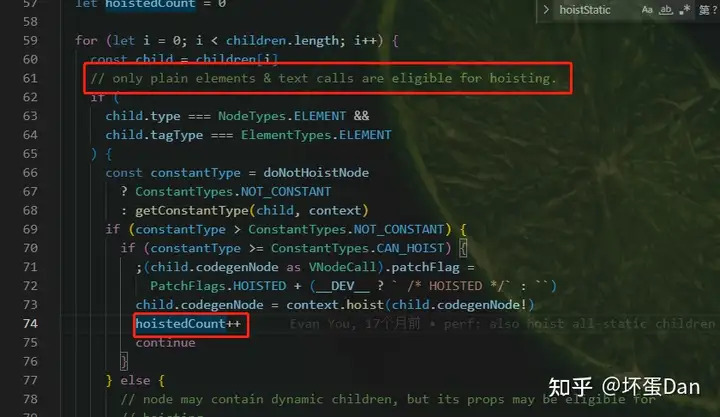
只有普通元素节点和文本调用可以被提升。
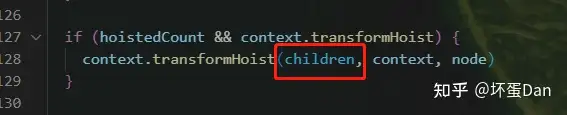
可以看到是直接把整个children传入里面的,所以这里的数据并没有做过滤处理,只要你这个block中包含了可以stringify的child,那这个block的children就都会传入transformHoist中。
然后我们回到compiler-dom代码中
位置:@vue/compiler-dom/src/transforms/stringifyStatic.ts
export const stringifyStatic: HoistTransform = (children, context, parent) => {
  // bail stringification for slot content
  if (context.scopes.vSlot > 0) {
    return
  }

  let nc = 0 // current node count
  let ec = 0 // current element with binding count
  const currentChunk: StringifiableNode[] = []

  const stringifyCurrentChunk = (currentIndex: number): number => {
    if (
      nc >= StringifyThresholds.NODE_COUNT ||
      ec >= StringifyThresholds.ELEMENT_WITH_BINDING_COUNT
    ) {
      // combine all currently eligible nodes into a single static vnode call
      const staticCall = createCallExpression(context.helper(CREATE_STATIC), [
        JSON.stringify(
          currentChunk.map(node => stringifyNode(node, context)).join('')
        ).replace(expReplaceRE, `" + $1 + "`),
        // the 2nd argument indicates the number of DOM nodes this static vnode
        // will insert / hydrate
        String(currentChunk.length)
      ])
      // replace the first node's hoisted expression with the static vnode call
      replaceHoist(currentChunk[0], staticCall, context)

      if (currentChunk.length > 1) {
        for (let i = 1; i < currentChunk.length; i++) {
          // for the merged nodes, set their hoisted expression to null
          replaceHoist(currentChunk[i], null, context)
        }

        // also remove merged nodes from children
        const deleteCount = currentChunk.length - 1
        children.splice(currentIndex - currentChunk.length + 1, deleteCount)
        return deleteCount
      }
    }
    return 0
  }

  let i = 0
  for (; i < children.length; i++) {
    const child = children[i]
    const hoisted = getHoistedNode(child)
    if (hoisted) {
      // presence of hoisted means child must be a stringifiable node
      const node = child as StringifiableNode
      const result = analyzeNode(node)
      if (result) {
        // node is stringifiable, record state
        nc += result[0]
        ec += result[1]
        currentChunk.push(node)
        continue
      }
    }
    // we only reach here if we ran into a node that is not stringifiable
    // check if currently analyzed nodes meet criteria for stringification.
    // adjust iteration index
    i -= stringifyCurrentChunk(i)
    // reset state
    nc = 0
    ec = 0
    currentChunk.length = 0
  }
  // in case the last node was also stringifiable
  stringifyCurrentChunk(i)
}
代码量其实挺少的。
一开头就是一个context.scopes.vSlot,这是个啥呢?我们回到hoistStatic.ts文件中
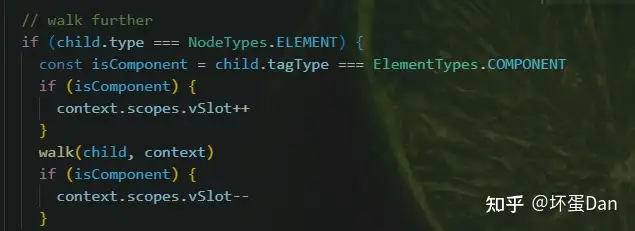
原来遇到组件就会++,然后执行完walk(也就是调用自己)在--。
也就是说是被组件包裹的元素,那就只有v-slot了,这种block是不允许stringify hoist的。
注意一点,就是虽然不能stringify但是可以hoist。
nc: 看注释:current node count,是当前节点的计数ec: 注释:current element with binding count, 当前元素绑定的计数,意思不是很清楚,我们等会再分析currentChunk:chunk这个词我们见的挺多的,比如webpack中表示一次热更新发送给浏览器的list中的item就是一个chunk。而在这里应该是表示一个block,最大可被stringify的block。getHoistedNode:
const getHoistedNode = (node: TemplateChildNode) =>
  ((node.type === NodeTypes.ELEMENT && node.tagType === ElementTypes.ELEMENT) ||
    node.type == NodeTypes.TEXT_CALL) &&
  node.codegenNode &&
  node.codegenNode.type === NodeTypes.SIMPLE_EXPRESSION &&
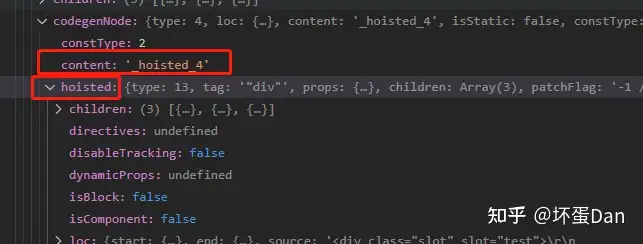
node.codegenNode.hoistedcodegenNode: 在core包中将可hoist的vnode进行了hoist处理。
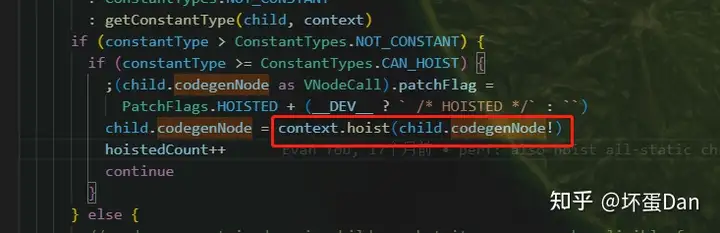
然后我们来看下context.hoist这个方法
    hoist(exp) {
      if (isString(exp)) exp = createSimpleExpression(exp)
      context.hoists.push(exp)
      const identifier = createSimpleExpression(
        `_hoisted_${context.hoists.length}`,
        false,
        exp.loc,
        ConstantTypes.CAN_HOIST
      )
      identifier.hoisted = exp
      return identifier
}, 
analyzeNode#
/**
 * for a hoisted node, analyze it and return:
 * - false: bailed (contains non-stringifiable props or runtime constant)
 * - [nc, ec] where
 *   - nc is the number of nodes inside
 *   - ec is the number of element with bindings inside
 */
function analyzeNode(node: StringifiableNode): [number, number] | false {
  if (node.type === NodeTypes.ELEMENT && isNonStringifiable(node.tag)) {
    return false
  }

  if (node.type === NodeTypes.TEXT_CALL) {
    return [1, 0]
  }

  let nc = 1 // node count
  let ec = node.props.length > 0 ? 1 : 0 // element w/ binding count
  let bailed = false
  const bail = (): false => {
    bailed = true
    return false
  }

  // TODO: check for cases where using innerHTML will result in different
  // output compared to imperative node insertions.
  // probably only need to check for most common case
  // i.e. non-phrasing-content tags inside `<p>`
  function walk(node: ElementNode): boolean {
    for (let i = 0; i < node.props.length; i++) {
      const p = node.props[i]
      // bail on non-attr bindings
      if (
        p.type === NodeTypes.ATTRIBUTE &&
        !isStringifiableAttr(p.name, node.ns)
      ) {
        return bail()
      }
      if (p.type === NodeTypes.DIRECTIVE && p.name === 'bind') {
        // bail on non-attr bindings
        if (
          p.arg &&
          (p.arg.type === NodeTypes.COMPOUND_EXPRESSION ||
            (p.arg.isStatic && !isStringifiableAttr(p.arg.content, node.ns)))
        ) {
          return bail()
        }
        if (
          p.exp &&
          (p.exp.type === NodeTypes.COMPOUND_EXPRESSION ||
            p.exp.constType < ConstantTypes.CAN_STRINGIFY)
        ) {
          return bail()
        }
      }
    }
    for (let i = 0; i < node.children.length; i++) {
      nc++
      const child = node.children[i]
      if (child.type === NodeTypes.ELEMENT) {
        if (child.props.length > 0) {
          ec++
        }
        walk(child)
        if (bailed) {
          return false
        }
      }
    }
    return true
  }

  return walk(node) ? [nc, ec] : false
} 注意这里的node是child节点
isNonStringifiable: 以下这些元素是不允许stringify的。
const isNonStringifiable = /*#__PURE__*/ makeMap(
  `caption,thead,tr,th,tbody,td,tfoot,colgroup,col`
) 为啥他们都不能被stringify呢? 我没想明白,好像也没搜到类似table相关的元素不能使用innerHTML插入的内容。现在先mark下来,我去官方那边发个discussions问问大佬们。。
找到了issue了
大概意思就是不能使用innerHTML插入table元素。看了一圈相关的搜索,发现是ie9以下的问题? 按理说都是现代浏览器了,应该不需要这么处理才对。
isStringifiableAttr:
const dataAriaRE = /^(data|aria)-/
const isStringifiableAttr = (name: string, ns: DOMNamespaces) => {
  return (
    (ns === DOMNamespaces.HTML
      ? isKnownHtmlAttr(name)
      : ns === DOMNamespaces.SVG
      ? isKnownSvgAttr(name)
      : false) || dataAriaRE.test(name)
  )
}isKnownHtmlAttr: 看其它里的内置html-attrisKnownSvgAttr: 看其它里的内置html-attr
这方法看名字就知道是判断这个node的attr能否符合stringify的标准。
总结下这个analyzeNode的方法
简单的说就是递归判断所有节点是否都可以stringify。
文本调用节点比较特殊,里面只有文本,所以可以直接返回:当前节点(nc): 1; 当前节点绑定的属性(ec): 0。
以下场景不能stringify。
- 和
table相关的标签 node的attr非内置或者自定义(data-)的- 使用了指令但是属性对应的是一个复合(
compound)表达式,比如v-bind:[src]。 - 第三点不是动态传入的
attr,但是arg绑定的attr不是内置或者自定义的。 - 指令绑定的表达式是一个复合表达式。
- 第五点是单表达式但是被判定
level为:不能stringify
然后遍历这个node的子节点,调用自己。
最后返回的要么是false,要么就是[nc, ec]这个数组。
回到我们的stringifyStatic方法中。
stringifyCurrentChunk:
  const stringifyCurrentChunk = (currentIndex: number): number => {
    if (
      nc >= StringifyThresholds.NODE_COUNT ||
      ec >= StringifyThresholds.ELEMENT_WITH_BINDING_COUNT
    ) {
      // combine all currently eligible nodes into a single static vnode call
      const staticCall = createCallExpression(context.helper(CREATE_STATIC), [
        JSON.stringify(
          currentChunk.map(node => stringifyNode(node, context)).join('')
        ).replace(expReplaceRE, `" + $1 + "`),
        // the 2nd argument indicates the number of DOM nodes this static vnode
        // will insert / hydrate
        String(currentChunk.length)
      ])
      // replace the first node's hoisted expression with the static vnode call
      replaceHoist(currentChunk[0], staticCall, context)

      if (currentChunk.length > 1) {
        for (let i = 1; i < currentChunk.length; i++) {
          // for the merged nodes, set their hoisted expression to null
          replaceHoist(currentChunk[i], null, context)
        }

        // also remove merged nodes from children
        const deleteCount = currentChunk.length - 1
        children.splice(currentIndex - currentChunk.length + 1, deleteCount)
        return deleteCount
      }
    }
    return 0
} StringifyCurrentChunk:
export const enum StringifyThresholds {
  ELEMENT_WITH_BINDING_COUNT = 5,
  NODE_COUNT = 20
}
CRATE_STATIC:
export const CREATE_STATIC = Symbol(__DEV__ ? `createStaticVNode` : ``) stringifyNode:
function stringifyNode(
  node: string | TemplateChildNode,
  context: TransformContext
): string {
  if (isString(node)) {
    return node
  }
  if (isSymbol(node)) {
    return ``
  }
  switch (node.type) {
    case NodeTypes.ELEMENT:
      return stringifyElement(node, context)
    case NodeTypes.TEXT:
      return escapeHtml(node.content)
    case NodeTypes.COMMENT:
      return `<!--${escapeHtml(node.content)}-->`
    case NodeTypes.INTERPOLATION:
      return escapeHtml(toDisplayString(evaluateConstant(node.content)))
    case NodeTypes.COMPOUND_EXPRESSION:
      return escapeHtml(evaluateConstant(node))
    case NodeTypes.TEXT_CALL:
      return stringifyNode(node.content, context)
    default:
      // static trees will not contain if/for nodes
      return ''
  }
} stringifyElement: 我放到其他里去了,简单的说和名字一样就是把元素节点字符串化。escapeHtml:stringifyElement这个小章节里有说到过,就是将特殊符号encode了,避免解析的时候出问题。evaluateConstant: 同上,简单的说就是把一些静态的bind给执行了,没必要放到runtime里去,比如原本style的属性被transform为bind的style(isStatic == true)之后再给转回来。。。
简单地说这个stringifyNode就是在判断节点的不同类型,分别处理转换为字符串。
然后回到我们的代码中
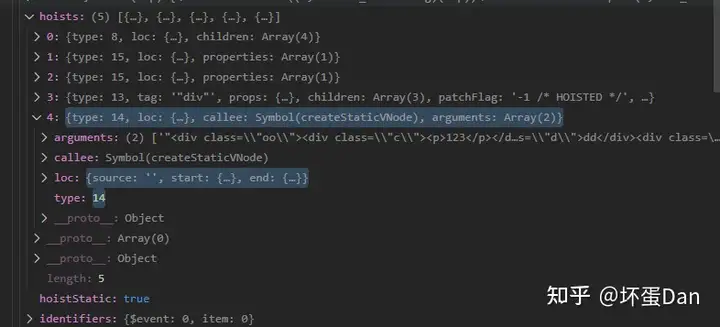
staticCall: 来看下数据
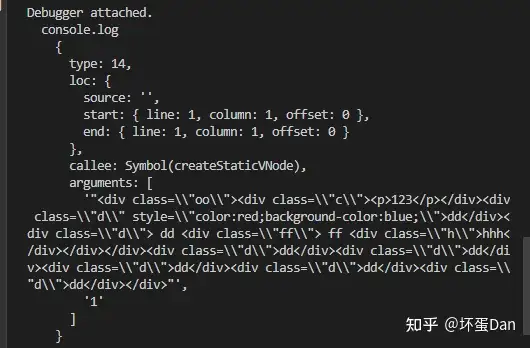
可以看到参数是我们整个被识别到的静态block。
replaceHoist:
const replaceHoist = (
  node: StringifiableNode,
  replacement: JSChildNode | null,
  context: TransformContext
) => {
  const hoistToReplace = (node.codegenNode as SimpleExpressionNode).hoisted!
  context.hoists[context.hoists.indexOf(hoistToReplace)] = replacement
} 看名字就知道是在将对应的hoist节点替换为stringify调用节点。
总结下stringifyCurrentChunk这个方法
简单的说就是把捕获到的静态block转换为字符串调用节点。
有几个点我们需要注意:
nc >= StringifyThresholds.NODE_COUNT ||ec >= StringifyThresholds.ELEMENT_WITH_BINDING_COUNT,也就是当前节点需要超过20,节点中带有绑定的数量超过5。为什么要这么做呢?因为innerHTML一次插入的量到一定的数量才能突出它的性能,节点少于20或者带有绑定的节点少于5几乎无差(处理带有绑定的节点需要做的操作更多),只需要hoist即可。- 如果有多个
chunk,它会删除context中这些hoist节点,因为他俩被合并了,自然就不能留有原来的了。
那么这整个方法基本上就都讲完了。
总结下#
逻辑其实没啥难度,但是里面有一堆小方法跳来跳去的,挺影响阅读。
实际上就是寻找hoist元素中可以被stringify的最大一块block并将它stringify之后替换原来的hoist元素。
其它没啥好说了,具体分析往回看。
其它#
内置html-attr#
    `accept,accept-charset,accesskey,action,align,allow,alt,async,` +
    `autocapitalize,autocomplete,autofocus,autoplay,background,bgcolor,` +
    `border,buffered,capture,challenge,charset,checked,cite,class,code,` +
    `codebase,color,cols,colspan,content,contenteditable,contextmenu,controls,` +
    `coords,crossorigin,csp,data,datetime,decoding,default,defer,dir,dirname,` +
    `disabled,download,draggable,dropzone,enctype,enterkeyhint,for,form,` +
    `formaction,formenctype,formmethod,formnovalidate,formtarget,headers,` +
    `height,hidden,high,href,hreflang,http-equiv,icon,id,importance,integrity,` +
    `ismap,itemprop,keytype,kind,label,lang,language,loading,list,loop,low,` +
    `manifest,max,maxlength,minlength,media,min,multiple,muted,name,novalidate,` +
    `open,optimum,pattern,ping,placeholder,poster,preload,radiogroup,readonly,` +
    `referrerpolicy,rel,required,reversed,rows,rowspan,sandbox,scope,scoped,` +
    `selected,shape,size,sizes,slot,span,spellcheck,src,srcdoc,srclang,srcset,` +
    `start,step,style,summary,tabindex,target,title,translate,type,usemap,` +
`value,width,wrap`内置svg-attr#
  `xmlns,accent-height,accumulate,additive,alignment-baseline,alphabetic,amplitude,` +
    `arabic-form,ascent,attributeName,attributeType,azimuth,baseFrequency,` +
    `baseline-shift,baseProfile,bbox,begin,bias,by,calcMode,cap-height,class,` +
    `clip,clipPathUnits,clip-path,clip-rule,color,color-interpolation,` +
    `color-interpolation-filters,color-profile,color-rendering,` +
    `contentScriptType,contentStyleType,crossorigin,cursor,cx,cy,d,decelerate,` +
    `descent,diffuseConstant,direction,display,divisor,dominant-baseline,dur,dx,` +
    `dy,edgeMode,elevation,enable-background,end,exponent,fill,fill-opacity,` +
    `fill-rule,filter,filterRes,filterUnits,flood-color,flood-opacity,` +
    `font-family,font-size,font-size-adjust,font-stretch,font-style,` +
    `font-variant,font-weight,format,from,fr,fx,fy,g1,g2,glyph-name,` +
    `glyph-orientation-horizontal,glyph-orientation-vertical,glyphRef,` +
    `gradientTransform,gradientUnits,hanging,height,href,hreflang,horiz-adv-x,` +
    `horiz-origin-x,id,ideographic,image-rendering,in,in2,intercept,k,k1,k2,k3,` +
    `k4,kernelMatrix,kernelUnitLength,kerning,keyPoints,keySplines,keyTimes,` +
    `lang,lengthAdjust,letter-spacing,lighting-color,limitingConeAngle,local,` +
    `marker-end,marker-mid,marker-start,markerHeight,markerUnits,markerWidth,` +
    `mask,maskContentUnits,maskUnits,mathematical,max,media,method,min,mode,` +
    `name,numOctaves,offset,opacity,operator,order,orient,orientation,origin,` +
    `overflow,overline-position,overline-thickness,panose-1,paint-order,path,` +
    `pathLength,patternContentUnits,patternTransform,patternUnits,ping,` +
    `pointer-events,points,pointsAtX,pointsAtY,pointsAtZ,preserveAlpha,` +
    `preserveAspectRatio,primitiveUnits,r,radius,referrerPolicy,refX,refY,rel,` +
    `rendering-intent,repeatCount,repeatDur,requiredExtensions,requiredFeatures,` +
    `restart,result,rotate,rx,ry,scale,seed,shape-rendering,slope,spacing,` +
    `specularConstant,specularExponent,speed,spreadMethod,startOffset,` +
    `stdDeviation,stemh,stemv,stitchTiles,stop-color,stop-opacity,` +
    `strikethrough-position,strikethrough-thickness,string,stroke,` +
    `stroke-dasharray,stroke-dashoffset,stroke-linecap,stroke-linejoin,` +
    `stroke-miterlimit,stroke-opacity,stroke-width,style,surfaceScale,` +
    `systemLanguage,tabindex,tableValues,target,targetX,targetY,text-anchor,` +
    `text-decoration,text-rendering,textLength,to,transform,transform-origin,` +
    `type,u1,u2,underline-position,underline-thickness,unicode,unicode-bidi,` +
    `unicode-range,units-per-em,v-alphabetic,v-hanging,v-ideographic,` +
    `v-mathematical,values,vector-effect,version,vert-adv-y,vert-origin-x,` +
    `vert-origin-y,viewBox,viewTarget,visibility,width,widths,word-spacing,` +
    `writing-mode,x,x-height,x1,x2,xChannelSelector,xlink:actuate,xlink:arcrole,` +
    `xlink:href,xlink:role,xlink:show,xlink:title,xlink:type,xml:base,xml:lang,` +
    `xml:space,y,y1,y2,yChannelSelector,z,zoomAndPan`
stringifyElement#
function stringifyElement(
  node: ElementNode,
  context: TransformContext
): string {
  let res = `<${node.tag}`
  let innerHTML = ''
  for (let i = 0; i < node.props.length; i++) {
    const p = node.props[i]
    if (p.type === NodeTypes.ATTRIBUTE) {
      res += ` ${p.name}`
      if (p.value) {
        res += `="${escapeHtml(p.value.content)}"`
      }
    } else if (p.type === NodeTypes.DIRECTIVE) {
      if (p.name === 'bind') {
        const exp = p.exp as SimpleExpressionNode
        if (exp.content[0] === '_') {
          // internally generated string constant references
          // e.g. imported URL strings via compiler-sfc transformAssetUrl plugin
          res += ` ${
            (p.arg as SimpleExpressionNode).content
          }="__VUE_EXP_START__${exp.content}__VUE_EXP_END__"`
          continue
        }
        // #6568
        if (
          isBooleanAttr((p.arg as SimpleExpressionNode).content) &&
          exp.content === 'false'
        ) {
          continue
        }
        // constant v-bind, e.g. :foo="1"
        let evaluated = evaluateConstant(exp)
        if (evaluated != null) {
          const arg = p.arg && (p.arg as SimpleExpressionNode).content
          if (arg === 'class') {
            evaluated = normalizeClass(evaluated)
          } else if (arg === 'style') {
            evaluated = stringifyStyle(normalizeStyle(evaluated))
          }
          res += ` ${(p.arg as SimpleExpressionNode).content}="${escapeHtml(
            evaluated
          )}"`
        }
      } else if (p.name === 'html') {
        // #5439 v-html with constant value
        // not sure why would anyone do this but it can happen
        innerHTML = evaluateConstant(p.exp as SimpleExpressionNode)
      } else if (p.name === 'text') {
        innerHTML = escapeHtml(
          toDisplayString(evaluateConstant(p.exp as SimpleExpressionNode))
        )
      }
    }
  }
  if (context.scopeId) {
    res += ` ${context.scopeId}`
  }
  res += `>`
  if (innerHTML) {
    res += innerHTML
  } else {
    for (let i = 0; i < node.children.length; i++) {
      res += stringifyNode(node.children[i], context)
    }
  }
  if (!isVoidTag(node.tag)) {
    res += `</${node.tag}>`
  }
  return res
}escapeHtml: 这个方法不用多说,一方面是安全性,另一方面是避免特殊符号导致html解析失败。
const escapeRE = /["'&<>]/
export function escapeHtml(string: unknown) {
const str = '' + string
const match = escapeRE.exec(str)
if (!match) {
return str
}
let html = ''
let escaped: string
let index: number
let lastIndex = 0
for (index = match.index; index < str.length; index++) {
switch (str.charCodeAt(index)) {
case 34: // "
escaped = '"'
break
case 38: // &
escaped = '&'
break
case 39: // '
escaped = '''
break
case 60: // <
escaped = '<'
break
case 62: // >
escaped = '>'
break
default:
continue
}
if (lastIndex !== index) {
html += str.slice(lastIndex, index)
}
lastIndex = index + 1
html += escaped
}
return lastIndex !== index ? html + str.slice(lastIndex, index) : html
} isBooleanAttr: 不多说。
 const specialBooleanAttrs = `itemscope,allowfullscreen,formnovalidate,ismap,nomodule,novalidate,readonly`
/**
 * The full list is needed during SSR to produce the correct initial markup.
 */
export const isBooleanAttr = /*#__PURE__*/ makeMap(
  specialBooleanAttrs +
    `,async,autofocus,autoplay,controls,default,defer,disabled,hidden,` +
    `loop,open,required,reversed,scoped,seamless,` +
    `checked,muted,multiple,selected`
)evaluateConstant: 帮你把简单的表达式执行了,能进入到这个方法里的肯定是可以stringify的,所以这里的表达式不可能有上下文或者动态等。 使用new Function(retrun ${xxx})()包裹可以将字符串内容转换为数据原本对应的类型,比如string -> object。
// __UNSAFE__
// Reason: eval.
// It's technically safe to eval because only constant expressions are possible
// here, e.g. `{{ 1 }}` or `{{ 'foo' }}`
// in addition, constant exps bail on presence of parens so you can't even
// run JSFuck in here. But we mark it unsafe for security review purposes.
// (see compiler-core/src/transforms/transformExpression)
function evaluateConstant(exp: ExpressionNode): string {
  if (exp.type === NodeTypes.SIMPLE_EXPRESSION) {
    return new Function(`return ${exp.content}`)()
  } else {
    // compound
    let res = ``
    exp.children.forEach(c => {
      if (isString(c) || isSymbol(c)) {
        return
      }
      if (c.type === NodeTypes.TEXT) {
        res += c.content
      } else if (c.type === NodeTypes.INTERPOLATION) {
        res += toDisplayString(evaluateConstant(c.content))
      } else {
        res += evaluateConstant(c)
      }
    })
    return res
  }
}toDisplayString: 不多说。
/**
 * For converting {{ interpolation }} values to displayed strings.
 * @private
 */
export const toDisplayString = (val: unknown): string => {
  return isString(val)
    ? val
    : val == null
    ? ''
    : isArray(val) ||
      (isObject(val) &&
        (val.toString === objectToString || !isFunction(val.toString)))
    ? JSON.stringify(val, replacer, 2)
    : String(val)
} normalizeClass: 格式化class的表达式。
export function normalizeClass(value: unknown): string {
  let res = ''
  if (isString(value)) {
    res = value
  } else if (isArray(value)) {
    for (let i = 0; i < value.length; i++) {
      const normalized = normalizeClass(value[i])
      if (normalized) {
        res += normalized + ' '
      }
    }
  } else if (isObject(value)) {
    for (const name in value) {
      if (value[name]) {
        res += name + ' '
      }
    }
  }
  return res.trim()
} normalizeStyle: 格式化style数据。
export function normalizeStyle(
  value: unknown
): NormalizedStyle | string | undefined {
  if (isArray(value)) {
    const res: NormalizedStyle = {}
    for (let i = 0; i < value.length; i++) {
      const item = value[i]
      const normalized = isString(item)
        ? parseStringStyle(item)
        : (normalizeStyle(item) as NormalizedStyle)
      if (normalized) {
        for (const key in normalized) {
          res[key] = normalized[key]
        }
      }
    }
    return res
  } else if (isString(value)) {
    return value
  } else if (isObject(value)) {
    return value
  }
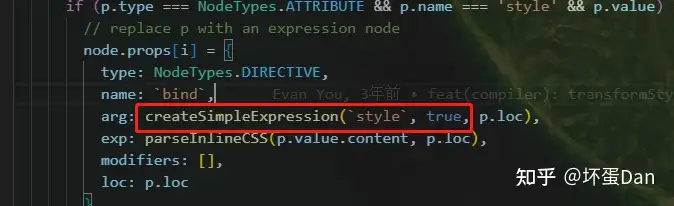
} 还记得之前说过的transformStyle吗?静态的style也是会被转变为bind的类型对应type == 7 。不过需要注意的是它的isStatic标志位是true。
parseStringStyle: 就不看代码了,就是把字符串比如color: red;变为{ color: 'red' }stringifyStyle: 将对象格式的style拼接为原始的color: red;这种。hyphenate就不看代码了,就是把把大写字母改为-小写字母,毕竟原生样式不支持部分大写。
export function stringifyStyle(
  styles: NormalizedStyle | string | undefined
): string {
  let ret = ''
  if (!styles || isString(styles)) {
    return ret
  }
  for (const key in styles) {
    const value = styles[key]
    const normalizedKey = key.startsWith(`--`) ? key : hyphenate(key)
    if (
      isString(value) ||
      (typeof value === 'number' && isNoUnitNumericStyleProp(normalizedKey))
    ) {
      // only render valid values
      ret += `${normalizedKey}:${value};`
    }
  }
  return ret
}isNoUnitNumericStyleProp: 接收数字类型的样式。
/**
 * CSS properties that accept plain numbers
 */
export const isNoUnitNumericStyleProp = /*#__PURE__*/ makeMap(
  `animation-iteration-count,border-image-outset,border-image-slice,` +
    `border-image-width,box-flex,box-flex-group,box-ordinal-group,column-count,` +
    `columns,flex,flex-grow,flex-positive,flex-shrink,flex-negative,flex-order,` +
    `grid-row,grid-row-end,grid-row-span,grid-row-start,grid-column,` +
    `grid-column-end,grid-column-span,grid-column-start,font-weight,line-clamp,` +
    `line-height,opacity,order,orphans,tab-size,widows,z-index,zoom,` +
    // SVG
    `fill-opacity,flood-opacity,stop-opacity,stroke-dasharray,stroke-dashoffset,` +
    `stroke-miterlimit,stroke-opacity,stroke-width`
) isVoidTag: 自闭合标签。
const VOID_TAGS = 'area,base,br,col,embed,hr,img,input,link,meta,param,source,track,wbr'

/**
 * Compiler only.
 * Do NOT use in runtime code paths unless behind `__DEV__` flag.
 */
export const isVoidTag = /*#__PURE__*/ makeMap(VOID_TAGS)
那么总结下这个方法
简单的说这个方法和它的名字一样,就是在将元素节点转换为字符串。在转化的过程中做了以下处理
- 特殊字符
encode处理,避免解析的时候出错。 - 拼接静态属性。
- 内置属性表达式标记为
__VUE_EXP_START__${exp.content}__VUE_EXP_END__,比如之前讲过的src这种涉及到链接的。 - 如果是布尔类型的属性并且是
false,这个时候不处理,因为没必要。 - 不涉及动态或者上下文的
bind表达式被简单的执行了,为什么可以直接执行呢?因为可以进入这个方法中的已经是经过筛选过后的了。与其放到runtime去处理,还不如编译的时候就处理了。比如class和style。 - 处理并吐槽硬编码的
v-html,比如v-html="'<p>123</p>'"。

-
处理
v-text。 -
如果带有
scopedId,会帮你拼接到attr中,这也就是为什么你在浏览器中可以看到大部分元素的属性里都有一段hash的原因。
参考#
- ^@vue/compiler-core https://github.com/vuejs/core/tree/main/packages/compiler-core
- ^vue3-static-hoist https://vuejs.org/guide/extras/rendering-mechanism.html#static-hoisting
- ^Node.cloneNode https://developer.mozilla.org/zh-CN/docs/Web/API/Node/cloneNode
编辑于 2022-12-27 12:34・IP 属地广东