
前言#
昨天我们找到了入口、确定了分析的流程,最后还定义了用来调试的测试单元。
坏蛋Dan:vue/compiler-dom源码分析学习--day1: 确定分析流程
今天我们来分析第一部分
ignoreSideEffectTags#
看名字就知道是在处理副作用标签的,入口如下
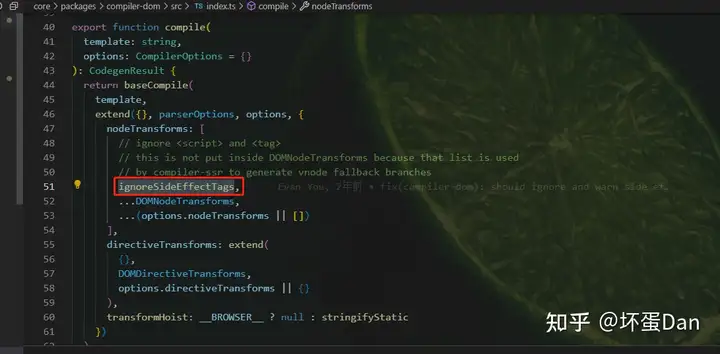
是node也就是节点的处理方式,我们来看下代码
import { NodeTransform, NodeTypes, ElementTypes } from '@vue/compiler-core'
import { DOMErrorCodes, createDOMCompilerError } from '../errors'

export const ignoreSideEffectTags: NodeTransform = (node, context) => {
  if (
    node.type === NodeTypes.ELEMENT &&
    node.tagType === ElementTypes.ELEMENT &&
    (node.tag === 'script' || node.tag === 'style')
  ) {
    context.onError(
      createDOMCompilerError(DOMErrorCodes.X_IGNORED_SIDE_EFFECT_TAG, node.loc)
    )
    context.removeNode()
  }
}
这里的代码提醒了我,之前有些地方节点类型我没怎么说,其实还是得说一下,因为有好几种类型存在。。。
比如这里的NodeType和TagType,什么意思呢?
前者表示节点的类型,比如文本(text)节点、注释(comment)节点这些。
而后者表示Tag的类型,比如插槽(slot)、组件(component)。
只有在保证NodeType为Element的情况下,第二点才能是ElementTypes。
这里很明显了,script和style都算是副作用标签,是需要过滤掉(remove)的。
context应该是@vue/compiler-core里的处理上下文环境,我们在compileTemplate里分析如何处理链接相关的类型时就接触过了。
DOMNodeTransforms#
刚是移除节点,现在是准备转换节点
transformStyle#
一看就是用来处理inline style的。
由于我们的测试单元没有写inline style,所以我们得补充下
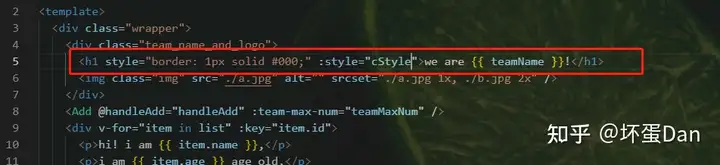
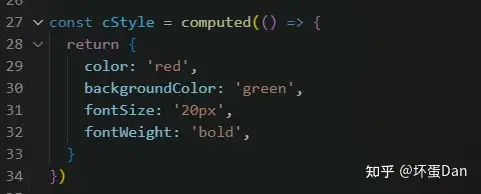
export const transformStyle: NodeTransform = node => {
  if (node.type === NodeTypes.ELEMENT) {
    node.props.forEach((p, i) => {
      if (p.type === NodeTypes.ATTRIBUTE && p.name === 'style' && p.value) {
        // replace p with an expression node
        node.props[i] = {
          type: NodeTypes.DIRECTIVE,
          name: `bind`,
          arg: createSimpleExpression(`style`, true, p.loc),
          exp: parseInlineCSS(p.value.content, p.loc),
          modifiers: [],
          loc: p.loc
        }
      }
    })
  }
}

const parseInlineCSS = (
  cssText: string,
  loc: SourceLocation
): SimpleExpressionNode => {
  const normalized = parseStringStyle(cssText)
  return createSimpleExpression(
    JSON.stringify(normalized),
    false,
    loc,
    ConstantTypes.CAN_STRINGIFY
  )
} NodeTypes.ATTRIBUTE: 对应type == 6,是属性节点(ast的节点,不是tag的)。
先来看下处理前的数据
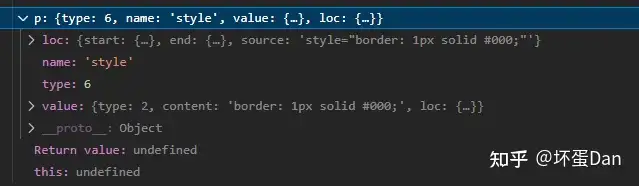
然后来看下处理后的数据
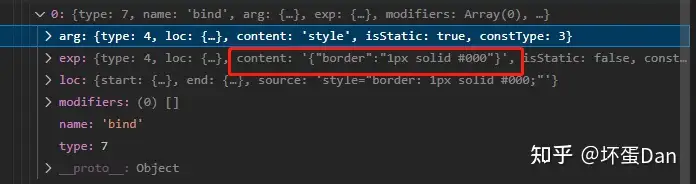
可以看到type从6变成了7,而name也从style变成了bind。
也就是说静态的inline style变成了动态的bind style。
这块操作是不是觉得有些熟悉?其实我们在compileTemplate中就接触过了,将img的src转换成bind。
createSimpleExpression: 看名字就知道是用来生成一个表达式节点parseStringStyle:我们来看下代码
export function parseStringStyle(cssText: string): NormalizedStyle {
  const ret: NormalizedStyle = {}
  cssText.split(listDelimiterRE).forEach(item => {
    if (item) {
      const tmp = item.split(propertyDelimiterRE)
      tmp.length > 1 && (ret[tmp[0].trim()] = tmp[1].trim())
    }
  })
  return ret
}
就是简单的根据规则切割成一个对象
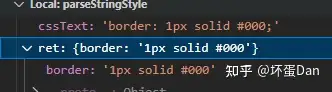
这块还挺简单的,把静态的inline style转换成动态的bind style。至于为啥要这么做,只有transformElement会用到。
transformTransition#
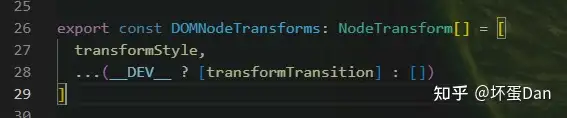
这个方法只有在__DEV__的时候才会执行,这个点需要mark。
这个方法一看就知道是用来处理transition[1]的。
由于我们的代码也没有transition,所以也得补充下
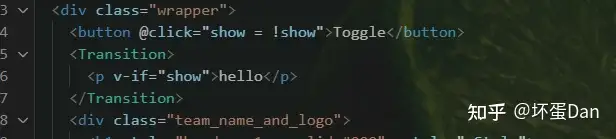
我直接把官网的copy过来了,省事
export const transformTransition: NodeTransform = (node, context) => {
  if (
    node.type === NodeTypes.ELEMENT &&
    node.tagType === ElementTypes.COMPONENT
  ) {
    const component = context.isBuiltInComponent(node.tag)
    if (component === TRANSITION) {
      return () => {
        if (!node.children.length) {
          return
        }

        // warn multiple transition children
        if (hasMultipleChildren(node)) {
          context.onError(
            createDOMCompilerError(
              DOMErrorCodes.X_TRANSITION_INVALID_CHILDREN,
              {
                start: node.children[0].loc.start,
                end: node.children[node.children.length - 1].loc.end,
                source: ''
              }
            )
          )
        }

        // check if it's s single child w/ v-show
        // if yes, inject "persisted: true" to the transition props
        const child = node.children[0]
        if (child.type === NodeTypes.ELEMENT) {
          for (const p of child.props) {
            if (p.type === NodeTypes.DIRECTIVE && p.name === 'show') {
              node.props.push({
                type: NodeTypes.ATTRIBUTE,
                name: 'persisted',
                value: undefined,
                loc: node.loc
              })
            }
          }
        }
      }
    }
  }
}ElementTypes.COMPONENT:tag的类型,表示组件,这里可以看出transition算是内置组件。isBuiltInComponent: 这个方法是将自定义的tag标记为build-in也就是内置的tag,这样compiler编译的时候才不会把他们忽略掉。hasMultipleChildren,来看下代码
function hasMultipleChildren(node: ComponentNode | IfBranchNode): boolean {
  // #1352 filter out potential comment nodes.
  const children = (node.children = node.children.filter(
    c =>
      c.type !== NodeTypes.COMMENT &&
      !(c.type === NodeTypes.TEXT && !c.content.trim())
  ))
  const child = children[0]
  return (
    children.length !== 1 ||
    child.type === NodeTypes.FOR ||
    (child.type === NodeTypes.IF && child.branches.some(hasMultipleChildren))
  )
} 很好理解,就是判断transition下有没有超出两个的节点。其中NodeTypes.FOR和NodeTypes.IF是<tag for/if>这样的节点,分别对应的type为11/9。
transformTransition这个方法很简单,就是下面三点
- 将当前
tag注册到build-in components中,这样compiler就不会忽略它,会将它转换成vnode。 - 判断这个
transition是否符合使用,是否两个节点(transition标签下的第一层子节点)以上 - 如果不是
if的效果,那就是show,类似css中display的效果,这个时候子dom是不能被处理掉的,得挂载,这也就是为什么要往这个子节点的props里push一个persisted: true。
总结#
今天我们分析了忽略副作用标签<script>/<style>,以及转换静态inline style为动态bind style,
然后又分析了转换transition这个组件的场景。
如果觉得这篇文章对你有帮助的话,请务必点个赞~
参考#
- ^vue3.x-transition https://vuejs.org/guide/built-ins/transition.html#transition
发布于 2022-12-13 18:08・IP 属地广东