
前言#
这段时间忙着学rust了,所以这一块分析就搁置了,昨天学完文档后决定先回来把这个包分析完了再回去深入学习。
之前我们是刚找到入口和选择完测试用例
坏蛋Dan:vue/compiler-core源码分析学习--day1: 确定入口 && 测试用例
今天我们往下分析baseParse方法
baseParse#
先来看下baseParse方法的入口传入的数据
  const ast = compiler.parse(source, {
    // there are no components at SFC parsing level
    isNativeTag: () => true,
    // preserve all whitespaces
    isPreTag: () => true,
    getTextMode: ({ tag, props }, parent) => {
      // all top level elements except <template> are parsed as raw text
      // containers
      if (
        (!parent && tag !== 'template') ||
        // <template lang="xxx"> should also be treated as raw text
        (tag === 'template' &&
          props.some(
            p =>
              p.type === NodeTypes.ATTRIBUTE &&
              p.name === 'lang' &&
              p.value &&
              p.value.content &&
              p.value.content !== 'html'
          ))
      ) {
        return TextModes.RAWTEXT
      } else {
        return TextModes.DATA
      }
    },
    onError: e => {
      errors.push(e)
    }
}) source自然是源码
而第二个参数应该是options,用来处理不同tag的。
我们回到compiler-core/parse中看下。
export function baseParse(
  content: string,
  options: ParserOptions = {}
): RootNode {
  const context = createParserContext(content, options)
  const start = getCursor(context)
  return createRoot(
    parseChildren(context, TextModes.DATA, []),
    getSelection(context, start)
  )
} 果然是options,然后我们按顺序分析这几个方法里做了什么。
createParserContext#
看名字就知道是用来初始化执行上下文的
function createParserContext(
  content: string,
  rawOptions: ParserOptions
): ParserContext {
  const options = extend({}, defaultParserOptions)

  let key: keyof ParserOptions
  for (key in rawOptions) {
    // @ts-ignore
    options[key] =
      rawOptions[key] === undefined
        ? defaultParserOptions[key]
        : rawOptions[key]
  }
  return {
    options,
    column: 1,
    line: 1,
    offset: 0,
    originalSource: content,
    source: content,
    inPre: false,
    inVPre: false,
    onWarn: options.onWarn
  }
} 确实是用来初始化执行上下文的,这里还有一步合并覆盖options,来看下defaultParserOptions
export const defaultParserOptions: MergedParserOptions = {
  delimiters: [`{{`, `}}`],
  getNamespace: () => Namespaces.HTML,
  getTextMode: () => TextModes.DATA,
  isVoidTag: NO,
  isPreTag: NO,
  isCustomElement: NO,
  decodeEntities: (rawText: string): string =>
    rawText.replace(decodeRE, (_, p1) => decodeMap[p1]),
  onError: defaultOnError,
  onWarn: defaultOnWarn,
  comments: __DEV__
}

/**
 * Always return false.
 */
export const NO = () => false

const decodeRE = /&(gt|lt|amp|apos|quot);/g
const decodeMap: Record<string, string> = {
  gt: '>',
  lt: '<',
  amp: '&',
  apos: "'",
  quot: '"'
}delimiters:相信大家都知道是啥,vue的template也是基于mustache[1语法的,简单的说就是一种模板引擎,会将{{和}}之间的内容替换为数据,然后再转换为正常的html模板。decodeEntities:由于模板中可能包含一些特殊符号,比如<这个会影响到模板的解析,所以在解析之前会把这种特殊符号encode处理。然后这里应该是用来处理文本节点内容的,在输出的时候自然要decode处理,不然渲染的内容会和你模板的内容不一致,着你不得跳脚?
最后来看下数据
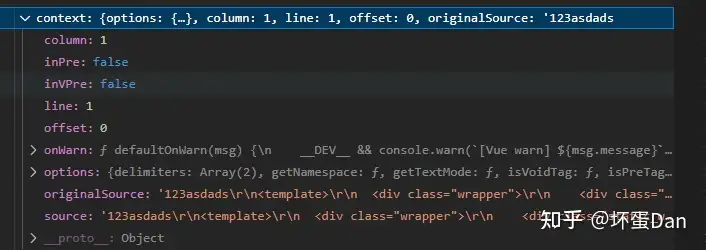
getCursor#
 function getCursor(context: ParserContext): Position {
  const { column, line, offset } = context
  return { column, line, offset }
}
这个不多说,就是获取代码的起始位置
createRoot#
export function createRoot(
  children: TemplateChildNode[],
  loc = locStub
): RootNode {
  return {
    type: NodeTypes.ROOT,
    children,
    helpers: [],
    components: [],
    directives: [],
    hoists: [],
    imports: [],
    cached: 0,
    temps: 0,
    codegenNode: undefined,
    loc
  }
}
创建一个根节点
parseChildren#
这个方法才是重点,这里就先跳过,下面开个一级标题来分析它,这样才有空间给二级标题。
getSelection#
function getSelection(
  context: ParserContext,
  start: Position,
  end?: Position
): SourceLocation {
  end = end || getCursor(context)
  return {
    start,
    end,
    source: context.originalSource.slice(start.offset, end.offset)
  }
}很简单,就是确定你这块template的开始位置和结束位置,其它内容都去掉,比如template之前的text之类的。
parseChildren#
上面绕过放到这里,看名字就知道是用来解析源码转化成ast节点的。
在开始之前, 我先贴出调用栈,这样你看的时候就能知道顺序了。
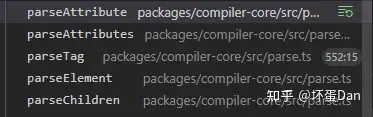
由于代码有些长,所以我打算一块一块的分析,这里先放出这个函数整体的框架
function parseChildren(
  context: ParserContext,
  mode: TextModes,
  ancestors: ElementNode[]
): TemplateChildNode[] {
  const parent = last(ancestors)
  const ns = parent ? parent.ns : Namespaces.HTML
  const nodes: TemplateChildNode[] = []

  while (!isEnd(context, mode, ancestors)) {
    // ...
  }

  // Whitespace handling strategy like v2
  let removedWhitespace = false
  if (mode !== TextModes.RAWTEXT && mode !== TextModes.RCDATA) {
    // ...
  }

  return removedWhitespace ? nodes.filter(Boolean) : nodes
}先是while循环,然后对mode的判断处理。
isEnd#
在分析while之前,先来看下while的条件
function isEnd(
  context: ParserContext,
  mode: TextModes,
  ancestors: ElementNode[]
): boolean {
  const s = context.source

  switch (mode) {
    case TextModes.DATA:
      if (startsWith(s, '</')) {
        // TODO: probably bad performance
        for (let i = ancestors.length - 1; i >= 0; --i) {
          if (startsWithEndTagOpen(s, ancestors[i].tag)) {
            return true
          }
        }
      }
      break

    case TextModes.RCDATA:
    case TextModes.RAWTEXT: {
      const parent = last(ancestors)
      if (parent && startsWithEndTagOpen(s, parent.tag)) {
        return true
      }
      break
    }

    case TextModes.CDATA:
      if (startsWith(s, ']]>')) {
        return true
      }
      break
  }

  return !s
}这里注意我们的mode是TextModes.DATA
在分析具体内容前我们先来看下这个TextModes
export const enum TextModes {
  //          | Elements | Entities | End sign              | Inside of
  DATA, //    | ✔        | ✔        | End tags of ancestors |
  RCDATA, //  | ✘        | ✔        | End tag of the parent | <textarea>
  RAWTEXT, // | ✘        | ✘        | End tag of the parent | <style>,<script>
  CDATA,
  ATTRIBUTE_VALUE
}这个TextModes应该是用来区分不同类型的节点的,由于当前我们的source只是一段字符串,所以需要区分不同类型才行,比如el节点或者原始文本节点等。
ancestors是一个stack,也就是栈。
template分析基于stack :
这里先说一下,我们的template是各种嵌套html元素的,所以在解析的时候得保证嵌套元素的位置是正确的,那这个时候vue就用了stack。
栈的特点就是后进先出。
那这个后进先出有什么用呢?
想一下我们的html元素有什么特点? 大部分都是闭和标签的比如<a>xx</a>,少部分是自闭合标签比如<input>。我们在解析的时候就可以依赖这个闭合标签来获取这个元素的嵌套内容。
这个时候栈就派上用场了。
解析到标签的头,给这个标签创建一个节点,把这个标签的`tag`存放到这个节点里,然后把这个节点`push`到栈里面,这样`pop`的时候对应标签结束标志的标签就会是正确的。
至于自闭合标签的比如input,这种直接就放栈里,然后匹配的时候绕过即可。
那么现在回到我们的isEnd方法里。
 function startsWithEndTagOpen(source: string, tag: string): boolean {
  return (
    startsWith(source, '</') &&
    source.slice(2, 2 + tag.length).toLowerCase() === tag.toLowerCase() &&
    /[\t\r\n\f />]/.test(source[2 + tag.length] || '>')
  )
}很明显,这里就是在匹配闭合标签。匹配到就直接return true
如果没有匹配到有兜底判断,判断s是也就是source是否被截取完了。
忘了说了,这里会对source进行截取,根据tag也就是标签的>和/>来切割。
至于另外两个mode我们这里就不分析了,可能之后还会遇到。
while里的代码#
isEnd分析完,我们知道了这是用来判断template是否解析完了,循环是否可以结束用的。
来看下while里面做了什么
这一块if条件嵌套有些多,所以我先放出整体框架。
while (!isEnd(context, mode, ancestors)) {

  const s = context.source
  let node: TemplateChildNode | TemplateChildNode[] | undefined = undefined

  if (mode === TextModes.DATA || mode === TextModes.RCDATA) {
    // 0.0
    if (!context.inVPre && startsWith(s, context.options.delimiters[0])) {
      // 0.0.0
    } else if (mode === TextModes.DATA && s[0] === '<') {
      // 0.0.1
      if (s.length === 1) {
        // 0.0.1.0
      } else if (s[1] === '!') {
        // 0.0.1.1
        if (startsWith(s, '<!--')) {
          // 0.0.1.1.0
        } else if (startsWith(s, '<!DOCTYPE')) {
          // 0.0.1.1.1
        } else if (startsWith(s, '<![CDATA[')) {
          // 0.0.1.1.2
          if (ns !== Namespaces.HTML) {
            // 0.0.1.1.2.0
          } else {
            // 0.0.1.1.2.1
          }
        } else {
          // 0.0.1.1.3
        }
      } else if (s[1] === '/') {
        // 0.0.1.2
        if (s.length === 2) {
          // 0.0.1.2.0
        } else if (s[2] === '>') {
          // 0.0.1.2.1
        } else if (/[a-z]/i.test(s[2])) {
          // 0.0.1.2.2
        } else {
          // 0.0.1.2.3
        }
      } else if (/[a-z]/i.test(s[1])) {
        // 0.0.1.3
        if (...) {
          // 0.0.1.3.0
        }
      } else if (s[1] === '?') {
        // 0.0.1.4
      } else {
        // 0.0.1.5
      }
    }
  }


  if (!node) {
    // 0.1
  }


  if (isArray(node)) {
    // 0.2.0
  } else {
    // 0.2.1
  }
}一共五层if(加上while,不算的话就四层),有些是用来处理错误场景的if,到时我们分析可以会绕过。
0.0.0
 if (!context.inVPre && startsWith(s, context.options.delimiters[0])) {
        // '{{'
        node = parseInterpolation(context, mode)
}这个VPre应该指的是v-pre[2这个标签,这个标签可以让内容不被编译完整输出,一般用在{{}}需要展示的场景
先来看下如果没有v-pre标签的场景
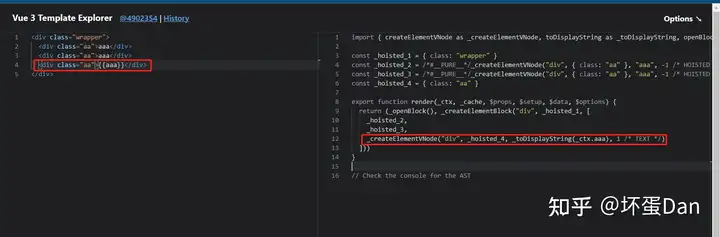
然后再来看下有v-pre的。
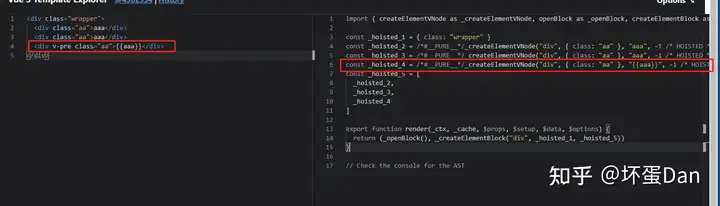
可以看到它也是可以被hoistStatic也就是静态提升的。
那么这个if分支的条件就是元素不在使用了v-pre指令的元素里面并且匹配到了{{ 。
parseInterpolation这个方法涉及内容有些多,我放到其它章节里。
这里简单说下就是用来处理{{ }},转换成一个节点,具体看其它的parseInterpolation方法。
我们接着分析。
0.0.1
这个if分支的条件是:mode是DATA并且匹配到了<
0.0.1.0:当前s也就是source只剩这一个符号了,那直接报错Unexpected EOF in tag.完事。
emitError(context, ErrorCodes.EOF_BEFORE_TAG_NAME, 1) 0.0.1.1:如果<后面接的是!符号。0.0.1.1.0:这是个注释节点。
node = parseComment(context) parseComment这个方法老规矩还是放到其它里面,简单的说就是处理这块注释代码转换为注释节点。
0.0.1.1.1:HTML5的文档注释``[3 ,用于声明这是一个遵循H5标准的html文档,这样浏览器就会用HTML5的标准解析这个文件。
node = parseBogusComment(context)这个parseBogusComment方法老规矩放到其它中,简单的说就是被当作注释忽略了。
0.0.1.1.2:这种是xml中的用法。 ``这种也直接叉出去。
            emitError(context, ErrorCodes.MISSING_END_TAG_NAME, 2)
advanceBy(context, 3) 0.0.1.2.2: 看似是符合要求的,但实际上并不是,实际上应该是没有对应开标签的单独``,我们后面会知道为什么这里会是这个样子。
             emitError(context, ErrorCodes.X_INVALID_END_TAG)
            parseTag(context, TagType.End, parent)
continueparseTag这个方法老规矩放到其它中,由于后面会再次遇到,这里就不多说了。
0.0.1.2.3: 接着又是不认识的``那么这个注释就是有问题的。
然后如果匹配到了但是是``,也有问题。
另外你要是``,那不好意思,这个我也不认识,也是叉出去报错。
接着是处理嵌套注释,嵌套注释其实浏览器是会渲染的,但是达不到预期,比如 --> -->这样。
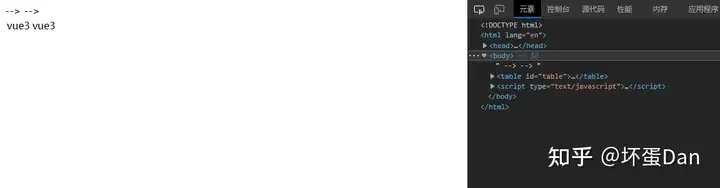
虽然ide会帮你检查,但保不齐还是有人头硬这么写。
所以这里也需要处理嵌套注释。
最后创建一个注释节点。
parseBogusComment#
function parseBogusComment(context: ParserContext): CommentNode | undefined {
  __TEST__ && assert(/^<(?:[\!\?]|\/[^a-z>])/i.test(context.source))

  const start = getCursor(context)
  const contentStart = context.source[1] === '?' ? 1 : 2
  let content: string

  const closeIndex = context.source.indexOf('>')
  if (closeIndex === -1) {
    content = context.source.slice(contentStart)
    advanceBy(context, context.source.length)
  } else {
    content = context.source.slice(contentStart, closeIndex)
    advanceBy(context, closeIndex + 1)
  }

  return {
    type: NodeTypes.COMMENT,
    content,
    loc: getSelection(context, start)
  }
}
这个方法不多说了,就是把一些不符合使用的代码也当作是注释,比如``闭合的话也没关系,直接把剩余代码都当做是注释。
parseCDATA#
function parseCDATA(
  context: ParserContext,
  ancestors: ElementNode[]
): TemplateChildNode[] {
  __TEST__ &&
    assert(last(ancestors) == null || last(ancestors)!.ns !== Namespaces.HTML)
  __TEST__ && assert(startsWith(context.source, '<![CDATA['))

  advanceBy(context, 9)
  const nodes = parseChildren(context, TextModes.CDATA, ancestors)
  if (context.source.length === 0) {
    emitError(context, ErrorCodes.EOF_IN_CDATA)
  } else {
    __TEST__ && assert(startsWith(context.source, ']]>'))
    advanceBy(context, 3)
  }

  return nodes
}简单的说就是把它里面的内容当作html去解析。
parseTag#
 /**
 * Parse a tag (E.g. `<div id=a>`) with that type (start tag or end tag).
 */
function parseTag(
  context: ParserContext,
  type: TagType.Start,
  parent: ElementNode | undefined
): ElementNode
function parseTag(
  context: ParserContext,
  type: TagType.End,
  parent: ElementNode | undefined
): void
function parseTag(
  context: ParserContext,
  type: TagType,
  parent: ElementNode | undefined
): ElementNode | undefined {
  // ...忽略测试代码
  // Tag open.
  const start = getCursor(context)
  const match = /^<\/?([a-z][^\t\r\n\f />]*)/i.exec(context.source)!
  const tag = match[1]
  const ns = context.options.getNamespace(tag, parent)

  advanceBy(context, match[0].length)
  advanceSpaces(context)

  // save current state in case we need to re-parse attributes with v-pre
  const cursor = getCursor(context)
  const currentSource = context.source

  // check <pre> tag
  if (context.options.isPreTag(tag)) {
    context.inPre = true
  }

  // Attributes.
  let props = parseAttributes(context, type)

  // check v-pre
  if (
    type === TagType.Start &&
    !context.inVPre &&
    props.some(p => p.type === NodeTypes.DIRECTIVE && p.name === 'pre')
  ) {
    context.inVPre = true
    // reset context
    extend(context, cursor)
    context.source = currentSource
    // re-parse attrs and filter out v-pre itself
    props = parseAttributes(context, type).filter(p => p.name !== 'v-pre')
  }

  // Tag close.
  let isSelfClosing = false
  if (context.source.length === 0) {
    emitError(context, ErrorCodes.EOF_IN_TAG)
  } else {
    isSelfClosing = startsWith(context.source, '/>')
    if (type === TagType.End && isSelfClosing) {
      emitError(context, ErrorCodes.END_TAG_WITH_TRAILING_SOLIDUS)
    }
    advanceBy(context, isSelfClosing ? 2 : 1)
  }

  if (type === TagType.End) {
    return
  }

  // 2.x deprecation checks
  if (
    __COMPAT__ &&
    __DEV__ &&
    isCompatEnabled(
      CompilerDeprecationTypes.COMPILER_V_IF_V_FOR_PRECEDENCE,
      context
    )
  ) {
    let hasIf = false
    let hasFor = false
    for (let i = 0; i < props.length; i++) {
      const p = props[i]
      if (p.type === NodeTypes.DIRECTIVE) {
        if (p.name === 'if') {
          hasIf = true
        } else if (p.name === 'for') {
          hasFor = true
        }
      }
      if (hasIf && hasFor) {
        warnDeprecation(
          CompilerDeprecationTypes.COMPILER_V_IF_V_FOR_PRECEDENCE,
          context,
          getSelection(context, start)
        )
        break
      }
    }
  }

  let tagType = ElementTypes.ELEMENT
  if (!context.inVPre) {
    if (tag === 'slot') {
      tagType = ElementTypes.SLOT
    } else if (tag === 'template') {
      if (
        props.some(
          p =>
            p.type === NodeTypes.DIRECTIVE && isSpecialTemplateDirective(p.name)
        )
      ) {
        tagType = ElementTypes.TEMPLATE
      }
    } else if (isComponent(tag, props, context)) {
      tagType = ElementTypes.COMPONENT
    }
  }

  return {
    type: NodeTypes.ELEMENT,
    ns,
    tag,
    tagType,
    props,
    isSelfClosing,
    children: [],
    loc: getSelection(context, start),
    codegenNode: undefined // to be created during transform phase
  }
}
代码较长,我们一点一点的分析。
上来先来三个
function parseTag(
  context: ParserContext,
  type: TagType.Start,
  parent: ElementNode | undefined
): ElementNode
function parseTag(
  context: ParserContext,
  type: TagType.End,
  parent: ElementNode | undefined
): void
function parseTag(
  context: ParserContext,
  type: TagType,
  parent: ElementNode | undefined
): ElementNode | undefined {这是一种typescript中重载的写法,比如如果第一个函数头参数匹配不对就会绕过第一个来匹配第二个。
这三个重载函数头唯一不同的参数是type的类型,分别对应枚举TagType的Start/End以及枚举自身。
这个方法我们遇到两次,一次是在parseElement,另一次是在处理落单的end tag。
getNamespace:这个方法compiler-sfc里的parse没有进行覆盖,所以沿用默认的也就是Namespaces.HTML。advanceSpaces:这个方法就不看了,就是绕过\t\r\n\f这几种情况。currentSource:被截取剩下的部分源码parseAttributes:
function parseAttributes(
  context: ParserContext,
  type: TagType
): (AttributeNode | DirectiveNode)[] {
  const props = []
  const attributeNames = new Set<string>()
  while (
    context.source.length > 0 &&
    !startsWith(context.source, '>') &&
    !startsWith(context.source, '/>')
  ) {
    if (startsWith(context.source, '/')) {
      emitError(context, ErrorCodes.UNEXPECTED_SOLIDUS_IN_TAG)
      advanceBy(context, 1)
      advanceSpaces(context)
      continue
    }
    if (type === TagType.End) {
      emitError(context, ErrorCodes.END_TAG_WITH_ATTRIBUTES)
    }

    const attr = parseAttribute(context, attributeNames)

    // Trim whitespace between class
    // https://github.com/vuejs/core/issues/4251
    if (
      attr.type === NodeTypes.ATTRIBUTE &&
      attr.value &&
      attr.name === 'class'
    ) {
      attr.value.content = attr.value.content.replace(/\s+/g, ' ').trim()
    }

    if (type === TagType.Start) {
      props.push(attr)
    }

    if (/^[^\t\r\n\f />]/.test(context.source)) {
      emitError(context, ErrorCodes.MISSING_WHITESPACE_BETWEEN_ATTRIBUTES)
    }
    advanceSpaces(context)
  }
  return props
}
代码有些长,不过很好理解。
当type == TagType.End的时候,会直接报错End tag cannot have attributes.,所以上面处理落单的逻辑中有parseTag是省事直接用了,为了这个错误提示和绕过对应的源码。
parseAttribute:这个方法我放到下面单独开个小标题,代码有些长,不过看名字就知道是用来分析属性的。
接着是对class属性的单独处理,把空白区域替换成单个space,然后去头擦尾。
然后把attr存储到props中最后再更新当前位置和截取源码。
最后返回props。
注意这里是props,外层用的while遍历处理,而parseAttribute是处理单个prop。
回到parseTag方法中
处理完props之后对v-pre的场景做处理,你应该注意到了parseAttribute中并没有处理v-pre的场景,也没有在这个场景中改变inVpre这个标志位,而更外层parseElement方法中也没有对inVpre这个标志位设置为true的场景。
所以这里需要有判断是否有v-pre的指令并且把标志位设置为true的场景,这样处理的时候状态才能准确。然后把v-pre去掉再重新parseAttributes一遍。
至于为啥不parseAttributes之前就判断,因为要先收集才好处理,不然这就得一边解析一边处理,这就有可能导致问题。
接着判断自闭合标签的,如果匹配到了/>的代码,那就是一个自闭合标签。
然后又是对2.x的兼容处理,警告v-if直接搭配v-for的场景。
接着给tag设置类型,默认都是ELEMENT, 如果标签是slot则标记为SLOT,而template比较特殊,大部分情况下没必要特殊标记,vue2.x中会被过滤而vue3.x中会被当作原生元素来渲染,不过当它们和if,else,else-if,for,slot结合,那就得做特殊标记了,标记类型为TEMPLATE。
而组件有单独的判断逻辑,我们来看下isComponent。
function isComponent(
  tag: string,
  props: (AttributeNode | DirectiveNode)[],
  context: ParserContext
) {
  const options = context.options
  if (options.isCustomElement(tag)) {
    return false
  }
  if (
    tag === 'component' ||
    /^[A-Z]/.test(tag) ||
    isCoreComponent(tag) ||
    (options.isBuiltInComponent && options.isBuiltInComponent(tag)) ||
    (options.isNativeTag && !options.isNativeTag(tag))
  ) {
    return true
  }
  // at this point the tag should be a native tag, but check for potential "is"
  // casting
  for (let i = 0; i < props.length; i++) {
    const p = props[i]
    if (p.type === NodeTypes.ATTRIBUTE) {
      if (p.name === 'is' && p.value) {
        if (p.value.content.startsWith('vue:')) {
          return true
        } else if (
          __COMPAT__ &&
          checkCompatEnabled(
            CompilerDeprecationTypes.COMPILER_IS_ON_ELEMENT,
            context,
            p.loc
          )
        ) {
          return true
        }
      }
    } else {
      // directive
      // v-is (TODO Deprecate)
      if (p.name === 'is') {
        return true
      } else if (
        // :is on plain element - only treat as component in compat mode
        p.name === 'bind' &&
        isStaticArgOf(p.arg, 'is') &&
        __COMPAT__ &&
        checkCompatEnabled(
          CompilerDeprecationTypes.COMPILER_IS_ON_ELEMENT,
          context,
          p.loc
        )
      ) {
        return true
      }
    }
  }
}
首先,判断自定义元素。
之前的文章里提到过的,默认遇到不认识的标签都当作组件,所以如果有需要,则将部分浏览器不支持的元素标记为customElement。
除此之外,以下场景的都将被当作是组件:
- 动态组件,使用
component作为tag,配合is属性动态加载组件。 tag带有大写字母isCoreComponent: 是核心包里自带的组件,比如Teleport、Suspense、keepAlive、BaseTransition。isBuiltInComponent[5:内部组件,比如Transition, 不需要引入可直接使用,不过如果你是用在render function里的,那么你就需要导入,因为没有编译阶段。- 兜底逻辑,不是原生的元素。
这里还有一种特殊的场景,使用is[6属性。

2.x版本中仅支持搭配component来使用,而3.1支持了解构,is可以用在原生元素中。
不过写法上需要用vue:开头

上一次遇到这个vue:还是在分析compiler-dom的v-on指令的时候,2.x中可以通过@hook:xxx的方式监听子组件的生命周期,在3.x中改成@vue:xxx的方式,具体请自行浏览这个文档。
VNode Lifecycle Events | Vue 3 Migration Guide (vuejs.org)
那么再回到我们的parseTag方法中
最后组装成一个节点再返回。
注意这里的type: NodeTypes.ELEMENT,之前也有说到过,NodeTypes和ElementTypes表示的意思是不一样的,前者表示的是AST节点的类型,而后者表示tag也就是标签的类型,引申出来的意思就是前者表示vnode的类型,后者表示vdom的类型。
parseAttribute#
function parseAttribute(
  context: ParserContext,
  nameSet: Set<string>
): AttributeNode | DirectiveNode {

  // Name.
  const start = getCursor(context)
  const match = /^[^\t\r\n\f />][^\t\r\n\f />=]*/.exec(context.source)!
  const name = match[0]

  if (nameSet.has(name)) {
    emitError(context, ErrorCodes.DUPLICATE_ATTRIBUTE)
  }
  nameSet.add(name)

  if (name[0] === '=') {
    emitError(context, ErrorCodes.UNEXPECTED_EQUALS_SIGN_BEFORE_ATTRIBUTE_NAME)
  }
  {
    const pattern = /["'<]/g
    let m: RegExpExecArray | null
    while ((m = pattern.exec(name))) {
      emitError(
        context,
        ErrorCodes.UNEXPECTED_CHARACTER_IN_ATTRIBUTE_NAME,
        m.index
      )
    }
  }

  advanceBy(context, name.length)

  // Value
  let value: AttributeValue = undefined

  if (/^[\t\r\n\f ]*=/.test(context.source)) {
    advanceSpaces(context)
    advanceBy(context, 1)
    advanceSpaces(context)
    value = parseAttributeValue(context)
    if (!value) {
      emitError(context, ErrorCodes.MISSING_ATTRIBUTE_VALUE)
    }
  }
  const loc = getSelection(context, start)

  if (!context.inVPre && /^(v-[A-Za-z0-9-]|:|\.|@|#)/.test(name)) {
    const match =
      /(?:^v-([a-z0-9-]+))?(?:(?::|^\.|^@|^#)(\[[^\]]+\]|[^\.]+))?(.+)?$/i.exec(
        name
      )!

    let isPropShorthand = startsWith(name, '.')
    let dirName =
      match[1] ||
      (isPropShorthand || startsWith(name, ':')
        ? 'bind'
        : startsWith(name, '@')
        ? 'on'
        : 'slot')
    let arg: ExpressionNode | undefined

    if (match[2]) {
      const isSlot = dirName === 'slot'
      const startOffset = name.lastIndexOf(match[2])
      const loc = getSelection(
        context,
        getNewPosition(context, start, startOffset),
        getNewPosition(
          context,
          start,
          startOffset + match[2].length + ((isSlot && match[3]) || '').length
        )
      )
      let content = match[2]
      let isStatic = true

      if (content.startsWith('[')) {
        isStatic = false

        if (!content.endsWith(']')) {
          emitError(
            context,
            ErrorCodes.X_MISSING_DYNAMIC_DIRECTIVE_ARGUMENT_END
          )
          content = content.slice(1)
        } else {
          content = content.slice(1, content.length - 1)
        }
      } else if (isSlot) {
        // #1241 special case for v-slot: vuetify relies extensively on slot
        // names containing dots. v-slot doesn't have any modifiers and Vue 2.x
        // supports such usage so we are keeping it consistent with 2.x.
        content += match[3] || ''
      }

      arg = {
        type: NodeTypes.SIMPLE_EXPRESSION,
        content,
        isStatic,
        constType: isStatic
          ? ConstantTypes.CAN_STRINGIFY
          : ConstantTypes.NOT_CONSTANT,
        loc
      }
    }

    if (value && value.isQuoted) {
      const valueLoc = value.loc
      valueLoc.start.offset++
      valueLoc.start.column++
      valueLoc.end = advancePositionWithClone(valueLoc.start, value.content)
      valueLoc.source = valueLoc.source.slice(1, -1)
    }

    const modifiers = match[3] ? match[3].slice(1).split('.') : []
    if (isPropShorthand) modifiers.push('prop')

    // 2.x compat v-bind:foo.sync -> v-model:foo
    if (__COMPAT__ && dirName === 'bind' && arg) {
      if (
        modifiers.includes('sync') &&
        checkCompatEnabled(
          CompilerDeprecationTypes.COMPILER_V_BIND_SYNC,
          context,
          loc,
          arg.loc.source
        )
      ) {
        dirName = 'model'
        modifiers.splice(modifiers.indexOf('sync'), 1)
      }

      if (__DEV__ && modifiers.includes('prop')) {
        checkCompatEnabled(
          CompilerDeprecationTypes.COMPILER_V_BIND_PROP,
          context,
          loc
        )
      }
    }

    return {
      type: NodeTypes.DIRECTIVE,
      name: dirName,
      exp: value && {
        type: NodeTypes.SIMPLE_EXPRESSION,
        content: value.content,
        isStatic: false,
        // Treat as non-constant by default. This can be potentially set to
        // other values by `transformExpression` to make it eligible for hoisting.
        constType: ConstantTypes.NOT_CONSTANT,
        loc: value.loc
      },
      arg,
      modifiers,
      loc
    }
  }

  // missing directive name or illegal directive name
  if (!context.inVPre && startsWith(name, 'v-')) {
    emitError(context, ErrorCodes.X_MISSING_DIRECTIVE_NAME)
  }

  return {
    type: NodeTypes.ATTRIBUTE,
    name,
    value: value && {
      type: NodeTypes.TEXT,
      content: value.content,
      loc: value.loc
    },
    loc
  }
}
错误的场景我们就绕过了,都比较好理解的
nameSet:是一个字符串集合,用来存储属性的名字。name:属性的名字。
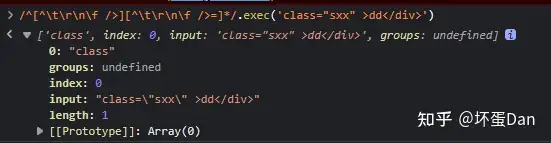
parseAttributeValue:
function parseAttributeValue(context: ParserContext): AttributeValue {
  const start = getCursor(context)
  let content: string

  const quote = context.source[0]
  const isQuoted = quote === `"` || quote === `'`
  if (isQuoted) {
    // Quoted value.
    advanceBy(context, 1)

    const endIndex = context.source.indexOf(quote)
    if (endIndex === -1) {
      content = parseTextData(
        context,
        context.source.length,
        TextModes.ATTRIBUTE_VALUE
      )
    } else {
      content = parseTextData(context, endIndex, TextModes.ATTRIBUTE_VALUE)
      advanceBy(context, 1)
    }
  } else {
    // Unquoted
    const match = /^[^\t\r\n\f >]+/.exec(context.source)
    if (!match) {
      return undefined
    }
    const unexpectedChars = /["'<=`]/g
    let m: RegExpExecArray | null
    while ((m = unexpectedChars.exec(match[0]))) {
      emitError(
        context,
        ErrorCodes.UNEXPECTED_CHARACTER_IN_UNQUOTED_ATTRIBUTE_VALUE,
        m.index
      )
    }
    content = parseTextData(context, match[0].length, TextModes.ATTRIBUTE_VALUE)
  }

  return { content, isQuoted, loc: getSelection(context, start) }
}使用""或者''包裹等号右边表达式的场景:
下面这种也是可以的
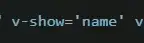
如果包裹的时候没有"/'结尾,那么这里就会把后面全部源码当作是字符串处理。
parseTextData前面有说过了,就是decode处理。
没有使用""或者''包裹等号右边表达式的场景:
下面四种写法中,只有最后一种是有问题的,其它都是正常可以写的。


最后把这个值用对象包裹,记录位置以及是否使用"/'包裹以及源码位置,并返回。
回到parseAttribute方法中。
处理完(初步,只是切割出来没有加工)等号右边的表达式之后再对等号左边的代码进行初步加工。
isPropShorthand:这个是vue3.2里新增的.prop[7修饰符的语法糖
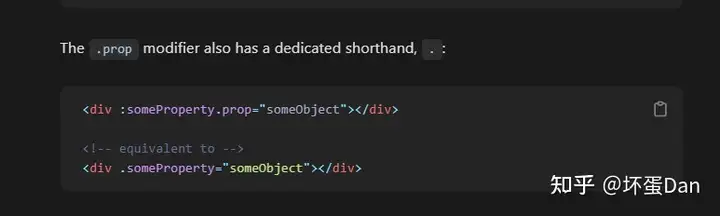
这里很明显就是在处理语法糖了,match[1]是v-xx的xx,比如

:变为bind, @变成on,其它的算slot。
dirName:自然就是指令的名字。- match[2]指的是使用
:分开指令和绑定的场景,比如:

如果像上面这个例子中使用[]包裹绑定值的名字,那么就是一种动态的写法,isStatic是false。
而这些指令中v-slot中有一种特殊情况,vuetifyjs[8中使用了大量的slot。而且它们的slot中还带上了.符号,由于v-slot现在还是和vue2一样自身没有修饰符,所以这里直接加上完事。
接着将这些等号左边的数据转换成一个单表达式节点,而这个节点就是前面我们分析compiler-dom的时候遇到的arg节点。注意这里的isStatic,如果是true,那就可以直接stringfy,而如果不是就直接NOT_CONSTANT
接着就是切割出修饰符modifier。如果遇到了.xxx开头的属性还得多加一个prop修饰符,前面有解释这种语法糖。
然后是对2.x的兼容场景
如果使用了v-model的.sync修饰符,那么会被移除

最后组装这一个attribute节点,类型是DIRECTIVE,也就是type == 7。
name是指令的名字,exp只是等号右边的表达式,arg是等号左边的表达式,modifiers是修饰符。
上面是使用了vue指令的attribute。
而如果没有使用就会被判断为原生attribute,没有arg、modifiers。
最后别忘了,这个方法只是处理了元素的单个属性。
parseElement#
 function parseElement(
  context: ParserContext,
  ancestors: ElementNode[]
): ElementNode | undefined {

  // Start tag.
  const wasInPre = context.inPre
  const wasInVPre = context.inVPre
  const parent = last(ancestors)
  const element = parseTag(context, TagType.Start, parent)
  const isPreBoundary = context.inPre && !wasInPre
  const isVPreBoundary = context.inVPre && !wasInVPre

  if (element.isSelfClosing || context.options.isVoidTag(element.tag)) {
    // #4030 self-closing <pre> tag
    if (isPreBoundary) {
      context.inPre = false
    }
    if (isVPreBoundary) {
      context.inVPre = false
    }
    return element
  }

  // Children.
  ancestors.push(element)
  const mode = context.options.getTextMode(element, parent)
  const children = parseChildren(context, mode, ancestors)
  ancestors.pop()

  // 2.x inline-template compat
  if (__COMPAT__) {
    const inlineTemplateProp = element.props.find(
      p => p.type === NodeTypes.ATTRIBUTE && p.name === 'inline-template'
    ) as AttributeNode
    if (
      inlineTemplateProp &&
      checkCompatEnabled(
        CompilerDeprecationTypes.COMPILER_INLINE_TEMPLATE,
        context,
        inlineTemplateProp.loc
      )
    ) {
      const loc = getSelection(context, element.loc.end)
      inlineTemplateProp.value = {
        type: NodeTypes.TEXT,
        content: loc.source,
        loc
      }
    }
  }

  element.children = children

  // End tag.
  if (startsWithEndTagOpen(context.source, element.tag)) {
    parseTag(context, TagType.End, parent)
  } else {
    emitError(context, ErrorCodes.X_MISSING_END_TAG, 0, element.loc.start)
    if (context.source.length === 0 && element.tag.toLowerCase() === 'script') {
      const first = children[0]
      if (first && startsWith(first.loc.source, '<!--')) {
        emitError(context, ErrorCodes.EOF_IN_SCRIPT_HTML_COMMENT_LIKE_TEXT)
      }
    }
  }

  element.loc = getSelection(context, element.loc.start)

  if (isPreBoundary) {
    context.inPre = false
  }
  if (isVPreBoundary) {
    context.inVPre = false
  }
  return element
}wasInPre:曾经在pre标签内wasInVPre: 曾经在v-pre标签内,为啥要加个曾经呢?因为等会parseTag的时候这个context.pre/vPre可能变化,所以这里需要缓存处理。isPreBoundary: 自然就是指当前在pre标签内isVPreBoundary:同上isSelfClosing:表示这个元素是自闭合标签isVoidTag:这个是用来过滤某些自定义元素的,至于啥是特殊的原生元素,之前在compiler-dom中有说到过,有些浏览器支持某些独特的元素,其它浏览器不兼容,这种情况下如果没有标记,就会被判断为component。getTextMode:这个也是来自options的,你可以回去文章开头看下compiler-sfc的parse.ts中传入的处理逻辑。算了,咱直接copy下来
    getTextMode: ({ tag, props }, parent) => {
      // all top level elements except <template> are parsed as raw text
      // containers
      if (
        (!parent && tag !== 'template') ||
        // <template lang="xxx"> should also be treated as raw text
        (tag === 'template' &&
          props.some(
            p =>
              p.type === NodeTypes.ATTRIBUTE &&
              p.name === 'lang' &&
              p.value &&
              p.value.content &&
              p.value.content !== 'html'
          ))
      ) {
        return TextModes.RAWTEXT
      } else {
        return TextModes.DATA
      }
} 那么这一段代码拿到现在来分析就简单多了,template(lang="xxx")、script、style以及customerBlock的tag都会被标记为RAWText,其它都是DATA类型。
我们来总结下这个方法
- 先是通过
parseTag把source转换成节点,然后判断是否是自闭合标签或者是需要过滤的tag,那不需要做处理直接return出去。 - 如果不是上面的场景,则将
element存放到ancestors这个栈上面。 - 调用
context.options.getTextMode获取当前节点的mode。 - 递归调用
parseChildren这个方法处理子节点。 pop出栈。这里终于接触到了出栈,但是出栈之后去哪里了呢?别急,很快会说到。- 一段
vue2.x的inline-template兼容逻辑。这一段咱就不多说了,毕竟之前compiler-sfc遇到的时候也没分析。 - 把出栈了的
element.children绑定为children也就是通过递归parseChildren方法获取的子节点。 - 处理
end tag,也即是。这里也解决了之前埋下的一个问题:为什么之前那里分析会报错,因为end tag在这个parseElement方法中已经处理了,外面理论上是不会存在``的了,除非是写错的。 - 绑定代码位置区域
- 初始化
context上inPre和inVPre这两个字段 - 返回
element
那么这里的代码说完了也没看到element在被pop之后去了哪里,实际上它被return出去,被pushNode方法push到nodes上了,作为它父节点的一个子节点。
这里又有一个问题,为什么先push进去,在parseChildren之后又pop出来呢?
先放进去后pop出来其实是为了保证在parseChildren的时候 stack最后一个节点是正确的祖先节点。
我们来看几组图对比下
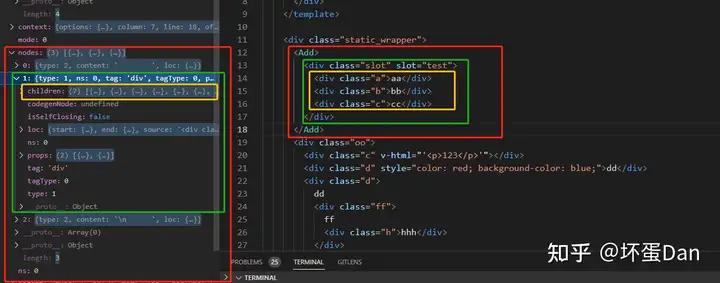
至于这里slot为啥会有7个子节点 ,因为换行的节点也算进去了。
所以对于nodes来说,是不会有层级错误或者顺序错误的问题的。
而对于ancestors这个stack来说,当某个tag的子节点被parse完返回之后,就会进行end tag匹配,匹配完了之后这个节点就被pop出去了,简单的说就是遇到入栈,遇到出栈,然后再被绑定到它的父节点上面去,所以对于栈来说顺序层级也是正常的。
我们来看下
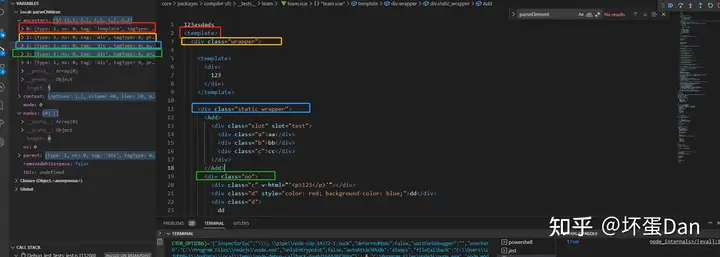
还有最后一个节点,篇幅不够,截图不到。
可以看到都是还没遇到end tag的。
参考#
- ^mustache https://www.baeldung.com/mustache
- ^vue3-vPre https://vuejs.org/api/built-in-directives.html#v-pre
- ^DOCTYPE https://developer.mozilla.org/en-US/docs/Glossary/Doctype
- ^el-pre https://developer.mozilla.org/en-US/docs/Web/HTML/Element/pre
- ^vue-build-in-component https://vuejs.org/api/built-in-components.html#built-in-components
- ^vue3.x-is https://vuejs.org/api/built-in-special-attributes.html#is
- ^vue3-v-bind https://vuejs.org/api/built-in-directives.html#v-bind
- ^vuetifyjs https://vuetifyjs.com/en/
发布于 2023-01-17 14:48・IP 属地广东