
前言#
昨天我们引入了静态资源(assets)以及给瓦片上色
坏蛋Dan:rust基础学习--基于Bevy实现扫雷小游戏day4
今天咱们继续
实现交互#
既然已经上完色了,接下来该准备实现交互了。
既然是交互,那自然就是避不开点击事件了。
那么我们得解决两个问题:
- 怎么监听点击
- 怎么知道点击的是哪个瓦片
第一个好解决,游戏引擎没有事件监听机制就奇了怪了。
重点是第二个。
在没有api的情况下,最简单最暴力的方式自然是获取点击的位置,然后再通过坐标 + 瓦片size来计算。
这里文档说官方没有提供相关api,所以这回真的只能暴力了。
在开始之前,这里还需要注意一点:窗口和我们的扫雷不一定是完全覆盖的,所以需要判断点击的是否是扫雷范围内的,然后才能计算是哪个瓦片。
我们到board_plugin/src/resources文件夹里创建一个board.rs文件,这个资源用来表示我们的扫雷块,之前的tile_map是裸露直接暴露给app的,这样不是很好,因为有些关联信息并没有被带上,比如当前扫雷块在窗口的位置。
你可能会想我们拓展下tile_map的字段即可。但实际上这样是不对的,tile_map并不能完全代表扫雷块,把这个扫雷块位置放到它里面是一种不规范的行为。
所以这里新开了一个board.rs用来表示扫雷块,这个tile_map自然是它的其中一个字段
 // board.rs
use crate::bounds::Bounds2;
use crate::{Coordinates, TileMap};
use bevy::prelude::*;

#[derive(Debug)]
pub struct Board {
    pub tile_map: TileMap,
    pub bounds: Bounds2,
    pub tile_size: f32,
}

impl Board {
    /// Translates a mouse position to board coordinates
    pub fn mouse_position(&self, window: &Window, position: Vec2) -> Option<Coordinates> {
        // Window to world space
        let window_size = Vec2::new(window.width(), window.height());
        let position = position - window_size / 2.;

        // Bounds check
        if !self.bounds.in_bounds(position) {
            return None;
        }
        // World space to board space
        let coordinates = position - self.bounds.position;
        Some(Coordinates {
            x: (coordinates.x / self.tile_size) as u16,
            y: (coordinates.y / self.tile_size) as u16,
        })
    }
}这里选择使用资源来实现是因为到时候是需要改变数据的,tile和tile_map都是资源,这样到时候就能直接穿透到tile上去修改数据。
计算逻辑很简单,就是用(点击的位置(相对于窗口) - 当前扫雷块的起始位置(左下角在窗口中的位置) / tile_size)。这样就获得了点击对应在扫雷块中的坐标即确定了对应的瓦片位置。
不过这里我们并没有实现in_bounds也就是判断是否在扫雷块中的逻辑。
另外还有一点你应该有点疑惑,那就是为什么这个window在被position减去之前要自己/ 2.呢?
因为position点击是根据world space的,而wprld space是默认当前camera为中心的,而我们的窗口是以左下角为中心的,所以这里position多减去width/2和height/2个位置来对准window坐标轴。
别忘了暴露出去
// board_plugin/resources/mod.rs

pub(crate) mod tile;
pub(crate) mod tile_map;
pub(crate) mod board;

mod board_options;

pub use board_options::*;然后我们来实现这个in_bounds方法,我们在board_plugin/src下新建bounds.rs,你可能会疑惑为啥不放到components里,因为这里不是为了实体服务的,这个bounds是用于表示我们扫雷块资源的范围的,原本应该由官方提供相应的。
 use bevy::prelude::Vec2;

#[derive(Debug, Copy, Clone)]
pub struct Bounds2 {
    pub position: Vec2,
    pub size: Vec2,
}

impl Bounds2 {
    pub fn in_bounds(&self, coords: Vec2) -> bool {
        coords.x >= self.position.x
            && coords.y >= self.position.y
            && coords.x <= self.position.x + self.size.x
            && coords.y <= self.position.y + self.size.y
    }
}
代码很简单就不多说了。
然后我们来调用这俩货。
回到lib.rs的create_board方法中, 由于我们的资源需要数据依赖,所以自然是不能在最开始插进去的,相反,我们得放在最后再加上去,因为是需要所有权的,为了避免影响到中间数据处理,这里得放在最后。
pub mod components;
pub mod resources;
mod bounds;

use bevy::log;
use bevy::prelude::*;

use resources::*;
use components::*;
use bounds::Bounds2;
use board::Board;
use tile_map::*;
use tile::*;
use bevy::math::Vec3Swizzles;
// ...
            commands.insert_resource(Board {
                tile_map,
                bounds: Bounds2 {
                    position: board_position.xy(),
                    size: board_size,
                },
                tile_size,
            });
// ...xy[2]: 降维打击,返回一个二维的Vec2。
那么现在还差一步,监听事件点击。
我们在board_plugin/src文件夹里创建一个systems的文件夹用来存放交互的逻辑,虽然lib.rs中也有逻辑,但是那也是为了配置而需要的逻辑,初始化数据,处理数据,组装数据等。
我们在里面创建mod.rs和input.rs文件。
mod.rs
pub mod input;input.rs中实现交互逻辑
// input.rs
use crate::Board;
use bevy::input::{mouse::MouseButtonInput, ElementState};
use bevy::log;
use bevy::prelude::*;

pub fn input_handling(
    windows: Res<Windows>,
    board: Res<Board>,
    mut button_evr: EventReader<MouseButtonInput>,
) {
    let window = windows.get_primary().unwrap();

    for event in button_evr.iter() {
        if let ElementState::Pressed = event.state {
            let position = window.cursor_position();
            if let Some(pos) = position {
                log::trace!("Mouse button pressed: {:?} at {}", event.button, pos);
                let tile_coordinates = board.mouse_position(window, pos);
                if let Some(coordinates) = tile_coordinates {
                    match event.button {
                        MouseButton::Left => {
                            log::info!("Trying to uncover tile on {}", coordinates);
                            // TODO: generate an event
                        }
                        MouseButton::Right => {
                            log::info!("Trying to mark tile on {}", coordinates);
                            // TODO: generate an event
                        }
                        _ => (),
                    }
                }
            }
        }
    }
}get_primary:返回主要的窗口的引用。MouseButtonInput:鼠标按钮输入事件。ButtonState:鼠标按钮的状态,自然是有Pressed和Released按压和释放两种状态。MouseButton:有四个属性,鼠标左/右键,滑轮以及一些鼠标的自定义宏键(都属于Other)。
这里做的事情也很简单,监听鼠标左键Pressed,然后计算点击的坐标
这里有辨别是鼠标左键还是右键的逻辑,因为扫雷游戏右键可以插旗。
然后我们引入到lib.rs里的build中注册这个system。
// lib.rs
mod systems;
// ..
//    app.add_startup_system(Self::create_board)
        .add_system(systems::input::input_handling);
// .. 然后我们来执行下cargo run
当你点击按钮的时候就会触发打印,输出对应坐标。
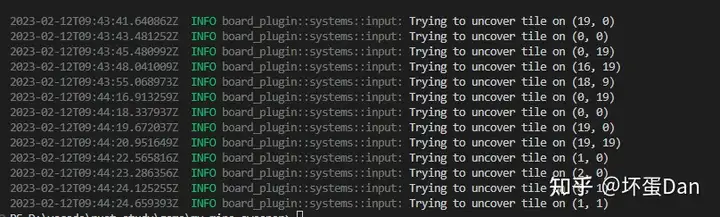
不过我们现在还没有实现点击之后触发的逻辑,这块是扫雷的核心逻辑。
代码#
src/bounds.rs#
use bevy::prelude::Vec2;

#[derive(Debug, Copy, Clone)]
pub struct Bounds2 {
    pub position: Vec2,
    pub size: Vec2,
}

impl Bounds2 {
    pub fn in_bounds(&self, coords: Vec2) -> bool {
        coords.x >= self.position.x
            && coords.y >= self.position.y
            && coords.x <= self.position.x + self.size.x
            && coords.y <= self.position.y + self.size.y
    }
}src/resources/board.rs#
// board.rs
use crate::bounds::Bounds2;
use crate::{Coordinates, TileMap};
use bevy::prelude::*;

#[derive(Debug, Resource)]
pub struct Board {
    pub tile_map: TileMap,
    pub bounds: Bounds2,
    pub tile_size: f32,
}

impl Board {
    /// Translates a mouse position to board coordinates
    pub fn mouse_position(&self, window: &Window, position: Vec2) -> Option<Coordinates> {
        // Window to world space
        let window_size = Vec2::new(window.width(), window.height());
        let position = position - window_size / 2.;

        // Bounds check
        if !self.bounds.in_bounds(position) {
            return None;
        }
        // World space to board space
        let coordinates = position - self.bounds.position;
        Some(Coordinates {
            x: (coordinates.x / self.tile_size) as u16,
            y: (coordinates.y / self.tile_size) as u16,
        })
    }
}systems/input.rs#
// input.rs
use crate::Board;
use bevy::input::{mouse::MouseButtonInput, ButtonState};
use bevy::log;
use bevy::prelude::*;

pub fn input_handling(
    windows: Res<Windows>,
    board: Res<Board>,
    mut button_evr: EventReader<MouseButtonInput>,
) {
    let window = windows.get_primary().unwrap();

    for event in button_evr.iter() {
        if let ButtonState::Pressed = event.state {
            let position = window.cursor_position();
            if let Some(pos) = position {
                log::trace!("Mouse button pressed: {:?} at {}", event.button, pos);
                let tile_coordinates = board.mouse_position(window, pos);
                if let Some(coordinates) = tile_coordinates {
                    match event.button {
                        MouseButton::Left => {
                            log::info!("Trying to uncover tile on {}", coordinates);
                            // TODO: generate an event
                        }
                        MouseButton::Right => {
                            log::info!("Trying to mark tile on {}", coordinates);
                            // TODO: generate an event
                        }
                        _ => (),
                    }
                }
            }
        }
    }
}src/lib.rs#
// lib.rs
mod bounds;
pub mod components;
pub mod resources;
mod systems;
use bevy::log;
use bevy::prelude::*;

use bevy::math::Vec3Swizzles;
use board::Board;
use bounds::Bounds2;
use components::*;
use resources::*;
use tile::*;
use tile_map::*;

pub struct BoardPlugin;

impl Plugin for BoardPlugin {
    fn build(&self, app: &mut App) {
        app.add_startup_system(Self::create_board)
            .add_system(systems::input::input_handling);
        #[cfg(feature = "debug")]
        {
            app.register_type::<Coordinates>()
                .register_type::<Bomb>()
                .register_type::<BombNeighbor>()
                .register_type::<Uncover>();
        }
        log::info!("Loaded Board Plugin");
    }
}

impl BoardPlugin {
    /// Computes a tile size that matches the window according to the tile map size
    fn adaptative_tile_size(
        window: Res<Windows>,
        (min, max): (f32, f32),      // Tile size constraints
        (width, height): (u16, u16), // Tile map dimensions
    ) -> f32 {
        let window = window.get_primary().expect("get window primary error");

        let max_width = window.width() / width as f32;
        let max_heigth = window.height() / height as f32;
        max_width.min(max_heigth).clamp(min, max)
    }

    /// System to generate the complete board
    pub fn create_board(
        mut commands: Commands,
        board_options: Option<Res<BoardOptions>>,
        window: Res<Windows>,
        asset_server: Res<AssetServer>, // The AssetServer resource
    ) {
        let options = match board_options {
            None => BoardOptions::default(), // If no options is set we use the default one
            Some(o) => o.clone(),
        };
        // Tilemap generation
        let mut tile_map = TileMap::empty(options.map_size.0, options.map_size.1);
        tile_map.set_bombs(options.bomb_count);
        #[cfg(feature = "debug")]
        // Tilemap debugging
        log::info!("{}", tile_map.console_output());

        let tile_size = match options.tile_size {
            TileSize::Fixed(v) => v,
            TileSize::Adaptive { min, max } => Self::adaptative_tile_size(
                window,
                (min, max),
                (tile_map.width(), tile_map.height()),
            ),
        };

        // We deduce the size of the complete board
        let board_size = Vec2::new(
            tile_map.width() as f32 * tile_size,
            tile_map.height() as f32 * tile_size,
        );
        log::info!("board size: {}", board_size);
        // We define the board anchor position (bottom left)
        let board_position = match options.position {
            BoardPosition::Centered { offset } => {
                Vec3::new(-(board_size.x / 2.), -(board_size.y / 2.), 0.) + offset
            }
            BoardPosition::Custom(p) => p,
        };

        commands
            .spawn(SpatialBundle {
                visibility: Visibility::VISIBLE,
                transform: Transform::from_translation(board_position.into()),
                ..Default::default()
            })
            .insert(Name::new("Board"))
            .with_children(|parent| {
                // We spawn the board background sprite at the center of the board, since the sprite pivot is centered
                parent
                    .spawn(SpriteBundle {
                        sprite: Sprite {
                            color: Color::WHITE,
                            custom_size: Some(board_size),
                            ..Default::default()
                        },
                        transform: Transform::from_xyz(board_size.x / 2., board_size.y / 2., 0.),
                        ..Default::default()
                    })
                    .insert(Name::new("Background"));

                let font = asset_server.load("fonts/pixeled.ttf");
                let bomb_image = asset_server.load("sprites/bomb.png");

                Self::spawn_tiles(
                    parent,
                    &tile_map,
                    tile_size,
                    options.tile_padding,
                    Color::GRAY,
                    bomb_image,
                    font,
                );
            });

        commands.insert_resource(Board {
            tile_map,
            bounds: Bounds2 {
                position: board_position.xy(),
                size: board_size,
            },
            tile_size,
        });
    }
    /// Generates the bomb counter text 2D Bundle for a given value
    fn bomb_count_text_bundle(count: u8, font: Handle<Font>, size: f32) -> Text2dBundle {
        // We retrieve the text and the correct color
        let (text, color) = (
            count.to_string(),
            match count {
                1 => Color::WHITE,
                2 => Color::GREEN,
                3 => Color::YELLOW,
                4 => Color::ORANGE,
                _ => Color::PURPLE,
            },
        );
        // We generate a text bundle
        Text2dBundle {
            text: Text {
                sections: vec![TextSection {
                    value: text,
                    style: TextStyle {
                        color,
                        font,
                        font_size: size,
                    },
                }],
                alignment: TextAlignment {
                    vertical: VerticalAlign::Center,
                    horizontal: HorizontalAlign::Center,
                },
            },
            transform: Transform::from_xyz(0., 0., 1.),
            ..Default::default()
        }
    }
    fn spawn_tiles(
        parent: &mut ChildBuilder,
        tile_map: &TileMap,
        size: f32,
        padding: f32,
        color: Color,
        bomb_image: Handle<Image>,
        font: Handle<Font>,
    ) {
        // Tiles
        for (y, line) in tile_map.iter().enumerate() {
            for (x, tile) in line.iter().enumerate() {
                let coordinates = Coordinates {
                    x: x as u16,
                    y: y as u16,
                };

                let tile_bundle = SpriteBundle {
                    sprite: Sprite {
                        color,
                        custom_size: Some(Vec2::splat(size - padding)),
                        ..Default::default()
                    },
                    transform: Transform::from_xyz(
                        (x as f32 * size) + (size / 2.),
                        (y as f32 * size) + (size / 2.),
                        1.,
                    ),
                    ..Default::default()
                };

                let mut cmd = parent.spawn(tile_bundle);

                cmd.insert(Name::new(format!("Tile ({}, {})", x, y)))
                    .insert(coordinates);

                match tile {
                    Tile::Bomb => {
                        cmd.insert(Bomb).with_children(|parent| {
                            parent.spawn(SpriteBundle {
                                sprite: Sprite {
                                    custom_size: Some(Vec2::splat(size - padding)),
                                    ..Default::default()
                                },
                                transform: Transform::from_xyz(0., 0., 1.),
                                texture: bomb_image.clone(),
                                ..Default::default()
                            });
                        });
                    }
                    Tile::BombNeighbor(count) => {
                        let bomb_neighbor = BombNeighbor { count: *count };
                        cmd.insert(bomb_neighbor).with_children(|parent| {
                            parent.spawn(Self::bomb_count_text_bundle(
                                *count,
                                font.clone(),
                                size - padding,
                            ));
                        });
                    }
                    _ => (),
                };
            }
        }
    }
}剩下的mod.rs就不放出来了。
总结#
万事差不多都具备了,可以开始实现核心逻辑了。
参考#
- ^Bevy Minesweeper: Input Management https://dev.to/qongzi/bevy-minesweeper-part-5-24j4
- ^xy https://docs.rs/bevy/0.9.1/bevy/math/trait.Vec3Swizzles.html#tymethod.xy
发布于 2023-02-12 17:52・IP 属地广东