
前言#
没有前言~
安装#
我这是window系统,所以按照window的来[1]
- 安装
rust的包
安装 Rustwww.rust-lang.org/zh-CN/tools/install
跟着弹出来的终端一步一步安装即可。
在安装rust之前会检查你是否有VS 2013以上的编译工具,没有会给你装VS 2022
Desktop Development with C++The Windows 10 or 11 SDKThe English language pack component, along with any other language pack of your choosing
安装完之后测试下是否正常
cargo -V
rustc -Vcargo是rust的包管理器,类似node的npm。rustc:rust的编译器,类似c++的gcc。
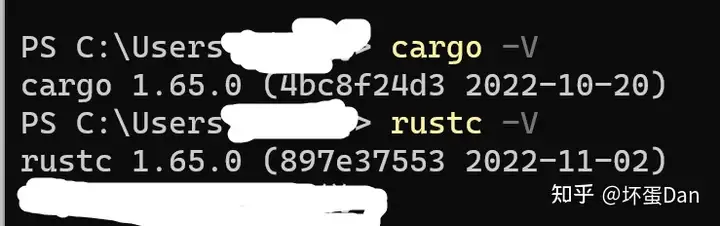
正常。
如果是linux或者mac系统[2]。
终端执行
$ curl --proto '=https' --tlsv1.3 https://sh.rustup.rs -sSf | sh 安装完后可能还需要linker
macOS需要安装C compiler,一方面是rust编译需要,另一方面是有的rust包是用C编写的。
$ xcode-select --install而linux系统则需要安装GCC或者CLang, 根据自身情况安装。比如Ubuntu需要安装build-essential包。
更新rust#
如果想更新版本,可以执行以下指令
rustup update卸载rust#
rustup self uninstall文档#
直接在终端输入或者看官方线上文档[5]
rustup doc安装异常#
如果你在终端输入rustc -V,系统提示你找不到该指令,大概率是环境变量配置有问题。rust会默认配置好环境变量。你需要检查%PATH%是否正常,是否包含你rust的配置路径。
window终端输入
echo %PATH%
linux`或者`mac
echo $PATH 如果你排查之后发现路径正常,那只能是去call大佬了。
https://discord.gg/rust-langdiscord.gg/rust-lang
参考#
- ^install-rust-in-window https://doc.rust-lang.org/book/ch01-01-installation.html#installing-rustup-on-windows
- ^install-rust-in-linux-or-macos https://doc.rust-lang.org/book/ch01-01-installation.html#installing-rustup-on-linux-or-macos
- ^update-rust https://doc.rust-lang.org/book/ch01-01-installation.html#updating-and-uninstalling
- ^uninstall-rust https://doc.rust-lang.org/book/ch01-01-installation.html#updating-and-uninstalling
- ^rust-online-doc https://doc.rust-lang.org/book/foreword.html
- ^install-rust-troubleshoot https://doc.rust-lang.org/book/ch01-01-installation.html#troubleshooting
编辑于 2022-11-23 10:16・IP 属地广东