
前言#
昨天我们简单的学习了数据结构并且写了一个小demo
坏蛋Dan:python简单入门--day3:数据结构和小例子
今天我们来了解下python的面向对象编程理念、输入输出、错误的捕获处理、标准库以及其它
Object Oriented Programming#
前面我们写代码都是基于函数,以一块语句的方式来修改数据,这种一般叫做面向过程编程(precedure-oriented programming)。
而我们还以可以用另一种方式,将一系列函数等组合到一个对象里面,这种则是面向对象编程(object-oriented programming)。
这两种编程理念都没问题,大部分时候我们都可以使用面向过程编程,而小部分时候不适合面向过程,那么就可以采用面向对象的方式。
类(classes)和对象(objects)是面向对象编程的两个主要方面。
类可以创建一个新类型,而对象是类的一个实例。
比如通过int创建的整数变量都是对象,而int是一个class,所以这些变量都是int这个class的实例。
对于对象/类里面的变量来说,一般被叫做字段(fields)。 也可以是函数,但是函数只可以定义于class里面,不过作为类的实例,对象也可以使用这些函数。
字段有两个类型:
instance variablesclass variables
self#
和一般的函数对比,类里面的函数(一般用来区分叫做methods)唯一的不同点就在于它的第一个参数必须要是self(一般叫self,你也可以自定义), 这个self不需要我们传入,编译解析的时候会自动带上。(可以参考Rust里的struct implement的methods)。
至于为什么不需要我们手动传入self,这里有个简单的例子用于理解:
比如我们有一个MyClass的类和它的实例myobject对象,当我们通过myobject调用定义在MyClass里的methods的时候:myobject.methods(arg1, arg2),在编译解析的时候会被python转换为MyClass.methods(myobject, arg1, arg2)。所以我们并不需要手动传入。
Classes#
定义类的关键字是class,字段和函数都定义在这个类的block里面。
直接来看下例子
class Person:
    pass  # An empty block

p = Person()
print(p)创建类的实例不需要new关键字

__main__.Person:表示这个p对象是当前module里的Person类的实例对象,而后面这一段十六进制则是我们这个对象在堆内存上的地址。
Methods#
直接来看下例子
class Person:
    def say_hi(self):
        print('Hello, how are you?')

p = Person()
p.say_hi()
# The previous 2 lines can also be written as
# Person().say_hi()
__init__ 方法#
在类里面有一些特殊的methods,而这个__init__则是其中一个。
这个方法会在一个对象实例被创建的时候执行,相当于其它语言的constructor。
我们来看下用法
class Person:
    def __init__(self, name):
        self.name = name

    def say_hi(self):
        print('Hello, my name is', self.name)

p = Person('Swaroop')
p.say_hi()
# The previous 2 lines can also be written as
# Person('Swaroop').say_hi()
类和对象的变量#
前面说过,类和对象的变量叫做字段(fields),并且字段有两种类型:instance variables和class variables。
顾名思义,就是类的字段和对象的字段。
Class variables: 类字段是公用的(shared),它们也可以被这个类的实例对象访问。不过需要注意的是,类字段是唯一的,如果存在多个实例对象,那么这些实例对象共用这个字段,当其中一个对象改变这个字段的时候,所有的类对象访问这个字段的时候也都会发生改变。Object variables:这些字段由实例对象自行管理,即当数据发生变化的时候并不会影响到其它实例对象。
我们来看下例子
 class Robot:
    """Represents a robot, with a name."""

    # A class variable, counting the number of robots
    population = 0

    def __init__(self, name):
        """Initializes the data."""
        self.name = name
        print("(Initializing {})".format(self.name))

        # When this person is created, the robot
        # adds to the population
        Robot.population += 1

    def die(self):
        """I am dying."""
        print("{} is being destroyed!".format(self.name))

        Robot.population -= 1

        if Robot.population == 0:
            print("{} was the last one.".format(self.name))
        else:
            print("There are still {:d} robots working.".format(
                Robot.population))

    def say_hi(self):
        """Greeting by the robot.

        Yeah, they can do that."""
        print("Greetings, my masters call me {}.".format(self.name))

    @classmethod
    def how_many(cls):
        """Prints the current population."""
        print("We have {:d} robots.".format(cls.population))


droid1 = Robot("R2-D2")
droid1.say_hi()
Robot.how_many()

droid2 = Robot("C-3PO")
droid2.say_hi()
Robot.how_many()

print("\nRobots can do some work here.\n")

print("Robots have finished their work. So let's destroy them.")
droid1.die()
droid2.die()

Robot.how_many()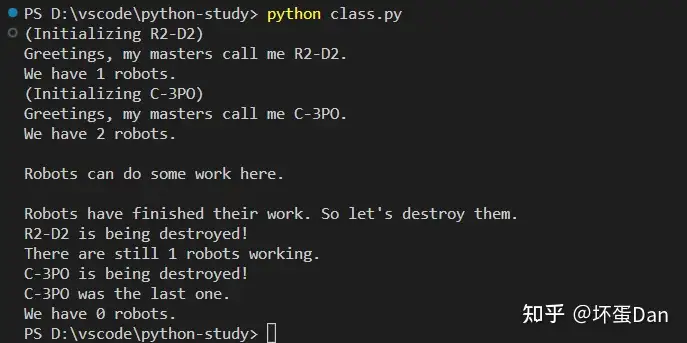
这里的name是对象字段,而population这个字段则是一个类字段。
注意self也是对象自身的,而不是类的。
另外我们还可以用self.__class__这个attribute去访问类字段:self.__class__.population(类似前端的通过prototype去访问)。
这里还有一个装饰器(decorator[1]):@classmethod指明how_many这个方法是类私有的,实例对象不能访问。
简单地说,这里的装饰器算是一种语法糖,相当于以下写法
how_many = classmethod(how_many)所有的类字段都是公用的,除了通过__开头的,通过__开头的比如__privatevar指明这个字段是类私有的,创建的实例对象不会有这个字段。
继承(Inheritance)#
继承是面向对象编程的其中一个特性,我们可以通过继承来复用一些方法。(一些语言比如go、rust都不再实现这个特性,改用implement crate等方式实现,因为继承是全部继承,存在浪费。)
比如教室,A教室和B教室,对于这两个教室来说,教室的所有属性比如教室的介绍、用途都是一样的,但是子类又需要有自己的属性,比如名字叫A或者名字叫B。
那么这个时候我们可以构造一个父类叫做:教室,把一些相同的特性都翻到这个父类里。然后实现两个子类A教室和B教室继承这个父类。
教程里给出的例子是学校的成员,有教师和学生,但他们无疑都是学校成员。
class SchoolMember:
    '''Represents any school member.'''
    def __init__(self, name, age):
        self.name = name
        self.age = age
        print('(Initialized SchoolMember: {})'.format(self.name))

    def tell(self):
        '''Tell my details.'''
        print('Name:"{}" Age:"{}"'.format(self.name, self.age), end=" ")


class Teacher(SchoolMember):
    '''Represents a teacher.'''
    def __init__(self, name, age, salary):
        SchoolMember.__init__(self, name, age)
        self.salary = salary
        print('(Initialized Teacher: {})'.format(self.name))

    def tell(self):
        SchoolMember.tell(self)
        print('Salary: "{:d}"'.format(self.salary))


class Student(SchoolMember):
    '''Represents a student.'''
    def __init__(self, name, age, marks):
        SchoolMember.__init__(self, name, age)
        self.marks = marks
        print('(Initialized Student: {})'.format(self.name))

    def tell(self):
        SchoolMember.tell(self)
        print('Marks: "{:d}"'.format(self.marks))

t = Teacher('Mrs. Shrividya', 40, 30000)
s = Student('Swaroop', 25, 75)

# prints a blank line
print()

members = [t, s]
for member in members:
    # Works for both Teachers and Students
    member.tell()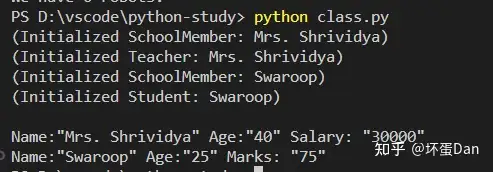
语法是在类定义类名的地方加上(需要继承的类,允许传入多个,需要用[]包裹)
这个写法有些类似于js中的伪继承。
其它我就不必多说了,相信大家都清楚。
Input and Output#
作为程序,和用户进行交互是不可避免的。那么交互就有两个点需要实现:输入和输出。
我们前面已经接触过相关的api了,输入:内置的input方法;输出:内置的print方法。
input from user#
我们直接来看下例子
def reverse(text):
    return text[::-1]


def is_palindrome(text):
    return text == reverse(text)


something = input("Enter text: ")
if is_palindrome(something):
    print("Yes, it is a palindrome")
else:
    print("No, it is not a palindrome")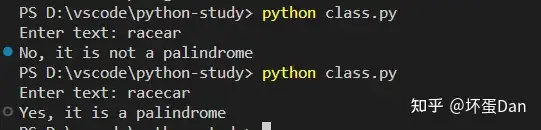
一个简单判断字符串是否是回文的代码片段。
Files#
当然,交互可不止有输入框,文件操作也算是一种交互。
直接来看下如何简单的读/写一个文件,来个经典的例子
poem = '''\
Programming is fun
When the work is done
if you wanna make your work also fun:
    use Python!
'''

# Open for 'w'riting
f = open('poem.txt', 'w')
# Write text to file
f.write(poem)
# Close the file
f.close()

# If no mode is specified,
# 'r'ead mode is assumed by default
f = open('poem.txt')
while True:
    line = f.readline()
    # Zero length indicates EOF
    if len(line) == 0:
        break
    # The `line` already has a newline
    # at the end of each line
    # since it is reading from a file.
    print(line, end='')
# close the file
f.close()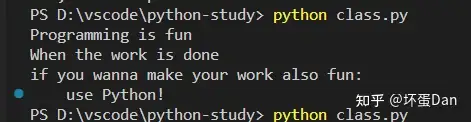
open是内置的函数,第一个参数是path,第二个参数是可以选的,默认是-r表示read读,当传入-w的时候表示写(覆盖),-a表示写但是非覆盖,在原有基础上新增。
另外还有两个mode,-t表示操作的是文本,而-b则表示操作的是二进制(binary)。
默认情况下是将文件视作-t,打开则是-r。
还有其它不太常用的,你可以直接通过help(open)来查看其它的mode。
Pickle#
python标准库中提供了一个模块叫做pickle,翻译过来就是腌制的意思,而它的用法也如它的名字一样。
它允许我们将任何原始的python对象存储到文件中并在之后返回。
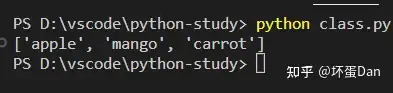
import pickle

# The name of the file where we will store the object
shoplistfile = 'shoplist.data'
# The list of things to buy
shoplist = ['apple', 'mango', 'carrot']

# Write to the file
f = open(shoplistfile, 'wb')
# Dump the object to a file
pickle.dump(shoplist, f)
f.close()

# Destroy the shoplist variable
del shoplist

# Read back from the storage
f = open(shoplistfile, 'rb')
# Load the object from the file
storedlist = pickle.load(f)
print(storedlist)
f.close()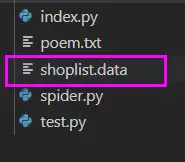
wb表示write binary,而rb表示read binary。
另外我们还可以指明encoding,一般都是utf-8
 # encoding=utf-8
import io

f = io.open("abc.txt", "wt", encoding="utf-8")
f.write(u"Imagine non-English language here")
f.close()

text = io.open("abc.txt", encoding="utf-8").read()
print(text)Exceptions#
当遇到程序错误的时候,python中物理终端程序的方式是ctrl + z(window,Mac上则是ctrl + d)和传统的ctrl + c是不同的,这一点需要注意。
捕获错误#
处理物理手段之外,还有我们最常见的try catch,但是在python则是try except,我们来看下例子
try:
    text = input('Enter something --> ')
except EOFError:
    print('Why did you do an EOF on me?')
except KeyboardInterrupt:
    print('You cancelled the operation.')
else:
print('You entered {}'.format(text))类似if ... elif...else一样,可以存在多个条件。
抛出错误#
有些错误是runtime的时候才会触发的,这个时候一般兜底逻辑也不适用,这个时候就需要把捕获到的错误抛出,然后手动去跟踪排查问题最后处理。
这里就需要使用到raise关键字
 class ShortInputException(Exception):
    '''A user-defined exception class.'''
    def __init__(self, length, atleast):
        Exception.__init__(self)
        self.length = length
        self.atleast = atleast

try:
    text = input('Enter something --> ')
    if len(text) < 3:
        raise ShortInputException(len(text), 3)
    # Other work can continue as usual here
except EOFError:
    print('Why did you do an EOF on me?')
except ShortInputException as ex:
    print(('ShortInputException: The input was ' +
           '{0} long, expected at least {1}')
          .format(ex.length, ex.atleast))
else:
    print('No exception was raised.')
我们还实现了一个类:ShortInputException,它继承于Exception这个类。
另外我们还使用了as这个关键字指明这个类捕获的错误变量名为ex。
Try...Finally#
这个自然就不必多说了,直接来看下例子
import sys
import time

f = None
try:
    f = open("poem.txt")
    # Our usual file-reading idiom
    while True:
        line = f.readline()
        if len(line) == 0:
            break
        print(line, end='')
        sys.stdout.flush()
        print("Press ctrl+c now")
        # To make sure it runs for a while
        time.sleep(2)
except IOError:
    print("Could not find file poem.txt")
except KeyboardInterrupt:
    print("!! You cancelled the reading from the file.")
finally:
    if f:
        f.close()
    print("(Cleaning up: Closed the file)")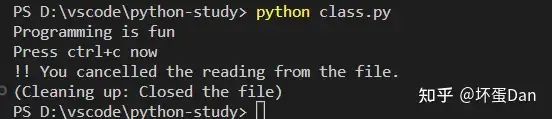
with语句#
这个语法需要特别留意,在python中with这个语句有特殊用法,我们先来看下例子
with open("poem.txt") as f:
    for line in f:
print(line, end='') 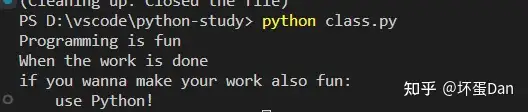
这个例子和我们之前写的open的是差不多的,唯一的不同点在于我们并不需要手动的去写f.close(),这个过程交给了with语句块自动实现。
在进入到with语句块的时候,它会去执行thefile.__enter__这个函数,然后在这个块结束后执行thefile.__exit__函数。
实现应该可以参考rust中对于Drop的implement。
这个with可以用来替代try...finally,会优雅些。
Standard Library#
一门编程语言一般可以拆分为三部分:
core:核心代码,一些基础数据结构等。standard library:标准库,对于core的一些补充拓展,比如一些非常非常常用的api实现,一般是内置的,也就是当你安装对应的语言环境的时候也会顺带带上,需要注意core没有了标准库照样能活。third-party dependences:第三方依赖,这种就不是自带的了,需要用户手动去install。
sys模块#
sys是system的缩写,是用来处理和操作系统相关的,我们之前使用过的sys.argv方法就是。
sys.version_info:这个方法是用来输出python的版本的。
import sys

print(sys.version_info)

logging模块#
这个模块一般是用来将内容存储到日志里的。
import os
import platform
import logging

if platform.platform().startswith('Windows'):
    logging_file = os.path.join(os.getenv('HOMEDRIVE'),
                                os.getenv('HOMEPATH'),
                                'test.log')
else:
    logging_file = os.path.join(os.getenv('HOME'),
                                'test.log')

print("Logging to", logging_file)

logging.basicConfig(
    level=logging.DEBUG,
    format='%(asctime)s : %(levelname)s : %(message)s',
    filename=logging_file,
    filemode='w',
)

logging.debug("Start of the program")
logging.info("Doing something")
logging.warning("Dying now")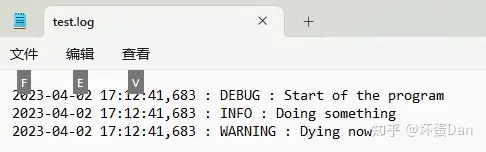
其它#
常用的标准库模块还有很多,比如debugging[2]、handling command line options[3]、regular expressions[4]等。
可以跟着这个教程学习标准库模块:http://pymotw.com/2/contents.html
More#
目前我们已经简单的接触和了解了基础的知识,这里做一些常见的内容补充。
传递元组#
如果你想一次返回多个不同类型的东西,那么这个时候你就可以使用元组
>>> def get_error_details():
...     return (2, 'details')
...
>>> errnum, errstr = get_error_details()
>>> errnum
2
>>> errstr
'details'注意这里errnum, errstr = get_error_details(),这里是用了解构。
另外这个还能做骚操作,比如快速的交换两个变量的值。
>>> a = 5; b = 8
>>> a, b
(5, 8)
>>> a, b = b, a
>>> a, b
(8, 5)
a, b = b, a,等价于(a, b) = (8, 5)。
特殊的方法#
注意,我这里说的是方法(methods),而不是函数(functions)。和rust一样,methods指的是关联的函数,而functions则是普通函数,区别在于第一个参数是否是self。
特殊指的是内置的。
我们之前就见过了两个类中的特殊方法:__init__和__del__。
除了它俩之外还有几个常见的:
__str__(self):当我们使用了print函数或者str()函数的时候就会触发这个methods。__lt__(self, other):当<操作符被调用的时候就会触发,同理于其它的操作符。不要觉得有些奇怪,因为python中万物皆对象。__getitem__(self, key): 当x[key]索引操作符被使用的时候触发。__len__(self):当len()函数被用于sequence的时候触发。
Lambda Forms#
简单地说这个lambda就是用来创建新的函数的。
我们先来看下例子
points = [{'x': 2, 'y': 3},
          {'x': 4, 'y': 1}]
points.sort(key=lambda i: i['y'])
print(points) 
它接收参数,也就是上面的i,而i['y']则是函数的表达式语句。
List Comprehension#
先来看下例子
listone = [2, 3, 4]
listtwo = [2*i for i in listone if i > 2]
print(listtwo)这里表示查找大于二的元素,然后将它*2处理。

有些不太好理解,但是确实是挺便利的。
The assert statement#
assert语句用来断言某个语句是否为true,我们在rust中写测试元的时候就很常用到。
 >>> mylist = ['item']
>>> assert len(mylist) >= 1
>>> mylist.pop()
'item'
>>> assert len(mylist) >= 1
Traceback (most recent call last):
  File "<stdin>", line 1, in <module>
AssertionError装饰器(Decorators)#
前面说过,装饰器就是一种语法糖写法,它是函数包裹的简写。
类似宏(macro),宏是操作与抽象语法树的,在编译阶段会被展开。
来看下例子
from time import sleep
from functools import wraps
import logging
logging.basicConfig()
log = logging.getLogger("retry")


def retry(f):
    @wraps(f)
    def wrapper_function(*args, **kwargs):
        MAX_ATTEMPTS = 5
        for attempt in range(1, MAX_ATTEMPTS + 1):
            try:
                return f(*args, **kwargs)
            except Exception:
                log.exception("Attempt %s/%s failed : %s",
                              attempt,
                              MAX_ATTEMPTS,
                              (args, kwargs))
                sleep(10 * attempt)
        log.critical("All %s attempts failed : %s",
                     MAX_ATTEMPTS,
                     (args, kwargs))
    return wrapper_function


counter = 0


@retry
def save_to_database(arg):
    print("Write to a database or make a network call or etc.")
    print("This will be automatically retried if exception is thrown.")
    global counter
    counter += 1
    # This will throw an exception in the first call
    # And will work fine in the second call (i.e. a retry)
    if counter < 2:
        raise ValueError(arg)


if __name__ == '__main__':
    save_to_database("Some bad value")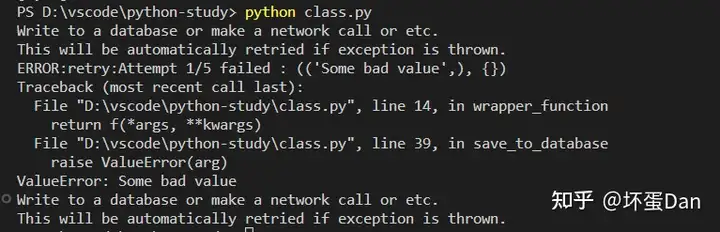
总结#
那么基础的东西我们就稍微的过了一遍了,python的东西还是很好入门的,但是要真用于开发,我们目前的知识还是差了很多,所以后面还需要去找些项目入门。
参考#
- ^python decorator https://python.swaroopch.com/more.html#decorator
- ^debugging http://docs.python.org/3/library/pdb.html
- ^handling command line options http://docs.python.org/3/library/argparse.html
- ^regular expressions http://docs.python.org/3/library/re.html
发布于 2023-04-02 17:54・IP 属地广东