
前言#
前面学了一堆调试和测试工具,是时候将他们结合到一起了。为什么需要将他们结合到一起呢?
试想一下,如果你需要调试一个第三方包,那么如果这个包是经过编译(比如typescript编写的包)压缩处理的,代码几乎无法阅读,那么基本就无法调试了。这个时候大家第一反应应该就是去拉未处理过的源码包,但是这理由有一个问题,那就是需要配置调试环境,这就相当麻烦。这个时候如果使用jest来写一个单元测试,基于这个测试元来调试就相当方便。
基础配置#
话不多说,直接上手,先上官方链接。
Troubleshooting · Jestjestjs.io/docs/troubleshooting#debugging-in-vs-code
先安装环境,直接就上typescript,ts-jest,因为一个包是需要去拉源包调试,那这个包大概率是一个基于typescript编写的包。
mkdir jest-debug-study
cd jest-debug-study
mkdir lib
mkdir __tests__
echo > lib/index.ts
echo > __tests__/index.spec.ts
npm init --yes
npm install typescript ts-jest jest @types/jest -D
tsc --init
echo > jest.config.js然后配置下我们的tsconfig.json文件
 {
  "compilerOptions": {

    "target": "es2016",                                  /* Set the JavaScript language version for emitted JavaScript and include compatible library declarations. */
    "module": "ESNext",                                /* Specify what module code is generated. */
    "sourceMap": true,                                /* Create source map files for emitted JavaScript files. */
    "esModuleInterop": true,                             /* Emit additional JavaScript to ease support for importing CommonJS modules. This enables 'allowSyntheticDefaultImports' for type compatibility. */
    "forceConsistentCasingInFileNames": true,            /* Ensure that casing is correct in imports. */
    "strict": true,                                      /* Enable all strict type-checking options. */
    "skipLibCheck": true,                                 /* Skip type checking all .d.ts files. */
    "types": ["jest"]
  },
  "include": ["lib/**/*.ts", "__tests__/**/*.spec.ts"]
}注意这里的sourceMap一定要设置为true,这样才能调试。
然后再配置下jest.config.js文件
module.exports = {
    preset: 'ts-jest',
    testEnvironment: 'node',
}然后我们随便在lib/index.ts文件里随便写点东西并导出
export default function log (): void {
    console.log(1)
    console.log(2)
    console.log(3)
    console.log(4)
    console.log(5)
    console.log(6)
}然后index.spec.ts导入
import log from '../lib/index'

describe('test the log', () => {
    test('log', () => {
        expect(log()).toBeUndefined();
    })
}) 最后配置下package.json中的scripts: "test": "jest index.spec.ts"
然后终端跑一下
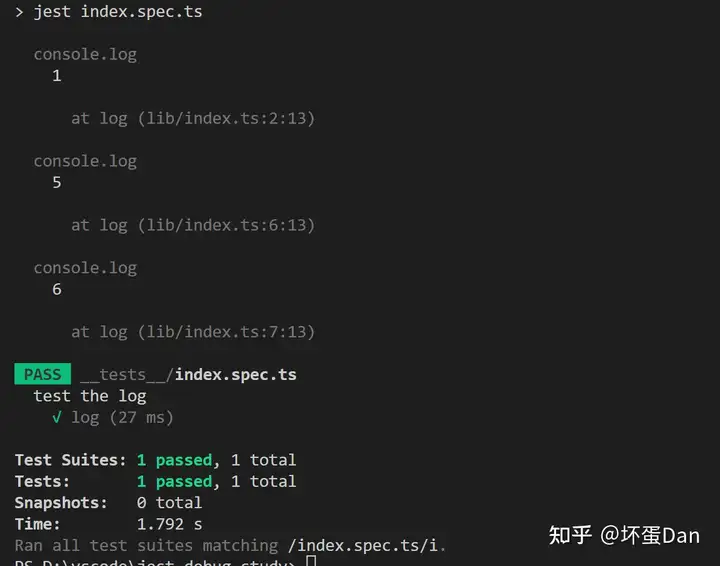
表现正常。
接下来进入我们的主题
调试#
这里只基于vscode的调试(并且是window的)
老规矩直接F5或者IDE左边调试按钮选择当前工作区然后选择node类型。
然后跟着官网来配置下launch.json
{
    "version": "0.2.0",
    "configurations": [
      {
        "name": "Debug Jest Tests",
        "type": "node",
        "request": "launch",
        "runtimeArgs": [
          "--inspect-brk",
          "${workspaceRoot}/node_modules/jest/bin/jest.js",
          "--runInBand"
        ],
      }
    ]
} 接着给index.ts文件打上断点,最后直接F5
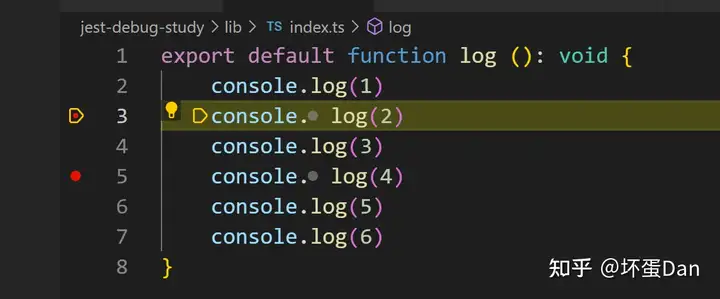
运行正常
最后如果感兴趣的话麻烦点个赞谢谢!
发布于 2022-11-10 18:38・IP 属地广东